
Taking advantage of the publication of the NcN videos, for those who are interested, we comment that during the talk there was a demonstration of the use of the “SMS Spoofing” functionality that has been added to version 1.0 of the Social Engineering Toolkit (SET). By the way, we also take the opportunity to thank Dave Keneddy for “welcoming” the contribution to the SET framework. It has been a real pleasure to be able to collaborate with this project.
In this post we would like to finish reviewing the different options available from the “SMS Spoofing” functionality.
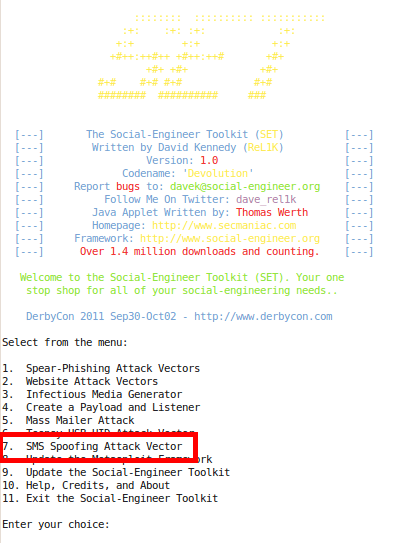
After executing SET, you can access the “SMS Spoofing” options from the main menu, with option “7”:
 From the “SMS Spoofing” menu you can access the following options:
- Perform an SMS Spoofing Attack
- Create a template
 Let's see below the use of both options.
Perform an SMS Spoofing Attack
If the “Perform a SMS Spoofing Attack” option is selected, the attack menu will be accessed and will allow you to select, first of all, the possibility of selecting a phone number or a number dictionary as a target:

If the “SMS Attack Single Phone Number” option is selected, the user will be asked for the target phone number:

Regarding the format of the destination telephone numbers, note that the country code must be included.
If the second option, “SMS Attack Mass SMS”, is used, the absolute path of the phone dictionary must be specified:

The telephone dictionary format is a plain text file with telephone numbers separated by a line break.
Next, whatever option has been chosen to specify the objectives, the user will be allowed to build the SMS message for the attack from scratch, or use one of the existing templates:

If the option “1. Pre-Defined Template” is chosen, a list of templates with messages that can be used for social engineering will be displayed (although it is advisable to modify the message to adapt it to each occasion). From the template you will obtain the origin number and the text for the message:
If you choose the “2. One-Time Use SMS” option, the following information must be provided:
– The phone number (spoofed) that you want to use as the origin of the message.
– The text of the message.

Finally, the user will be offered a list of providers that can be used to send Spoofed SMS.
The list includes one free provider (SohoOS), which has recently stopped offering service, and two paid services (Lleida.net and SMSGANG). In the case of using paid services, user credentials must be provided.
It should be noted that with all providers it is possible to send SMS messages to Spanish numbers.
Finally, for testing purposes, the possibility of sending SMS to an instance of the Android emulator running locally is also included.

Template Creation
If the “Create a Social-Engineering Template” option is selected from the “SMS Spoofing” menu, the user will be able to create templates to be used later during SMS Spoofing attacks. The information that will be requested from the user to build the template is the following:
- Author's name
- The phone number of origin of the message
- The template theme
- The body of the message

Only the parameters “source phone” and “message body” will be used for sending the message, the “author name” and “template theme” are used for the organization of the template collection.
The resulting template will be stored in the “$SET/templates/sms” directory, where you can also find the collection of templates that have been created from real SMS messages and that can be used during social engineering testing.
For those who want to review the “SMS Spoofing” code, a diagram of the design is provided (well, try to be  ) of the modification made to SET:

Finally, some references for those who want more information about using SET:
– Information in the Social Engineering Framework: http://www.social-engineer.org/framework/Computer_Based_Social_Engineering_Tools:_Social_Engineer_Toolkit_%28SET%29Video tutorials: http://www.secmaniac.com/movies/
– Video Tutorials: http://www.secmaniac.com/movies/
– In Spanish, post in DragonJar covering the new features of version 1.0:http://www.dragonjar.org/the-social-engineer-toolkit.xhtml
Seen in: http://testpurposes.net/2010/11/20/uso-de-sms-spoofing- desde-set/
Comments