

Previously we have already talked about Nagios. You can see the installation manual HERE
Well now we are going to monitor a GNU/Linux (Debian) machine but it can be used for any GNU/Linux and Unix. For monitoring we are going to use the SNMP protocol(If you don't know how to install it on UNIX – *BSD – GNU/Linux HERE we have a manual) and the checkups are going to be Memory, CPU, Disk and PING.
Once we have NAGIOS AND SNMP installed and configured, we are going to start monitoring.
Define the commands:
To define we have to add the following commands to the commands.cfg file, this file will be... depending on the installation that you would have performed:
vi /etc/nagios3/commands.cfgAnd we add the following:
define command{

command_name check_lnxmem_snmp

command_line $USER1$/check_snmp_mem.pl -H $HOSTADDRESS$ -C $ARG1$ -w $ARG2$ -c $ARG3$

}
define command{

command_name check_lnxload_snmp

command_line /usr/bin/perl $USER1$/check_snmp_load.pl -H $HOSTADDRESS$ -C $ARG1$ -2 -T netsl -w $ARG2$ -c $ARG3$

}
define command{

command_name check_disk_snmp

command_line /usr/bin/perl $USER1$/check_disk_snmp.pl -H $HOSTADDRESS$ -s $ARG1$ -d $ARG2$ -u $ARG3$ -w $ARG4$ -c $ARG5$

}
define command{

command_name check_lnxcpu_snmp

command_line /usr/bin/perl $USER1$/check_snmp_load.pl -H $HOSTADDRESS$ -C $ARG1$ -2 -T netsc -w $ARG2$ -c $ARG3$

}
define command{

command_name check_ping

command_line $USER1$/docu $ARG3$ “$USER1$/check_ping -H $HOSTADDRESS$ -w $ARG1$ -c $ARG2$ -p 1″

}
We create the folders where we are going to host the configuration files
mkdir /etc/nagios3/etc/cfg/Linux/We access the directory
cd /etc/nagios3/etc/cfg/Linux/We create the hosts.cfg file with the following content
define hostgroup {

hostgroup_name grupo-linux

alias Microsoft Windows Servers

members cacti_192.168.1.111

}
#Ping to hosts
define service {

use linux-srv

hostgroup_name grupo-linux

service_description linux cacti – ping

check_command check_ping!100.0,10%!500.0,20%

}

#Hosts Definition
define host {

use linux-srv

host_name cacti_192.168.1.111

alias cacti

address 192.168.1.111

}
We create the file templete.cfg in which we are going to define the services.
define host {

name linux-srv

flap_detection_enabled 1

notification_period 24×7

notification_options d,u,r

retain_status_information 1

retain_nonstatus_information 1

contact_groups grupo-linux

# check_command check_command_blank

max_check_attempts 3

register 0
}
define service {

name linux-srv

check_period 24×7

flap_detection_enabled 1

notification_period 24×7

notification_options w,u,c,r

parallelize_check 1

retain_status_information 1

retain_nonstatus_information 1

max_check_attempts 3

normal_check_interval 3

retry_check_interval 1

contact_groups grupo-linux

register 0

}
We define the contact file contacts.cfg
define contact{

contact_name grupo-linux

alias grupo-linux

service_notification_period 24×7

host_notification_period 24×7

service_notification_options w,u,c,r

host_notification_options d,r

service_notification_commands notify-service-by-email

host_notification_commands notify-host-by-email

email rokitoh@redorbita.com

}

define contactgroup {

contactgroup_name grupo-linux

alias Grupo de Linux

members grupo-linux

}
And finally we define the cacti.cfg checks
define service {

use linux-srv

host_name cacti_192.168.1.111

service_description Uso CPU

check_command check_lnxcpu_snmp!redorbita!80!90

}
define service {

use linux-srv

host_name cacti_192.168.1.111

service_description Carga CPU

check_command check_lnxload_snmp!redorbita!15,10,5!30,25,20

}

define service {

use linux-srv

host_name cacti_192.168.1.111

service_description Uso MEM

#check_command check_lnxmem_snmp!redorbita!90,90!95,95

check_command check_lnxmem_snmp!redorbita!95,60!99,90

}

define service {

use linux-srv

host_name cacti_192.168.1.111

service_description FileSystem [Raiz /]

check_command check_disk_snmp!redorbita!/!MB!80%!90%

}
Once the file is created we have to add its path to the nagios.cfg file
vi /etc/nagios3/nagios.cfgAt the end of the file we add the following:
############## Monitorización Linux #############
cfg_file=/etc/nagios3/etc/cfg/Linux/templete.cfg

cfg_file=/etc/nagios3/etc/cfg/Linux/hosts.cfg

cfg_file=/etc/nagios3/etc/cfg/Linux/cacti.cfg

cfg_file=/etc/nagios3/etc/cfg/Linux/contacts.cfg
We check to see if there are any errors in the configuration files
rokitoh@nagios:/etc/nagios3/etc/cfg/Linux# nagios3 -v /etc/nagios3/nagios.cfg
Nagios Core 3.2.1

Copyright (c) 2009-2010 Nagios Core Development Team and Community Contributors

Copyright (c) 1999-2009 Ethan Galstad

Last Modified: 03-09-2010

License: GPL
Website: http://www.nagios.org

Reading configuration data…

Read main config file okay…

Processing object config file ‘/etc/nagios3/commands.cfg’…

Processing object config directory ‘/usr/lib/nagios/plugins’…

Processing object config file ‘/usr/lib/nagios/plugins/mailq.cfg’…

Processing object config file ‘/usr/lib/nagios/plugins/snmp_storage.cfg’…

Processing object config file ‘/usr/lib/nagios/plugins/ifstatus.cfg’…

Processing object config file ‘/usr/lib/nagios/plugins/snmp_load.cfg’…

Processing object config file ‘/usr/lib/nagios/plugins/breeze.cfg’…

Processing object config file ‘/usr/lib/nagios/plugins/ftp.cfg’…

Processing object config file ‘/usr/lib/nagios/plugins/apt.cfg’…

Processing object config file ‘/usr/lib/nagios/plugins/tcp_udp.cfg’…

Processing object config file ‘/usr/lib/nagios/plugins/ntp.cfg’…

Processing object config file ‘/usr/lib/nagios/plugins/dummy.cfg’…

Processing object config file ‘/usr/lib/nagios/plugins/mrtg.cfg’…

Processing object config file ‘/usr/lib/nagios/plugins/rpc-nfs.cfg’…

Processing object config file ‘/usr/lib/nagios/plugins/users.cfg’…

Processing object config file ‘/usr/lib/nagios/plugins/games.cfg’…

Processing object config file ‘/usr/lib/nagios/plugins/real.cfg’…

Processing object config file ‘/usr/lib/nagios/plugins/pgsql.cfg’…

Processing object config file ‘/usr/lib/nagios/plugins/snmp_vrrp.cfg’…

Processing object config file ‘/usr/lib/nagios/plugins/flexlm.cfg’…

Processing object config file ‘/usr/lib/nagios/plugins/snmp_win.cfg’…

Processing object config file ‘/usr/lib/nagios/plugins/ssh.cfg’…

Processing object config file ‘/usr/lib/nagios/plugins/ping.cfg’…

Processing object config file ‘/usr/lib/nagios/plugins/news.cfg’…

Processing object config file ‘/usr/lib/nagios/plugins/telnet.cfg’…

Processing object config file ‘/usr/lib/nagios/plugins/radius.cfg’…

Processing object config file ‘/usr/lib/nagios/plugins/fping.cfg’…

Processing object config file ‘/usr/lib/nagios/plugins/netware.cfg’…

Processing object config file ‘/usr/lib/nagios/plugins/snmp_cpfw.cfg’…

Processing object config file ‘/usr/lib/nagios/plugins/snmp.cfg’…

Processing object config file ‘/usr/lib/nagios/plugins/snmp_process.cfg’…

Processing object config file ‘/usr/lib/nagios/plugins/procs.cfg’…

Processing object config file ‘/usr/lib/nagios/plugins/ldap.cfg’…

Processing object config file ‘/usr/lib/nagios/plugins/mysql.cfg’…

Processing object config directory ‘/usr/lib/nagios/plugins/doc’…

Processing object config file ‘/usr/lib/nagios/plugins/snmp_int.cfg’…

Processing object config file ‘/usr/lib/nagios/plugins/snmp_mem.cfg’…

Processing object config file ‘/usr/lib/nagios/plugins/snmp_env.cfg’…

Processing object config file ‘/usr/lib/nagios/plugins/load.cfg’…

Processing object config directory ‘/etc/nagios3/conf.d’…

Processing object config file ‘/etc/nagios3/conf.d/timeperiods_nagios2.cfg’…

Processing object config file ‘/etc/nagios3/conf.d/contacts.cfg’…

Processing object config file ‘/etc/nagios3/conf.d/generic-host_nagios2.cfg’…

Processing object config file ‘/etc/nagios3/conf.d/generic-service_nagios2.cfg’…

Processing object config file ‘/etc/nagios3/etc/cfg/Windows/templete.cfg’…

Processing object config file ‘/etc/nagios3/etc/cfg/Windows/hosts.cfg’…

Processing object config file ‘/etc/nagios3/etc/cfg/Windows/cpd01.cfg’…

Processing object config file ‘/etc/nagios3/etc/cfg/Windows/contacts.cfg’…

Processing object config file ‘/etc/nagios3/etc/cfg/Linux/templete.cfg’…

Processing object config file ‘/etc/nagios3/etc/cfg/Linux/hosts.cfg’…

Processing object config file ‘/etc/nagios3/etc/cfg/Linux/cacti.cfg’…

Processing object config file ‘/etc/nagios3/etc/cfg/Linux/contacts.cfg’…

Read object config files okay…
Running pre-flight check on configuration data…
Checking services…

Checked 9 services.

Checking hosts…

Checked 2 hosts.

Checking host groups…

Checked 2 host groups.

Checking service groups…

Checked 0 service groups.

Checking contacts…

Checked 3 contacts.

Checking contact groups…

Checked 3 contact groups.

Checking service escalations…

Checked 0 service escalations.

Checking service dependencies…

Checked 0 service dependencies.

Checking host escalations…

Checked 0 host escalations.

Checking host dependencies…

Checked 0 host dependencies.

Checking commands…

Checked 193 commands.

Checking time periods…

Checked 4 time periods.

Checking for circular paths between hosts…

Checking for circular host and service dependencies…

Checking global event handlers…

Checking obsessive compulsive processor commands…

Checking misc settings…
Total Warnings: 0

Total Errors: 0
Things look okay – No serious problems were detected during the pre-flight check

root@nagios:/etc/nagios3/etc/cfg/Linux
And we restart nagios
rokitoh@nagios:/etc/nagios3/etc/cfg/Linux# /etc/init.d/nagios3 reload

Reloading nagios3 monitoring daemon configuration files: nagios3.

rokitoh@nagios:/etc/nagios3/etc/cfg/Linux#
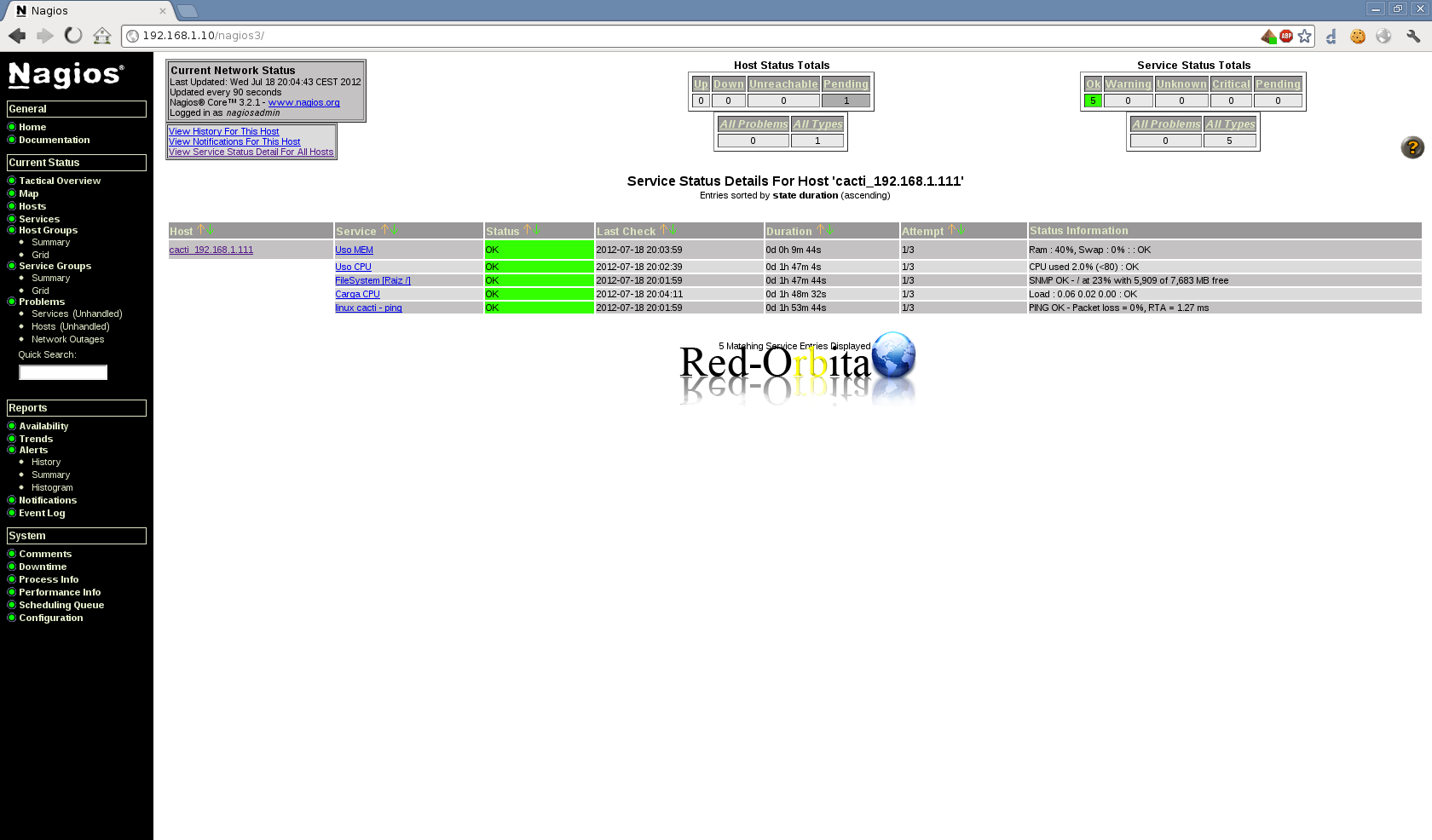
We open nagios in our favorite browser and if everything went well we would have to have it OK!
Greetings, rokitoh!
Comments