

We are going to see how to monitor ports and basic services such as SSH with nagios, for this we will start from the manuals that we have made on basic monitoring in Windows and GNU/Linux
Basic UNIX monitoring – *BSD – GNU/Linux in Nagios
Basic Windows monitoring in Nagios
In my case I am going to monitor Port 10000 (Webmin), 22 (SSH), 3389 (Terminal server) and 80 on which ISS is running, but you can monitor any other port.
Definir los comandos :
This command is already defined by default in nagios.
To define we have to add the following commands to the commands.cfg file, this file will be... depending on the installation that you would have performed
vi /etc/nagios3/commands.cfgAnd we add the following (In case we don't already have them):
define command{

command_name check_tcp

command_line $USER1$/check_tcp -H $HOSTADDRESS$ -p $ARG1$

}
# ‘check_ssh’ command definition

define command{

command_name check_ssh

command_line $USER1$/check_ssh $ARG1$ $HOSTADDRESS$

}
We access the directory
We access the directory where the configuration files are located in my case (/etc/nagios3/etc/cfg/Linux/)
cd /etc/nagios3/etc/cfg/LinuxWe add the new check.
vi cacti.cfgWe add the following:
define service {

use linux-srv

host_name cacti_192.168.1.111

service_description Puerto 10000 [Webmin]

check_command check_tcp!10000

}
define service {

use linux-srv

host_name cacti_192.168.1.111

service_description Puerto 22 [Servicio SSH]

check_command check_ssh

}
Now we are going to do exactly the same with port 3389
We access the directory where the configuration files are located
cd /etc/nagios3/etc/cfg/Windows
We add the new check.
vi cpd01.cfgWe add the following:
define service {

use windows-srv

host_name cpd_192.168.1.112

service_description Puerto 3389 [TS]

check_command check_tcp!3389

}
define service {

use windows-srv

host_name cpd_192.168.1.112

service_description Puerto 80 [Servidor ISS]

check_command check_tcp!80

}
We check to see if there are any errors in the configuration files
rokitoh@nagios:/etc/nagios3/etc/cfg/Windows# nagios3 -v /etc/nagios3/nagios.cfg
Nagios Core 3.2.1
Copyright (c) 2009-2010 Nagios Core Development Team and Community Contributors

Copyright (c) 1999-2009 Ethan Galstad

Last Modified: 03-09-2010

License: GPL
Website: http://www.nagios.org

Reading configuration data…

Read main config file okay…

Processing object config file ‘/etc/nagios3/commands.cfg’…

Processing object config directory ‘/usr/lib/nagios/plugins’…

Processing object config file ‘/usr/lib/nagios/plugins/mailq.cfg’…

Processing object config file ‘/usr/lib/nagios/plugins/snmp_storage.cfg’…

Processing object config file ‘/usr/lib/nagios/plugins/ifstatus.cfg’…

Processing object config file ‘/usr/lib/nagios/plugins/snmp_load.cfg’…

Processing object config file ‘/usr/lib/nagios/plugins/breeze.cfg’…

Processing object config file ‘/usr/lib/nagios/plugins/ftp.cfg’…

Processing object config file ‘/usr/lib/nagios/plugins/apt.cfg’…

Processing object config file ‘/usr/lib/nagios/plugins/tcp_udp.cfg’…

Processing object config file ‘/usr/lib/nagios/plugins/ntp.cfg’…

Processing object config file ‘/usr/lib/nagios/plugins/dummy.cfg’…

Processing object config file ‘/usr/lib/nagios/plugins/mrtg.cfg’…

Processing object config file ‘/usr/lib/nagios/plugins/rpc-nfs.cfg’…

Processing object config file ‘/usr/lib/nagios/plugins/users.cfg’…

Processing object config file ‘/usr/lib/nagios/plugins/games.cfg’…

Processing object config file ‘/usr/lib/nagios/plugins/real.cfg’…

Processing object config file ‘/usr/lib/nagios/plugins/pgsql.cfg’…

Processing object config file ‘/usr/lib/nagios/plugins/snmp_vrrp.cfg’…

Processing object config file ‘/usr/lib/nagios/plugins/flexlm.cfg’…

Processing object config file ‘/usr/lib/nagios/plugins/snmp_win.cfg’…

Processing object config file ‘/usr/lib/nagios/plugins/ssh.cfg’…

Processing object config file ‘/usr/lib/nagios/plugins/ping.cfg’…

Processing object config file ‘/usr/lib/nagios/plugins/news.cfg’…

Processing object config file ‘/usr/lib/nagios/plugins/telnet.cfg’…

Processing object config file ‘/usr/lib/nagios/plugins/radius.cfg’…

Processing object config file ‘/usr/lib/nagios/plugins/fping.cfg’…

Processing object config file ‘/usr/lib/nagios/plugins/netware.cfg’…

Processing object config file ‘/usr/lib/nagios/plugins/snmp_cpfw.cfg’…

Processing object config file ‘/usr/lib/nagios/plugins/snmp.cfg’…

Processing object config file ‘/usr/lib/nagios/plugins/snmp_process.cfg’…

Processing object config file ‘/usr/lib/nagios/plugins/procs.cfg’…

Processing object config file ‘/usr/lib/nagios/plugins/ldap.cfg’…

Processing object config file ‘/usr/lib/nagios/plugins/mysql.cfg’…

Processing object config directory ‘/usr/lib/nagios/plugins/doc’…

Processing object config file ‘/usr/lib/nagios/plugins/snmp_int.cfg’…

Processing object config file ‘/usr/lib/nagios/plugins/snmp_mem.cfg’…

Processing object config file ‘/usr/lib/nagios/plugins/snmp_env.cfg’…

Processing object config file ‘/usr/lib/nagios/plugins/load.cfg’…

Processing object config directory ‘/etc/nagios3/conf.d’…

Processing object config file ‘/etc/nagios3/conf.d/timeperiods_nagios2.cfg’…

Processing object config file ‘/etc/nagios3/conf.d/contacts.cfg’…

Processing object config file ‘/etc/nagios3/conf.d/generic-host_nagios2.cfg’…

Processing object config file ‘/etc/nagios3/conf.d/generic-service_nagios2.cfg’…

Processing object config file ‘/etc/nagios3/etc/cfg/Windows/templete.cfg’…

Processing object config file ‘/etc/nagios3/etc/cfg/Windows/hosts.cfg’…

Processing object config file ‘/etc/nagios3/etc/cfg/Windows/cpd01.cfg’…

Processing object config file ‘/etc/nagios3/etc/cfg/Windows/contacts.cfg’…

Processing object config file ‘/etc/nagios3/etc/cfg/Linux/templete.cfg’…

Processing object config file ‘/etc/nagios3/etc/cfg/Linux/hosts.cfg’…

Processing object config file ‘/etc/nagios3/etc/cfg/Linux/cacti.cfg’…

Processing object config file ‘/etc/nagios3/etc/cfg/Linux/contacts.cfg’…

Read object config files okay…
Running pre-flight check on configuration data…
Checking services…

Checked 11 services.

Checking hosts…

Checked 2 hosts.

Checking host groups…

Checked 2 host groups.

Checking service groups…

Checked 0 service groups.

Checking contacts…

Checked 3 contacts.

Checking contact groups…

Checked 3 contact groups.

Checking service escalations…

Checked 0 service escalations.

Checking service dependencies…

Checked 0 service dependencies.

Checking host escalations…

Checked 0 host escalations.

Checking host dependencies…

Checked 0 host dependencies.

Checking commands…

Checked 193 commands.

Checking time periods…

Checked 4 time periods.

Checking for circular paths between hosts…

Checking for circular host and service dependencies…

Checking global event handlers…

Checking obsessive compulsive processor commands…

Checking misc settings…
Total Warnings: 0

Total Errors: 0
Things look okay – No serious problems were detected during the pre-flight check
And we restart nagios
rokitoh@nagios:/etc/nagios3/etc/cfg/Windows# service nagios3 reload

Reloading nagios3 monitoring daemon configuration files: nagios3.
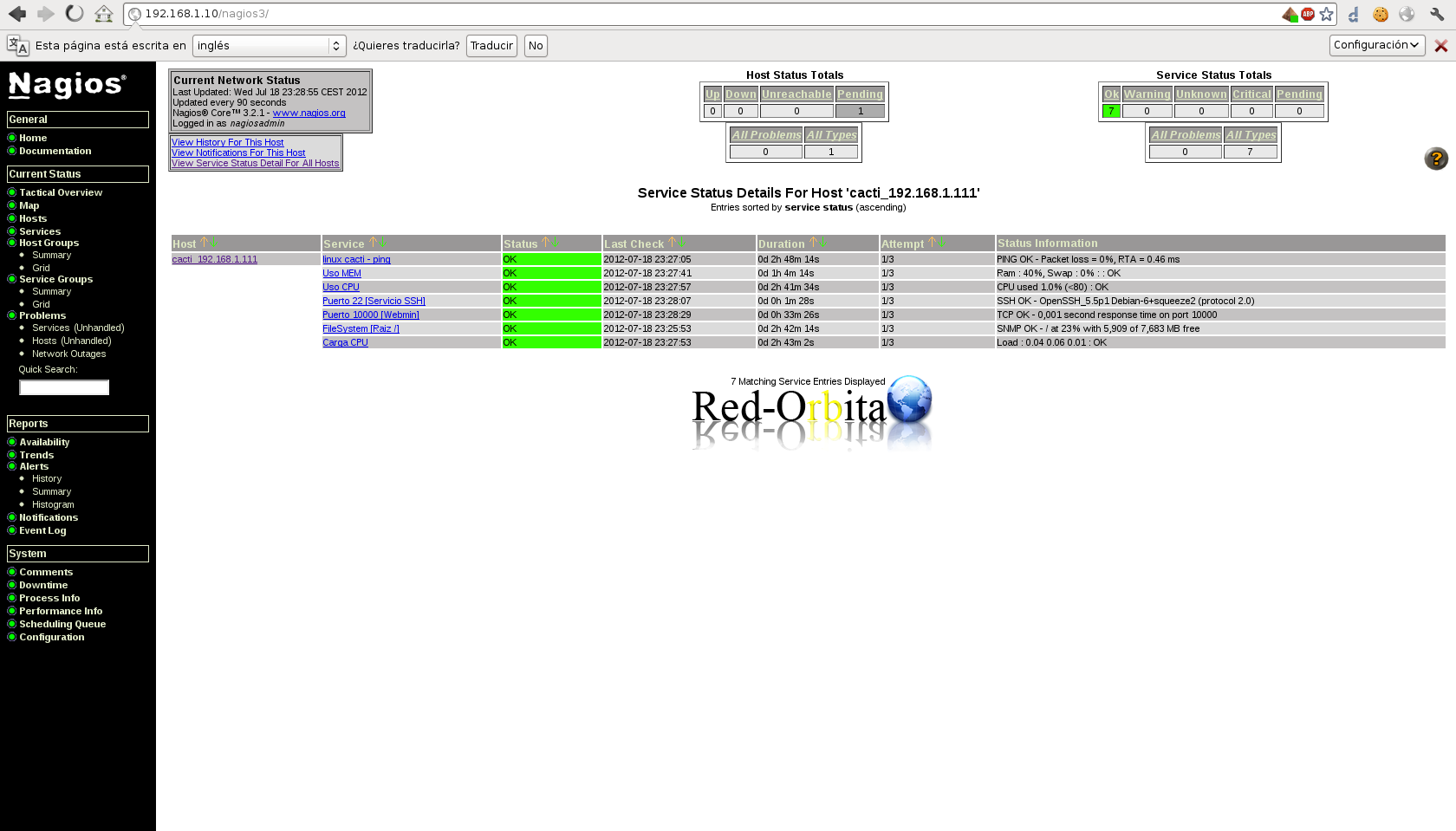
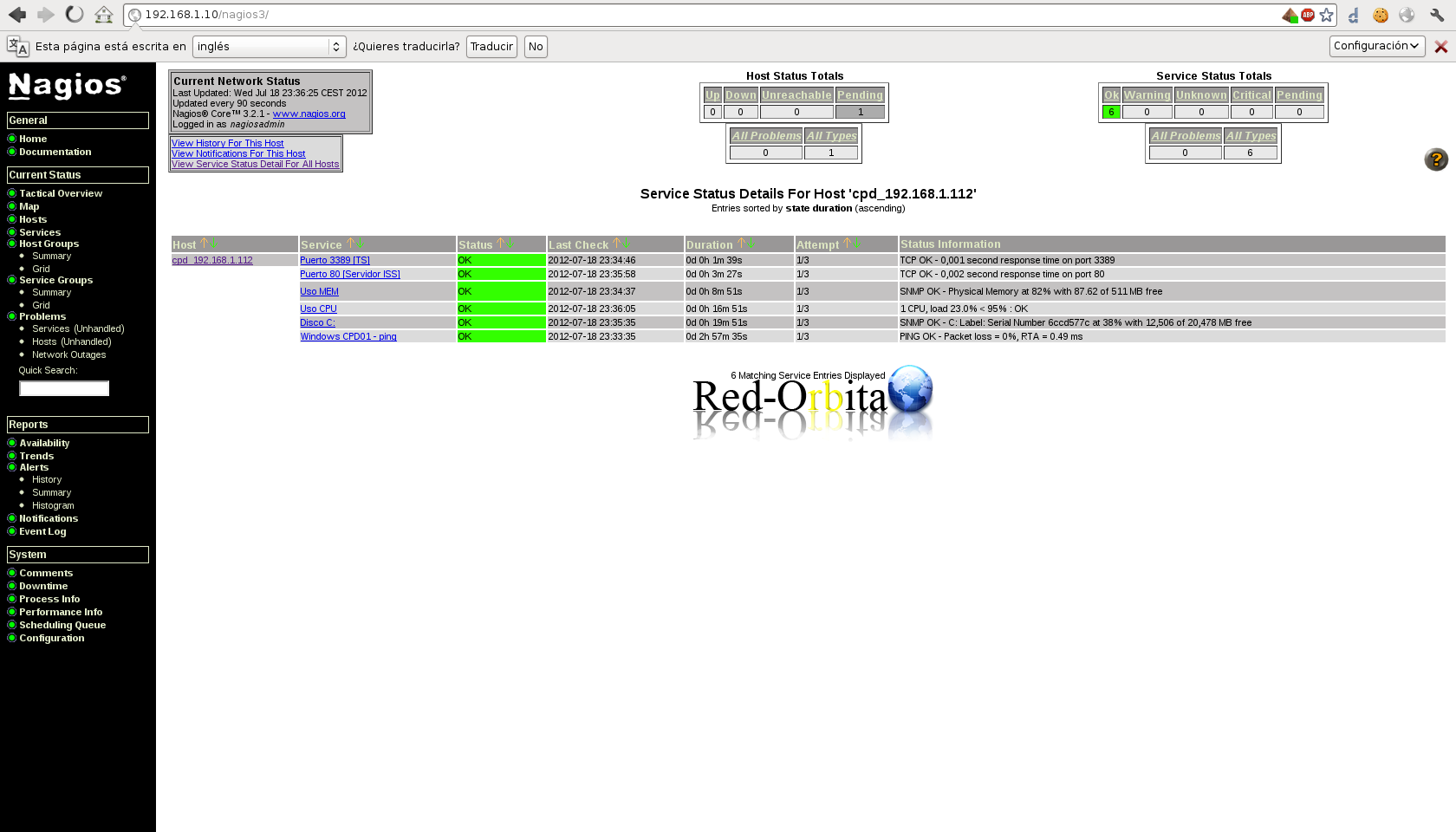
We open nagios in our favorite browser and if everything went well we would have to have it OK!
Comments