
We are going to explain how to configure the screen resolution under Debian (in this case I am under Testing Jessie)
Apparently today when I tried to start my debian it seemed like it had a huge screen resolution, I changed the configuration in Xorg but it was going through the "arc de triomphe"
We see the available resolutions:
xrandr

Now we are going to add two resolutions 1366×768 and 1280×1024
We take out the values to add the new resolution.
Bash
root@lusy:~# cvt 1366 768

# 1368×768 59.88 Hz (CVT) hsync: 47.79 kHz; pclk: 85.25 MHz

Modeline «1368x768_60.00» 85.25 1368 1440 1576 1784 768 771 781 798 -hsync +vsync
root@lusy:~# cvt 1280 1024

# 1280×1024 59.89 Hz (CVT 1.31M4) hsync: 63.67 kHz; pclk: 109.00 MHz

Modeline «1280x1024_60.00» 109.00 1280 1368 1496 1712 1024 1027 1034 1063 -hsync +vsync
We create the new resolution
text
xrandr –newmode  1368x768_60.00 85.25 1368 1440 1576 1784 768 771 781 798 -hsync +vsync
xrandr –newmode 1280x1024_60.00   109.00 1280 1368 1496 1712 1024 1027 1034 1063 -hsync +vsync
We add the new resolution
text
xrandr –addmode VGA-1 1368x768_60.00
xrandr –addmode VGA-1 1280x1024_60.00
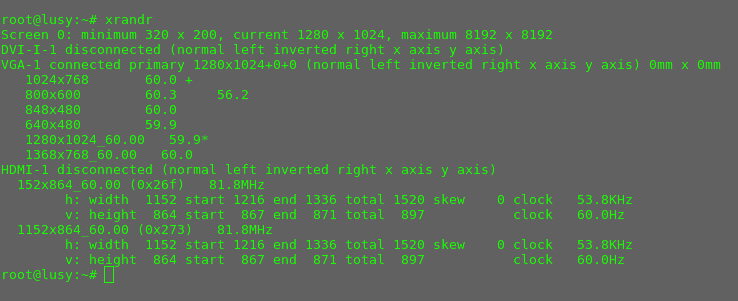
If we now check the resolutions we see that they have been added.
To delete the created resolution:
xrandr –rmmode 1368x768_60.00
All the best. rokitoh!
Comments