
What is a balancer? (Wikipedia)
A load balancer It is fundamentally a device hardware either software that is in charge of a set of servers that serve a application and, as its name implies, allocates or balances the requests that arrive from clients to servers using some algorithm (from a simple Round Robin to more sophisticated algorithms).1
Operation:
Through these servlets or programs we can perform configurations of high availability and load balancing. Tomcat is usually installed on computers external to the Apache web server (load balancer), and can be configured to receive requests both at the same time or as a secondary server. in case the first tomcat fails.
Architecture scheme
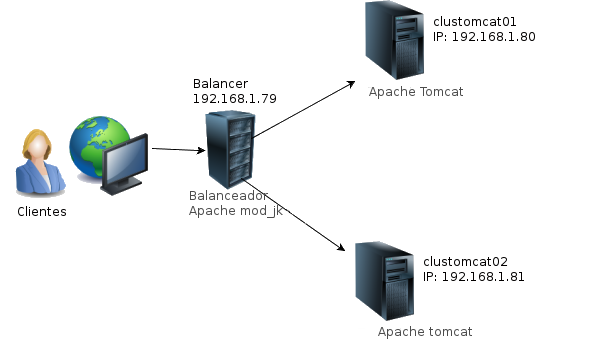
Balancer installation:
Bash
apt-get install apache2 openjdk-7-jre libapache2-mod-jkWe configure the workers.properties file
Bash
vi /etc/libapache2-mod-jk/workers.propertiesWe add the following configuration:
text
# Propiedades del entorno necesarias de configurar

workers.tomcat_home=/usr/local/tomcat

workers.java_home=/usr/lib/jvm/java-7-openjdk-amd64
# Los servidores a balancear estarán definidos más abajo en «balancer»

worker.list=balancer
#Configuramos tomcat 1
worker.worker1.port=8009

worker.worker1.host=192.168.1.80

worker.worker1.type=ajp13

worker.worker1.lbfactor=1
#Configuramos tomcat2
worker.worker2.port=8009

worker.worker2.host=192.168.1.81

worker.worker2.type=ajp13

worker.worker2.lbfactor=1
#Configuracion del balanceador
worker.balancer.type=lb

worker.balancer.balance_workers=worker1,worker2

worker.balancer.method=B
# El siguiente parámetro indica al balanceador que todas las peticiones de una misma

# sesión (usuario) vayan al mismo servidor

worker.balancer.sticky_session=true
Next we configure JkMount so that all requests are directed to the different tomcat servers, for this we must configure the file /etc/apache2/sites-enabled/000-default between the VirtualHost *:80 and VirtualHost tags
Apache
VirtualHost *:80>

ServerAdmin webmaster@localhost
DocumentRoot /var/www

<Directory />

Options FollowSymLinks

AllowOverride None

</Directory>

<Directory /var/www/>

Options Indexes FollowSymLinks MultiViews

AllowOverride None

Order allow,deny

allow from all

</Directory>
ScriptAlias /cgi-bin/ /usr/lib/cgi-bin/

<Directory «/usr/lib/cgi-bin»>

AllowOverride None

Options +ExecCGI -MultiViews +SymLinksIfOwnerMatch

Order allow,deny

Allow from all

</Directory>

JkMount /node/* balancer
JkMount /* balancer

ErrorLog ${APACHE_LOG_DIR}/error.log
# Possible values include: debug, info, notice, warn, error, crit,

# alert, emerg.

LogLevel warn
CustomLog ${APACHE_LOG_DIR}/access.log combined

</VirtualHost>
We enable the configuration of the jk modules and proceed to start Apache
Bash
cp /etc/apache2/mods-available/jk.* /etc/apache2/mods-enabled/

/etc/init.d/apache2 restart
Once we have configured the balancer, we move on to installing our two Apache Tomcat servers. I leave a detailed tutorial of its installation:
Install tomcat:
Finally in the server.xml file of each tomcat server (
<TOMCAT_HOME>/conf/servers.xml), we modify the parameter jvmRoute of the element Engine. clustomcat01
text
<Engine name=»Catalina» defaultHost=»localhost» jvmRoute=»worker1″>clustomcat02
text
<Engine name=»Catalina» defaultHost=»localhost» jvmRoute=»worker2″>Evidence:
– We add two different pages on each node of the tomcat servers
– We start the tomcat and through our browser we access the IP of the balancer and check which node resolves. (In my case it resolves for node01) as we can see in the following image:

– We stop at node01, refresh the URL again and it should resolve to node02

Regards, rokitoh
:wq!
Comments