
In this article we are going to explain how to clone (copy) a virtual machine from one storage to another. In this example we are going to copy a server with an ISCSI network shared storage
Para ello deberemos apagar la maquina la cual vamos a clonar.
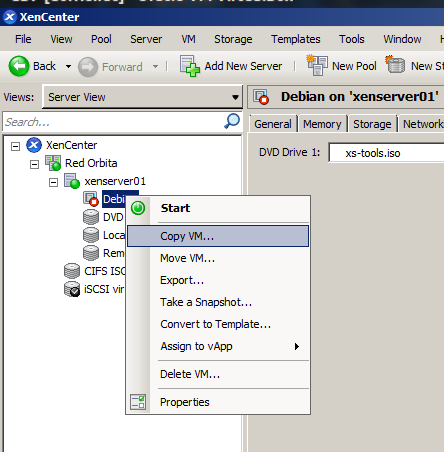
We access the XenCenter client, We position ourselves on the server → right click → Copy VM…
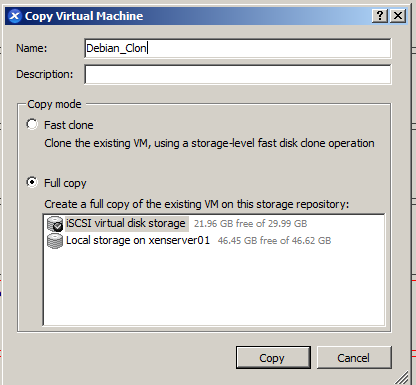
 We assign a name and select the storage to copy.
 If everything has gone correctly, the new machine should appear already cloned.

From the XenServer console
We list the virtual machines. In this case we will clone the Debian machine
[root@xenserver01 ~]#  xe vm-list

uuid ( RO)           :87dc7b1b-1054-db4a-9bdd-fb8a61244648

name-label ( RW): Debian

power-state ( RO): halted
We obtain the UUID of the storage where the virtual machine is hosted
[root@xenserver01 ~]#  xe sr-list
uuid ( RO)               :34cfa64d-c972-a2c1-2a38-c6dbe8a56e33

name-label ( RW): iSCSI virtual disk storage

name-description ( RW): iSCSI SR [192.168.1.21 (iqn.2011-03.org.example.istgt:datastorexen; LUN 0: 08002746901d030: 30 GB (FreeBSD))]

host ( RO): xenserver01

type ( RO): lvmoiscsi

content-type ( RO):
Command syntax:
xe vm-copy vm=<Nombre maquina virtual a copiar> sr-uuid=<UUID o SR de la maquina o almacenamiento a ser copiado> new-name-label=<nombre del clonado> new-name-description=»Breve descripción»We proceed to clone the server
[root@xenserver01 ~]# xe vm-copy vm=Debian sr-uuid=34cfa64d-c972-a2c1-2a38-c6dbe8a56e33 new-name-label=Debian_Clon new-name-description=»Clon maquina virtual Debian»

b8315ced-bd12-e600-6651-a46d8aa2608e
Once finished, the server copy should appear.
[root@xenserver01 ~]# xe vm-list
uuid ( RO)           : b8315ced-bd12-e600-6651-a46d8aa2608e

name-label ( RW): Debian_Clon

power-state ( RO): halted
Regards, rokitoh
:wq!
Comments