
Zimbra Collaboration is a mail server for GNU/Linux systems purchased by Telligent. It is a clear alternative to exchange.
Zimbra only recommends installing on distributions Red Hat, Open Suse and Ubuntu. In my case I am going to install it under centOS 7
Network diagram:
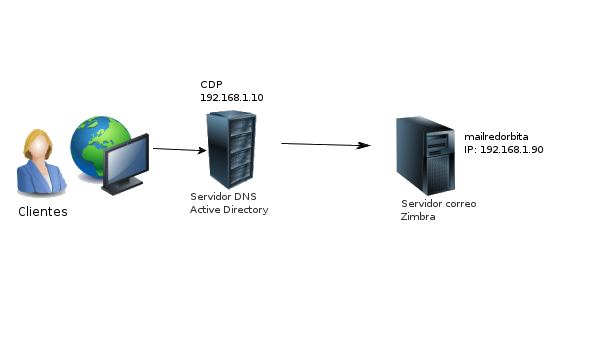
Network settings:
address 192.168.1.90

netmask 255.255.255.0

gateway 192.168.1.1
root@mailredorbita:~#  cat /etc/hostname

mailredorbita.CDP.redorbita.com
root@mailredorbita:~# cat /etc/hosts

127.0.0.1    localhost

127.0.1.1    mailredorbita.CDP.redorbita.com mailredorbita

192.168.1.90 mailredorbita.CDP.redorbita.com mailredorbita
#::1         localhost localhost.localdomain localhost6 localhost6.localdomain6
root@mailredorbita:~# cat /etc/resolv.conf

nameserver192.168.1.10

nameserver 192.168.1.11

domain CDP.redorbita.com
*NOTE: We must comment out the line ::1 in /ets/hosts because otherwise it may cause problems when starting zmconfigd
If we use Redhat or centOS we deactivate SElinux
root@mailredorbita:~#  cat  /etc/sysconfig/selinux
# This file controls the state of SELinux on the system.

# SELINUX= can take one of these three values:

#     enforcing – SELinux security policy is enforced.

#     permissive – SELinux prints warnings instead of enforcing.

#     disabled – No SELinux policy is loaded.

SELINUX=disabled

# SELINUXTYPE= can take one of these two values:

#     targeted – Targeted processes are protected,

#     minimum – Modification of targeted policy. Only selected processes are protected.

#     mls – Multi Level Security protection.

SELINUXTYPE=targeted
We open the ports in iptables
iptables -I INPUT -p tcp –dport 443 -j ACCEPT #https

iptables -I INPUT -p tcp –dport 3930 -j ACCEPT

iptables -I INPUT -p tcp –dport 110 -j ACCEPT #POP3

iptables -I INPUT -p tcp –dport 143 -j ACCEPT #IMAP

iptables -I INPUT -p tcp –dport 993 -j ACCEPT #IMAPS

iptables -I INPUT -p tcp –dport 389 -j ACCEPT #LDAP

iptables -I INPUT -p tcp –dport 995 -j ACCEPT #POP3S

iptables -I INPUT -p tcp –dport 7025 -j ACCEPT

iptables -I INPUT -p tcp –dport 5800 -j ACCEPT

iptables -I INPUT -p tcp –dport 5900 -j ACCEPT

iptables -I INPUT -p tcp –dport 7071 -j ACCEPT #Port for ZCS Web Administration

iptables -I INPUT -p tcp –dport 3894 -j ACCEPT

iptables -I INPUT -p tcp –dport 3895 -j ACCEPT

iptables -I INPUT -p tcp –dport 80 -j ACCEPT #HTTP (for webmail)
We deactivate postfix and sendmail
root@mailredorbita:~# systemctl stop postfix

root@mailredorbita:~# systemctl disable postfix

root@mailredorbita:~# systemctl stop sendmail

root@mailredorbita:~# systemctl disable sendmail
We register our mail server in the DNS

Installing Zimbra ZCS Open Source Edition
We install the necessary dependencies:
Ubuntu:
root@mailredorbita:~# apt-get install sqlite3 libperl5.14 libpcre3 libgmp3-dev libexpat1 libidn11 perl-modules lzma wgetRedhat:
root@mailredorbita:~# yum install perl perl-core ntpl nmap sudo libidn gmp libaio libstdc++ unzip sysstat sqlite wget -yWe download from the official website depending on our version.
root@mailredorbita:~# wget https://files.zimbra.com/downloads/8.6.0_GA/zcs-8.6.0_GA_1153.RHEL7_64.20141215151110.tgz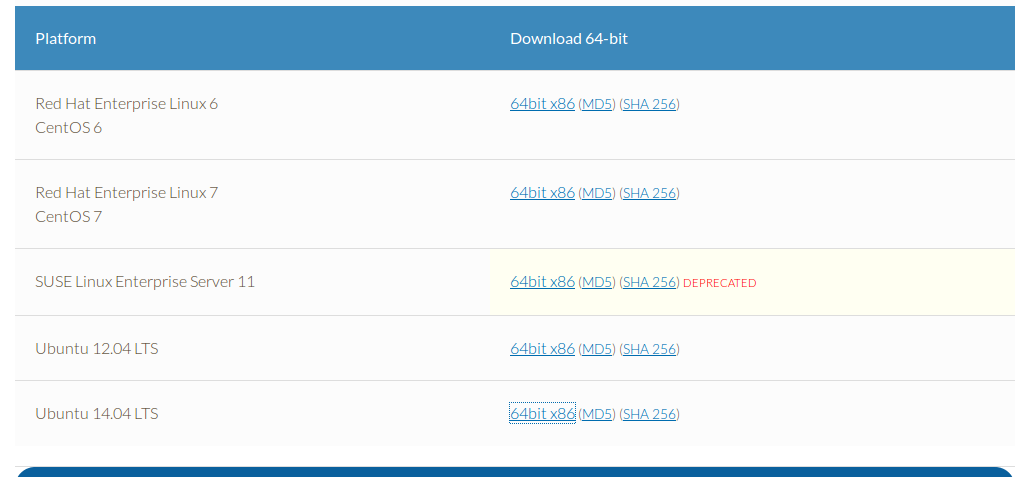
We unzip and access the folder
root@mailredorbita:~# tar xvf zcs-8.6.0_GA_1153.RHEL7_64.20141215151110.tgz

root@mailredorbita:~# cd zcs-8.6.0_GA_1153.RHEL7_64.20141215151110
We start the installation:
root@mailredorbita:~#  ./install.sh
Operations logged to /tmp/install.log.2281

Checking for existing installation…

zimbra-ldap…NOT FOUND

zimbra-logger…NOT FOUND

zimbra-mta…NOT FOUND

zimbra-dnscache…NOT FOUND

zimbra-snmp…NOT FOUND

zimbra-store…NOT FOUND

zimbra-apache…NOT FOUND

zimbra-spell…NOT FOUND

zimbra-convertd…NOT FOUND

zimbra-memcached…NOT FOUND

zimbra-proxy…NOT FOUND

zimbra-archiving…NOT FOUND

zimbra-core…NOT FOUND
We accept the license:
PLEASE READ THIS AGREEMENT CAREFULLY BEFORE USING THE SOFTWARE.

ZIMBRA, INC. («ZIMBRA») WILL ONLY LICENSE THIS SOFTWARE TO YOU IF YOU

FIRST ACCEPT THE TERMS OF THIS AGREEMENT. BY DOWNLOADING OR INSTALLING

THE SOFTWARE, OR USING THE PRODUCT, YOU ARE CONSENTING TO BE BOUND BY

THIS AGREEMENT. IF YOU DO NOT AGREE TO ALL OF THE TERMS OF THIS

AGREEMENT, THEN DO NOT DOWNLOAD, INSTALL OR USE THE PRODUCT.
License Terms for the Zimbra Collaboration Suite:

http://www.zimbra.com/license/zimbra-public-eula-2-5.html

Do you agree with the terms of the software license agreement? [N] y
Checking for prerequisites…

FOUND: NPTL

FOUND: nmap-ncat-6.40-4

FOUND: sudo-1.8.6p7-13

FOUND: libidn-1.28-3

FOUND: gmp-6.0.0-11

FOUND: libaio-0.3.109-12

FOUND: libstdc++-4.8.3-9

FOUND: unzip-6.0-15

FOUND: perl-core-5.16.3-285
Checking for suggested prerequisites…

FOUND: perl-5.16.3

FOUND: sysstat

FOUND: sqlite

Prerequisite check complete.
Checking for installable packages
Found zimbra-core

Found zimbra-ldap

Found zimbra-logger

Found zimbra-mta

Found zimbra-dnscache

Found zimbra-snmp

Found zimbra-store

Found zimbra-apache

Found zimbra-spell

Found zimbra-memcached

Found zimbra-proxy
In this part we select the software that is going to be installed.
Select the packages to install
Install zimbra-ldap [Y]
Install zimbra-logger [Y]
Install zimbra-mta [Y]
Install zimbra-dnscache [Y] N
Install zimbra-snmp [Y]
Install zimbra-store [Y]
Install zimbra-apache [Y]
Install zimbra-spell [Y]
Install zimbra-memcached [Y]
Install zimbra-proxy [Y]

Checking required space for zimbra-core

Checking space for zimbra-store

Checking required packages for zimbra-store

zimbra-store package check complete.
Installing:

zimbra-core

zimbra-ldap

zimbra-logger

zimbra-mta

zimbra-snmp

zimbra-store

zimbra-apache

zimbra-spell

zimbra-memcached

zimbra-proxy
We press [Y] to modify the system.
The system will be modified.  Continue? [N] Y
Removing /opt/zimbra

Removing zimbra crontab entry…done.

Cleaning up zimbra init scripts…done.

Cleaning up /etc/ld.so.conf…done.

Cleaning up /etc/security/limits.conf…done.
Finished removing Zimbra Collaboration Server.
Installing packages
zimbra-core……zimbra-core-8.6.0_GA_1153.RHEL7_64-20141215151110.x86_64.rpm…done

zimbra-ldap……zimbra-ldap-8.6.0_GA_1153.RHEL7_64-20141215151110.x86_64.rpm…done

zimbra-logger……zimbra-logger-8.6.0_GA_1153.RHEL7_64-20141215151110.x86_64.rpm…done

zimbra-mta……zimbra-mta-8.6.0_GA_1153.RHEL7_64-20141215151110.x86_64.rpm…done

zimbra-snmp……zimbra-snmp-8.6.0_GA_1153.RHEL7_64-20141215151110.x86_64.rpm…done

zimbra-store……zimbra-store-8.6.0_GA_1153.RHEL7_64-20141215151110.x86_64.rpm…done

zimbra-apache……zimbra-apache-8.6.0_GA_1153.RHEL7_64-20141215151110.x86_64.rpm…done

zimbra-spell……zimbra-spell-8.6.0_GA_1153.RHEL7_64-20141215151110.x86_64.rpm…done

zimbra-memcached……zimbra-memcached-8.6.0_GA_1153.RHEL7_64-20141215151110.x86_64.rpm…done

zimbra-proxy……zimbra-proxy-8.6.0_GA_1153.RHEL7_64-20141215151110.x86_64.rpm…done

Operations logged to /tmp/zmsetup04212015-195404.log

Installing LDAP configuration database…done.

Setting defaults…    MX: mailredorbita.cdp.redorbita.com (192.168.1.90)
Interface: 127.0.0.1

Interface: ::1

Interface: 192.168.1.90

192.168.1.90

192.168.1.90

192.168.1.90

done.
Main menu
1) Common Configuration:

2) zimbra-ldap:                             Enabled

3) zimbra-logger:                           Enabled

4) zimbra-mta:                              Enabled

5) zimbra-snmp:                             Enabled

6) zimbra-store:                            Enabled

+Create Admin User:                    yes

+Admin user to create:                 admin@mailredorbita.cdp.redorbita.com

******* +Admin Password                        UNSET

+Anti-virus quarantine user:           virus-quarantine.zgfpvf5b@mailredorbita.cdp.redorbita.com

+Enable automated spam training:       yes

+Spam training user:                   spam.f7jclvlo@mailredorbita.cdp.redorbita.com

+Non-spam(Ham) training user:          ham.vlbyffxrwc@mailredorbita.cdp.redorbita.com

+SMTP host:                            mailredorbita.cdp.redorbita.com

+Web server HTTP port:                 8080

+Web server HTTPS port:                8443

+Web server mode:                      https

+IMAP server port:                     7143

+IMAP server SSL port:                 7993

+POP server port:                      7110

+POP server SSL port:                  7995

+Use spell check server:               yes

+Spell server URL:                     http://mailredorbita.cdp.redorbita.com:7780/aspell.php

+Enable version update checks:         TRUE

+Enable version update notifications:  TRUE

+Version update notification email:    admin@mailredorbita.cdp.redorbita.com

+Version update source email:          admin@mailredorbita.cdp.redorbita.com

+Install mailstore (service webapp):   yes

+Install UI (zimbra,zimbraAdmin webapps): yes
7) zimbra-spell:                            Enabled

8) zimbra-proxy:                            Enabled

9) Default Class of Service Configuration:

s) Save config to file

x) Expand menu

q) Quit
We select option 6 from the menu to edit the fields.
Address unconfigured (**) items  (? – help) 6
Store configuration
1) Status:                                  Enabled

2) Create Admin User:                       yes

3) Admin user to create:                    admin@mailredorbita.cdp.redorbita.com

** 4) Admin Password                           UNSET

5) Anti-virus quarantine user:              virus-quarantine.zgfpvf5b@mailredorbita.cdp.redorbita.com

6) Enable automated spam training:          yes

7) Spam training user:                      spam.f7jclvlo@mailredorbita.cdp.redorbita.com

8) Non-spam(Ham) training user:             ham.vlbyffxrwc@mailredorbita.cdp.redorbita.com

9) SMTP host:                               mailredorbita.cdp.redorbita.com

10) Web server HTTP port:                    8080

11) Web server HTTPS port:                   8443

12) Web server mode:                         https

13) IMAP server port:                        7143

14) IMAP server SSL port:                    7993

15) POP server port:                         7110

16) POP server SSL port:                     7995

17) Use spell check server:                  yes

18) Spell server URL:                        http://mailredorbita.cdp.redorbita.com:7780/aspell.php

19) Enable version update checks:            TRUE

20) Enable version update notifications:     TRUE

21) Version update notification email:       admin@mailredorbita.cdp.redorbita.com

22) Version update source email:             admin@mailredorbita.cdp.redorbita.com

23) Install mailstore (service webapp):      yes

24) Install UI (zimbra,zimbraAdmin webapps): yes
We enter menu 4 to change the Zimbra administrator password
Select, or ‘r’ for previous menu [r] 4
Password for admin@mailredorbita.cdp.redorbita.com (min 6 characters): [hFyj3Wvlk]
Store configuration
1) Status:                                  Enabled

2) Create Admin User:                       yes

3) Admin user to create:                    admin@mailredorbita.cdp.redorbita.com

4) Admin Password                           set

5) Anti-virus quarantine user:              virus-quarantine.zgfpvf5b@mailredorbita.cdp.redorbita.com

6) Enable automated spam training:          yes

7) Spam training user:                      spam.f7jclvlo@mailredorbita.cdp.redorbita.com

8) Non-spam(Ham) training user:             ham.vlbyffxrwc@mailredorbita.cdp.redorbita.com

9) SMTP host:                               mailredorbita.cdp.redorbita.com

10) Web server HTTP port:                    8080

11) Web server HTTPS port:                   8443

12) Web server mode:                         https

13) IMAP server port:                        7143

14) IMAP server SSL port:                    7993

15) POP server port:                         7110

16) POP server SSL port:                     7995

17) Use spell check server:                  yes

18) Spell server URL:                        http://mailredorbita.cdp.redorbita.com:7780/aspell.php

19) Enable version update checks:            TRUE

20) Enable version update notifications:     TRUE

21) Version update notification email:       admin@mailredorbita.cdp.redorbita.com

22) Version update source email:             admin@mailredorbita.cdp.redorbita.com

23) Install mailstore (service webapp):      yes

24) Install UI (zimbra,zimbraAdmin webapps): yes
We press ENTER to return to the main menu.
select, or ‘r’ for previous menu [r]
Main menu
1) Common Configuration:

2) zimbra-ldap:                             Enabled

3) zimbra-logger:                           Disabled

4) zimbra-mta:                              Enabled

5) zimbra-snmp:                             Enabled

6) zimbra-store:                            Enabled

7) zimbra-spell:                            Enabled

8) zimbra-proxy:                            Enabled

9) Default Class of Service Configuration:

s) Save config to file

x) Expand menu

q) Quit
We press [a] to apply the changes
*** CONFIGURATION COMPLETE – press ‘a’ to apply

Select from menu, or press ‘a’ to apply config (? – help) a
We press enter
Save configuration data to a file? [Yes]We press enter
Save config in file: [/opt/zimbra/config.11477]We press enter:
Saving config in /opt/zimbra/config.11477…done.We press "and" to continue:
The system will be modified – continue? [No] y

Operations logged to /tmp/zmsetup04212015-195404.log

Setting local config values…done.

Initializing core config…Setting up CA…done.

Deploying CA to /opt/zimbra/conf/ca …done.

Creating SSL zimbra-store certificate…done.

Creating new zimbra-ldap SSL certificate…done.

Creating new zimbra-mta SSL certificate…done.

Creating new zimbra-proxy SSL certificate…done.

Installing mailboxd SSL certificates…done.

Installing MTA SSL certificates…done.

Installing LDAP SSL certificate…done.

Installing Proxy SSL certificate…done.

Initializing ldap…done.

Setting replication password…done.

Setting Postfix password…done.

Setting amavis password…done.

Setting nginx password…done.

Setting BES searcher  password…done.

Creating server entry for mailredorbita.cdp.redorbita.com…done.

Setting Zimbra IP Mode…done.

Saving CA in ldap …done.

Saving SSL Certificate in ldap …done.

Setting spell check URL…done.

Setting service ports on mailredorbita.cdp.redorbita.com…done.

Setting zimbraFeatureTasksEnabled=TRUE…done.

Setting zimbraFeatureBriefcasesEnabled=TRUE…done.

Setting TimeZone Preference…done.

Initializing mta config…done.

Setting services on mailredorbita.cdp.redorbita.com…done.

Adding mailredorbita.cdp.redorbita.com to zimbraMailHostPool in default COS…done.

Creating domain mailredorbita.cdp.redorbita.com…done.

Setting default domain name…done.

Creating domain mailredorbita.cdp.redorbita.com…already exists.

Creating admin account admin@mailredorbita.cdp.redorbita.com…done.

Creating root alias…done.

Creating postmaster alias…done.

Creating user spam.f7jclvlo@mailredorbita.cdp.redorbita.com…done.

Creating user ham.vlbyffxrwc@mailredorbita.cdp.redorbita.com…done.

Creating user virus-quarantine.zgfpvf5b@mailredorbita.cdp.redorbita.com…done.

Setting spam training and Anti-virus quarantine accounts…done.

Initializing store sql database…done.

Setting zimbraSmtpHostname for mailredorbita.cdp.redorbita.com…done.

Configuring SNMP…done.

Setting up syslog.conf…done.

Starting servers…done.

Installing common zimlets…

com_zimbra_adminversioncheck…done.

com_zimbra_attachcontacts…done.

com_zimbra_attachmail…done.

com_zimbra_bulkprovision…done.

com_zimbra_cert_manager…done.

com_zimbra_clientuploader…done.

com_zimbra_date…done.

com_zimbra_email…done.

com_zimbra_mailarchive…done.

com_zimbra_phone…done.

com_zimbra_proxy_config…done.

com_zimbra_srchhighlighter…done.

com_zimbra_tooltip…done.

com_zimbra_url…done.

com_zimbra_viewmail…done.

com_zimbra_webex…done.

com_zimbra_ymemoticons…done.

Finished installing common zimlets.

Restarting mailboxd…done.

Creating galsync account for default domain…done.
You have the option of notifying Zimbra of your installation.

This helps us to track the uptake of the Zimbra Collaboration Server.

The only information that will be transmitted is:

The VERSION of zcs installed (8.6.0_GA_1153_RHEL7_64)

The ADMIN EMAIL ADDRESS created (admin@mailredorbita.cdp.redorbita.com)
We press YES if we want to receive a notification of the installation.
Notify Zimbra of your installation? [Yes]

Notifying Zimbra of installation via http://www.zimbra.com/cgi-bin/notify.cgi?VER=8.6.0_GA_1153_RHEL7_64&MAIL=admin@mailredorbita.cdp.redorbita.com
Notification complete
Setting up zimbra crontab…done.
Moving /tmp/zmsetup04212015-195404.log to /opt/zimbra/log
Configuration complete – press return to exit
We start Zimbra
su – zimbra

zmcontrol start
We access through a web browser
https://mailredorbita.cdp.redorbita.com:7071 o https://192.168.1.90:7071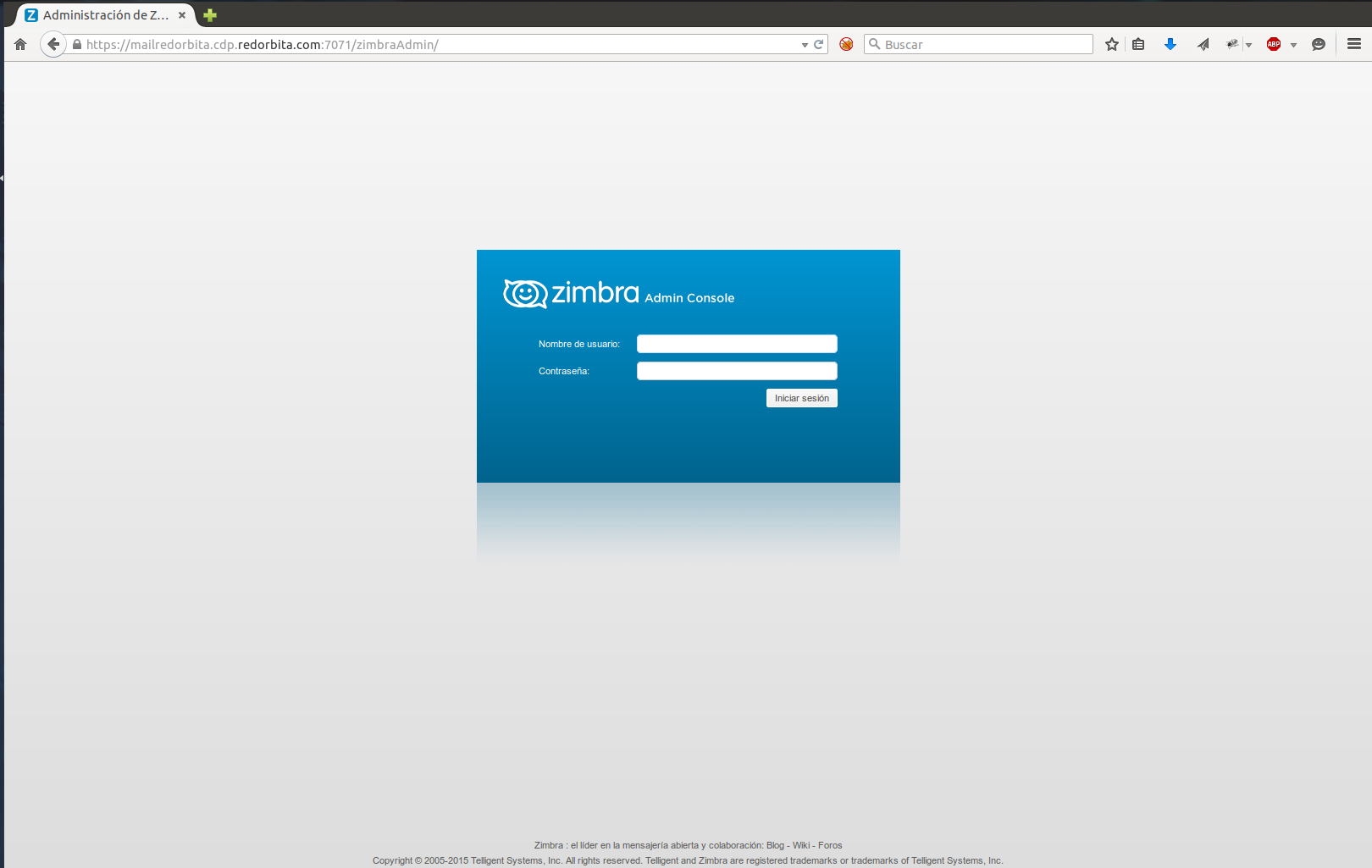
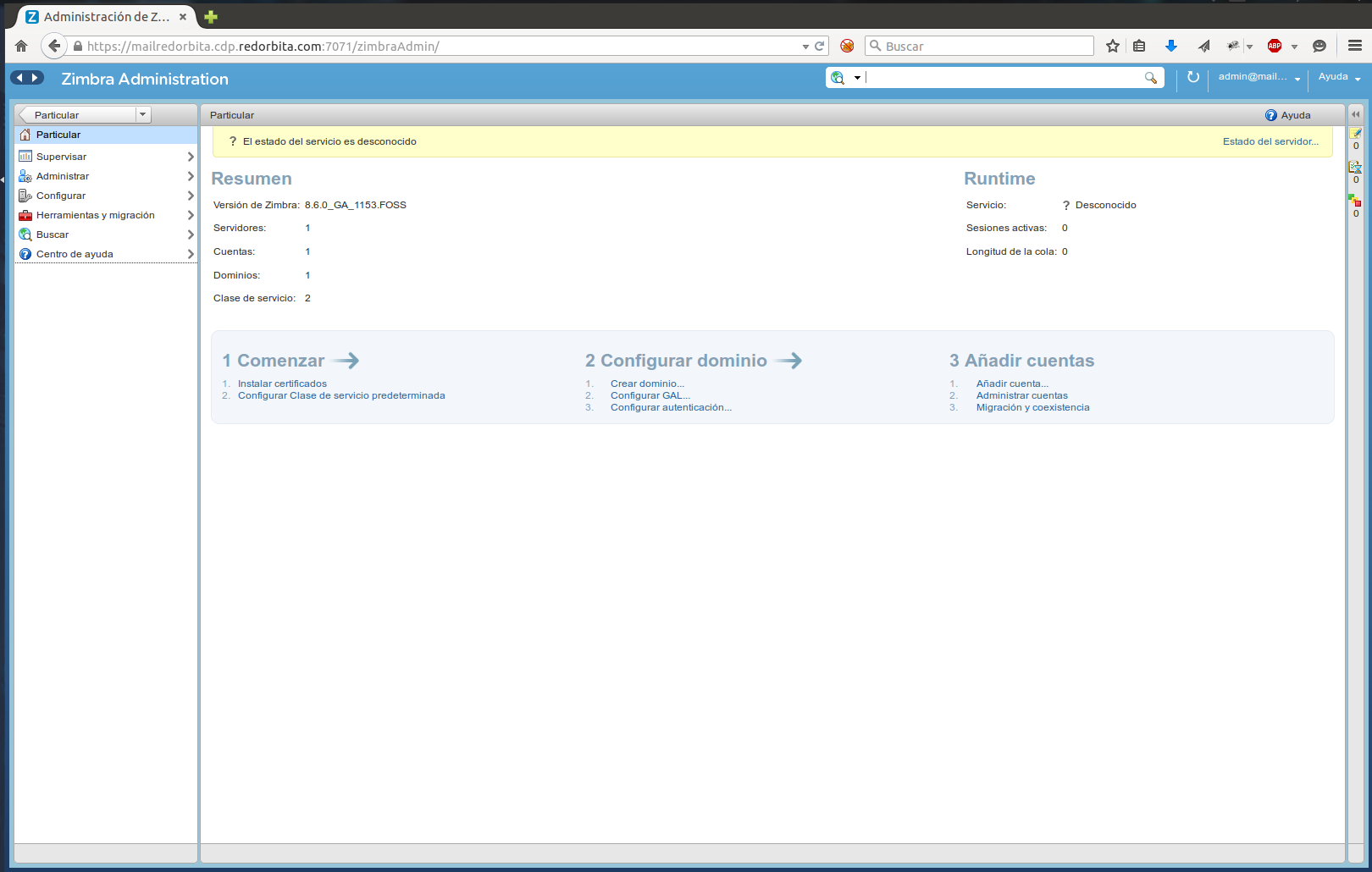
Regards, rokitoh
:wq!
Comments