
What does Pure Storage offer?
Pure Storage's FlashArray is an enterprise flash-based storage array designed to enable general deployment of flash memory in the enterprise data center. FlashArray leverages inline data reduction capabilities (deduplication, compression, and thin provisioning) to reduce the cost of flash-based storage to or below cost over spinning disk. It doubles capacity and performance, delivering 10x the performance, consuming 10x less power, and taking up 10x less space than traditional disk-based storage.
Expand a volume
To expand a volume we go to: Storage > select the host on the left side, once selected in Connected Volumes we press on the volume > Edit volume
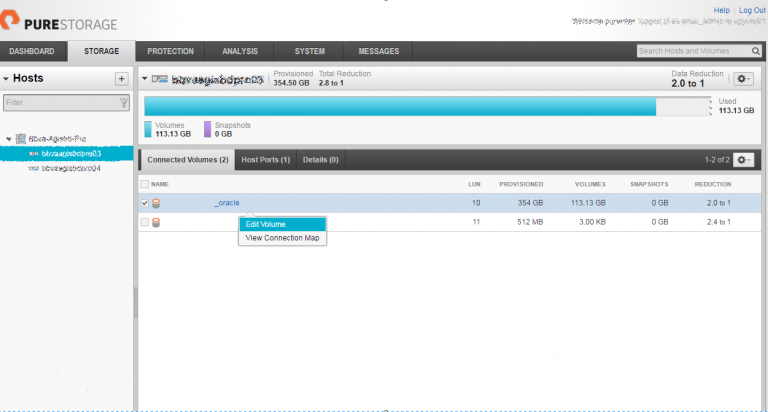
The wizard opens and we give the size.
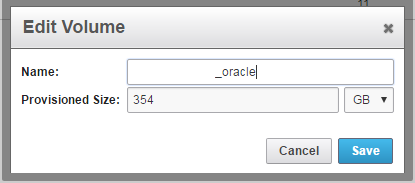
Once expanded we must go to the server which is providing service and force it to scan the volume again.
We check the size:
multipath -ll

oracle (3624a937asdadasdasd311047) dm-6 PURE,FlashArray

size=290G features=’0′ hwhandler=’0′ wp=rw

`-+- policy=’round-robin 0′ prio=1 status=active

|- 3:0:0:10 sdb 8:16 active ready running

|- 4:0:0:10 sdd 8:48 active ready running

|- 7:0:0:10 sdj 8:144 active ready running

|- 5:0:0:10 sdf 8:80 active ready running

|- 8:0:0:10 sdl 8:176 active ready running

|- 6:0:0:10 sdh 8:112 active ready running

|- 10:0:0:10 sdp 8:240 active ready running

`- 9:0:0:10 sdn 8:208 active ready running
To ask the system to rescan the bus we must do the following echo to the file /sys/class/scsi_host/host0/scan
echo «- – -» > /sys/class/scsi_host/host0/scanwe restart the multipath.
[rokitoh@redorbita device]# multipath -rOnce the multipath has been restarted it should show us the correct size.
[rokitoh@redorbita device]#  multipath -ll
oracle (3624a937asdadasdasd311047) dm-6 PURE,FlashArray

size=354G features=’0′ hwhandler=’0′ wp=rw

`-+- policy=’round-robin 0′ prio=1 status=active

|- 3:0:0:10 sdb 8:16 active ready running

|- 4:0:0:10 sdd 8:48 active ready running

|- 7:0:0:10 sdj 8:144 active ready running

|- 5:0:0:10 sdf 8:80 active ready running

|- 8:0:0:10 sdl 8:176 active ready running

|- 6:0:0:10 sdh 8:112 active ready running

|- 10:0:0:10 sdp 8:240 active ready running

`- 9:0:0:10 sdn 8:208 active ready running
We check the physical volume using the pvscan command.
[rokitoh@redorbita device]# pvscan

PV /dev/mapper/oracle VG vg_oracle lvm2 [290.00 GiB / 14.00 GiB free]
We extend the physical volume
[rokitoh@redorbita device]# pvresize /dev/mapper/oracle

Physical volume «/dev/mapper/oracle» changed

1 physical volume(s) resized / 0 physical volume(s) not resized
Once extended, we check again using the pvscan command if the volume has been extended correctly.
[rokitoh@redorbita device]# pvscan
PV /dev/mapper/oracle VG vg_oracle lvm2 [354.00 GiB / 78.00 GiB free]
All the best.
:wq!
Comments