
Docker Swarm is a native tool that allows you to build a cluster of docker machines.
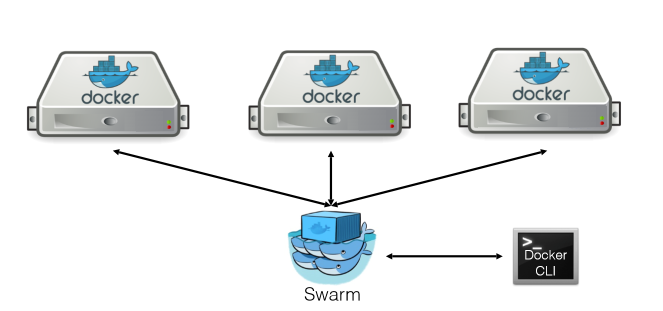
We start from the base that we have Docker and Virtualbox installed
We install docker-machine
rokitoh@redorbita:/# curl -k -L http://github.com/docker/machine/releases/download/v0.7.0/docker-machine-`uname -s`-`uname -m` > /usr/local/bin/docker-machine

rokitoh@redorbita:/# chmod +x /usr/local/bin/docker-machine
We use Docker Machine to create the different nodes of the cluster as well as the manager that is responsible for managing the resources. For the installation we are going to use the virtualbox driver.
Docker Machine currently supports the following platforms:
- Amazon Web Services
- Microsoft Azure
- Digital Ocean
- Exoscale
- Google Compute Engine
- Generic
- Microsoft Hyper-V
- OpenStack
- Rackspace
- IBM Softlayer
- Oracle VirtualBox
- VMware vCloud Air
- VMware Fusion
- VMware vSphere
rokitoh@redorbita:/# docker-machine create -d virtualbox manager
rokitoh@redorbita:/# docker-machine create -d virtualbox redorbita01
rokitoh@redorbita:/# docker-machine create -d virtualbox redorbita02
To list the created machines we use the following command:
rokitoh@redorbita:/# docker-machine ls

NAME          ACTIVE   DRIVER       STATE     URL                         SWARM   DOCKER    ERRORS

manager       *        virtualbox   Running   tcp://192.168.99.100:2376           v1.11.2

redorbita01   –        virtualbox   Running   tcp://192.168.99.101:2376           v1.11.2

redorbita02   –        virtualbox   Running   tcp://192.168.99.102:2376           v1.11.2
We connect to the manager
rokitoh@redorbita:/# eval $(docker-machine envmanager)

Generamos el token

rokitoh@redorbita:/# docker run –rm swarm create

Unable to find image ‘swarm:latest’ locally

latest: Pulling from library/swarm

1e61bbec5d24: Pull complete

8c7b2f6b74da: Pull complete

245a8db4f1e1: Pull complete

Digest: sha256:661f2e4c9470e7f6238cebf603bcf5700c8b948894ac9e35f2cf6f63dcda723a

Status: Downloaded newer image for swarm:latest

86c0b73088bd1cb2b41fd308193aea66
We configure the manager using the token obtained in the previous command
rokitoh@redorbita:/# docker run -d -p 3376:3376 -t -v /var/lib/boot2docker:/certs:ro swarm manage -H 0.0.0.0:3376 –tlsverify –tlscacert=/certs/ca.pem –tlscert=/certs/server.pem –tlskey=/certs/server-key.pem token://86c0b73088bd1cb2b41fd308193aea66Once the manager is configured, we must connect to all the nodes that make up the cluster and add the token.
We connect to redorbita01
rokitoh@redorbita:/# eval $(docker-machine env redorbita01)We add the node to the cluster
rokitoh@redorbita:/# docker run -d swarm join –addr=192.168.99.101:2376 token://86c0b73088bd1cb2b41fd308193aea66We connect to redorbita02
rokitoh@redorbita:/# eval $(docker-machine env redorbita02)We add the node to the cluster
rokitoh@redorbita:/# docker run -d swarm join –addr=192.168.99.102:2376 token://86c0b73088bd1cb2b41fd308193aea66Once configured, we only have to connect to the cluster and start managing it.
rokitoh@redorbita:/# eval $(docker-machine env manager)

rokitoh@redorbita:/#DOCKER_HOST=$(docker-machine ip manager):3376
Basic commands:
Obtain information from the nodes of our cluster
rokitoh@redorbita:/# docker info

Containers: 2

Images: 2

Storage Driver:

Role: primary

Strategy: spread

Filters: health, port, containerslots, dependency, affinity, constraint

Nodes: 2

redorbita01: 192.168.99.101:2376

└ ID: FOPV:OGXB:7YFC:LNK6:ZMN4:NNSE:PDZ6:P2CQ:VOKX:WTTZ:YGO4:ABQW

└ Status: Healthy

└ Containers: 1

└ Reserved CPUs: 0 / 1

└ Reserved Memory: 0 B / 1.021 GiB

└ Labels: executiondriver=, kernelversion=4.4.12-boot2docker, operatingsystem=Boot2Docker 1.11.2 (TCL 7.1); HEAD : a6645c3 – Wed Jun  1 22:59:51 UTC 2016, provider=virtualbox, storagedriver=aufs

└ UpdatedAt: 2016-07-15T19:17:59Z

└ ServerVersion: 1.11.2

redorbita02: 192.168.99.102:2376

└ ID: JAW2:JIDC:WEOY:CDZY:5LT7:QTHB:3ALB:Z4C2:PQCE:4AHL:CDU6:S55I

└ Status: Healthy

└ Containers: 1

└ Reserved CPUs: 0 / 1

└ Reserved Memory: 0 B / 1.021 GiB

└ Labels: executiondriver=, kernelversion=4.4.12-boot2docker, operatingsystem=Boot2Docker 1.11.2 (TCL 7.1); HEAD : a6645c3 – Wed Jun  1 22:59:51 UTC 2016, provider=virtualbox, storagedriver=aufs

└ UpdatedAt: 2016-07-15T19:18:33Z

└ ServerVersion: 1.11.2

Execution Driver:

Kernel Version: 4.4.12-boot2docker

Operating System: linux

CPUs: 2

Total Memory: 2.042 GiB

Name: e94e6277e756

ID:

Http Proxy:

Https Proxy:

No Proxy:
View containers running
rokitoh@redorbita:/# docker ps -a

CONTAINER ID        IMAGE               COMMAND                CREATED             STATUS              PORTS               NAMES

909281e4c434        swarm               «/swarm join –addr=   22 minutes ago      Up 14 minutes       2375/tcp            redorbita02/berserk_bartik

c05fb16e862a        swarm               «/swarm join –addr=   23 minutes ago      Up 15 minutes       2375/tcp            redorbita01/modest_babbage
All the best.
:wq!
Comments