
What is a reverse proxy?
A Reverse Proxy is an intermediary between a public network and a set of private servers; which is responsible for managing service requests from one or more external computers. These work by manipulating HTTP requests that are sent by various computers; in a process in which requests are attended to and at the same time they manipulate the presentation of these services to avoid compromising critical information from the group of private servers where they are requested.
Diagram:
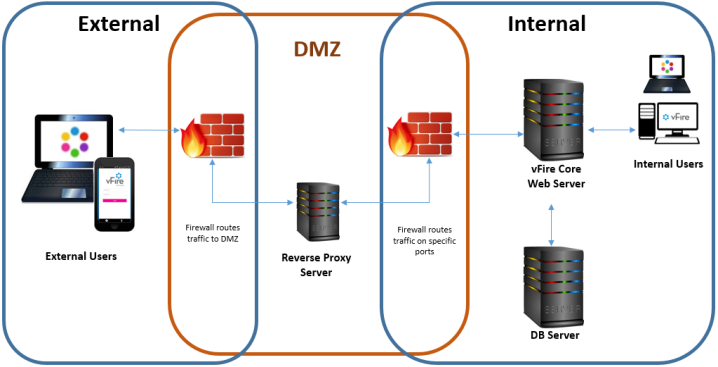
Facility:
Derivatives in debian.
aptitude install -y libapache2-mod-proxy-html libxml2-dev apache2 opensslRed hat derivatives
yum install httpd mod_ssl -yDerivatives in debian.
vi /etc/apache2/sites-enabled/reverse_proxy.confRed hat derivatives
vi /etc/httpd/conf.d/reverse_proxy.confConfiguration:
In my case, the port through which the web server hosted on the internal network is operating is 9443, therefore I will perform this configuration on this port.
#Redirigimos todo el trafico http a https
NameVirtualHost *:9443
<VirtualHost *:9443>
RewriteEngine On
RewriteRule ^(.*)$ https://%{HTTP_HOST}$1 [R=301,L]
</VirtualHost>
#Realizamos la configuración del proxy inverso
<IFModule mod_proxy.c>
<VirtualHost *:9443>
ServerAdmin rokitoh@red-orbita.com
ServerName reverseproxy.red-orbita.com
ServerAlias redorbitaapp01.red-orbita.com
ProxyPass /  http://192.168.20.1:9443/
ProxyPassReverse /  http://192.168.20.1:9443/
ProxyRequests Off
ProxyPreserveHost On
#Configuramos  el certificado:
SSLEngine on
SSLProxyEngine on
SSLCertificateFile /etc/httpd/certs/redorbita.crt
SSLCertificateKeyFile /etc/httpd/certs/redorbita.key
#Configuramos los permiosos
<proxy>
Order deny,allow
Allow from all
</proxy>
</VirtualHost>
</IFModule>
We exit saving the configuration file and restart the service
Derivatives in debian.
service apache restartRed hat derivatives
service httpd restart:wq!
Comments