
What is a reverse proxy?
A Reverse Proxy is an intermediary between a public network and a set of private servers; which is responsible for managing service requests from one or more external computers. These work by manipulating HTTP requests that are sent by various computers; in a process in which requests are attended to and at the same time they manipulate the presentation of these services to avoid compromising critical information from the group of private servers where they are requested.
Diagram:
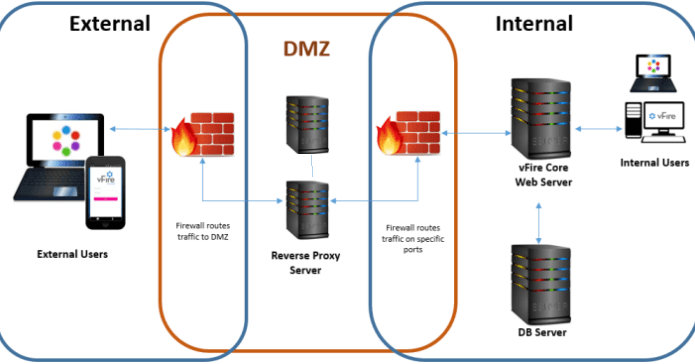
Taking advantage of the scenario in the previous post where we set up a haproxy cluster, we are going to implement our reverse proxy.
HAproxy High Availability Cluster on Red Hat 7
We make a backup of our initial configuration:
cp /etc/haproxy/haproxy.cfg /etc/haproxy/haproxy.cfg-bckConfiguramos el haproxy para realizar el balanceo al puerto del SFTP, en mi caso estoy empleado el 9022 para el servicio de SFTP.
cat /etc/haproxy/haproxy.cfg
global
maxconn 4096
daemon
defaults
timeout connect 5000
timeout client 50000
timeout server 50000
listen sftp
bind 172.20.0.12:9022
mode tcp
option tcplog
balance leastconn
server SFTP01 10.150.6.144:9022 check
server SFTP02 10.150.6.145:9022 checkWe configure iptables to perform a NAT
iptables -t nat -A POSTROUTING -s 10.150.6.129/25 -j SNAT –to 10.150.6.144

iptables -t nat -A POSTROUTING -s 10.150.6.129/25 -j SNAT –to 10.150.6.145
We enable forwarding
echo 1 > /proc/sys/net/ipv4/ip_forward

echo «net.ipv4.ip_forward=1» >> /etc/sysctl.conf
We restart the cluster service
pcs resource restartWe try to connect using the public IP:
sftp sftp@<ip publica> 9022All the best
:wq!
Comments