
Introduction
He Quansheng UV-K5 and its updated version UV-K5(8) They have become extremely popular radios within the radio amateur, technician, and enthusiast community for their low cost, modability, and extensive community support. Thanks to its flexible architecture and the availability of custom firmware, these devices can be transformed into much more powerful tools than their factory configuration allows.
This article is a complete guide to flash custom firmwares on the UV-K5 or UV-K5(8), highlighting the best options available, the steps necessary to carry out the process from the web browser, and recommendations according to the user profile. If you're looking to add features like real-time spectrum, advanced customization, or emergency-specific functionality, you'll find everything you need to get started here.
From prerequisites to comparisons and direct links to flashing tools, this guide is designed so that you can get the most out of your Quansheng radio in an easy way. safe, simple and totally free.
Compatible Models
- Quansheng UV-K5
- Quansheng UV-K5(8) (updated chip version)
- Quansheng UV-K6
Prerequisites
Necessary material:
-
Radio Quansheng UV-K5 or UV-K5(8)
-
USB programming cable (compatible with Baofeng/Kenwood 2 pin)
-
PC or web browser (Chrome/Edge recommended)
-
Desired Firmware (below in this document)
-
Installed USB drivers (Silicon Labs CP210x, CH340 depending on the chip in your cable)
Recommended Firmwares
1. UVMod
- Web interface for flashing
- Add features like real-time spectrum, expanded VFO, etc.
- Easy to customize and update firmware
- File Compatible
.k5personalized
2. Egzumer Firmware
- More technical and customizable
- Greater control over advanced features (hidden menus, technical options, etc.)
- Requires more knowledge
Flash with Official Quansheng Software
Download the software and firmware
- Official page or from community repositories (SWITCH TO CORRECT URL)
- The file must have extension
.bineither.k5
Install drivers
Connect the radio
- Connect the turned off radio to the PC with the cable
- Press and hold the key
PTT+VOL(on) to enter firmware mode (blank or dotted screen)
Run the software
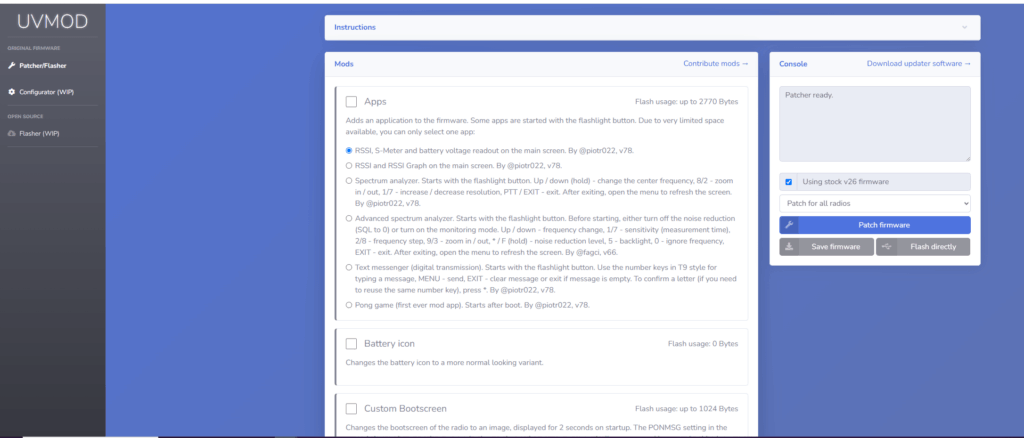
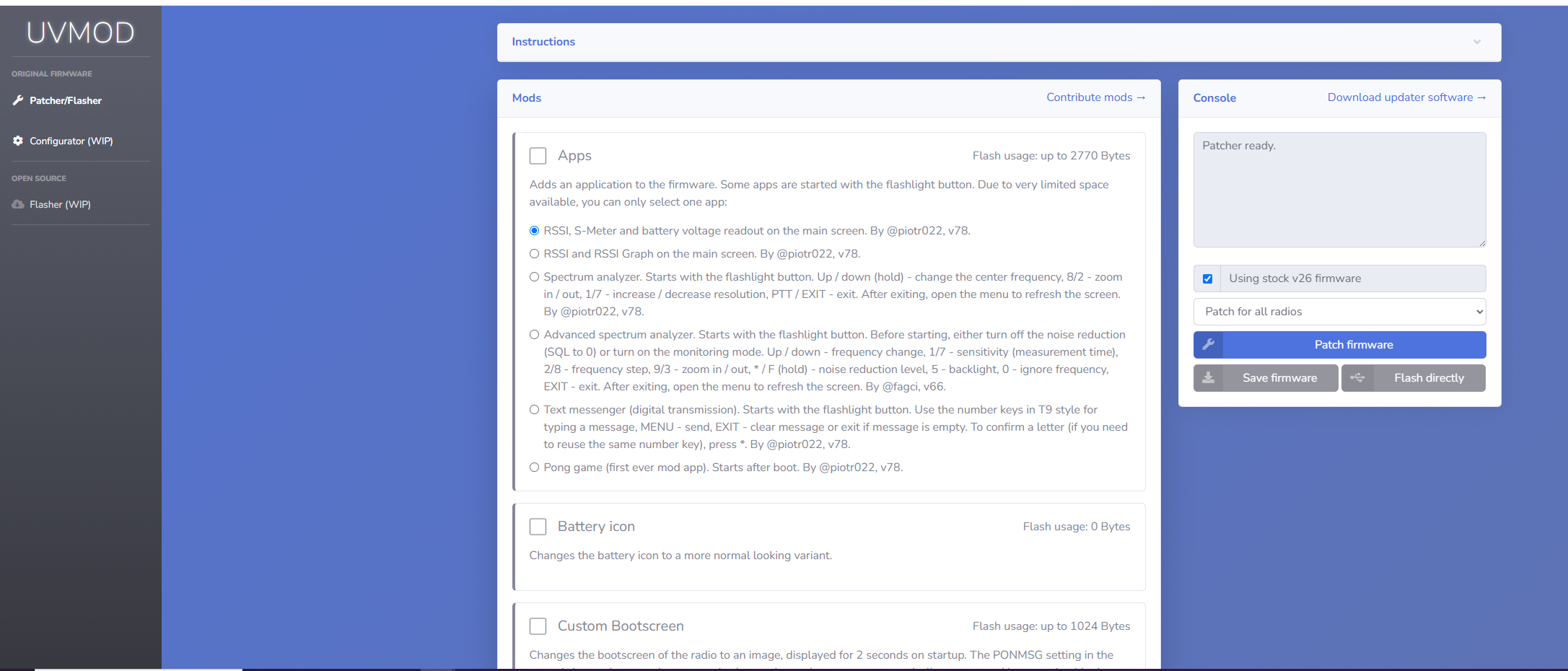
Flash with UVMod Web Flasher
Official site:
https://whosmatt.github.io/uvmod/
Advantages:
- You don't need to install anything (works in the browser)
- Detect the chip automatically
- You can upload your own
.k5custom or use official versions
Step by step instructions:
1. Connect radio to PC
- Connect it with the USB cable
- Enter flashing mode:
- Press
PTT+VOLwhen turning on
- Press
2. Open UVMod Web Flasher
- Access: https://whosmatt.github.io/uvmod/
- Click “Connect” and select the COM port of your radio
3. Select firmware
- Can:
- Use an official version of UVMod from the menu
- Upload a file
.k5personalized
4. Flash
Customization with files .k5
UVMod allows you to create and upload files .k5 personalized from its advanced menu, with options such as:
- Extended menus
- Regional Settings
- Inverted screen
- Color themes
You can generate your .k5 in https://whosmatt.github.io/uvmod/ → “Generate custom firmware”
Flash with Egzumer Firmware (via web browser)
The firmware Egzumer It is one of the most powerful and flexible bases available for the UV-K5. Although traditionally it required flashing with specific tools, now can be installed directly from the browser thanks to Web Serial API support.
Instructions using the button «FLASH WITH A BROWSER»
1. Access the releases page
- Go to the official repository:
https://github.com/egzumer/uv-k5-firmware-custom/releases
2. Locate the desired version
- Scroll to the most recent version.
- You will see the button
FLASH WITH A BROWSERnext to the build corresponding to your model (uv-k5,uv-k5(8)…).
3. Connect the radio to PC
- Use the USB programming cable
- Enter flashing mode: press and hold the keys
PTT+VOLwhen turning on the radio
4. Click the button FLASH WITH A BROWSER
- A new tab will open with the web flashing tool
- press the button "Connect" and select the port corresponding to the USB cable
- Press "Flash" to start the process
5. Wait for the flashing to finish
Flash with F4HWN (based on Egzumer) via Web
The firmware F4HWN is a customized version of the Egzumer firmware, focused on radio amateurs and emergency operators. Its maintenance is active and offers specific editions for different uses. Use the same web flasher than Egzumer, facilitating the process from any compatible browser.
Instructions using the Web Flash method
1. Access the official F4HWN repository
https://github.com/armel/uv-k5-firmware-custom/releases
2. Choose a suitable version and edition
You will see several editions available (explained below). Once chosen, click the link:
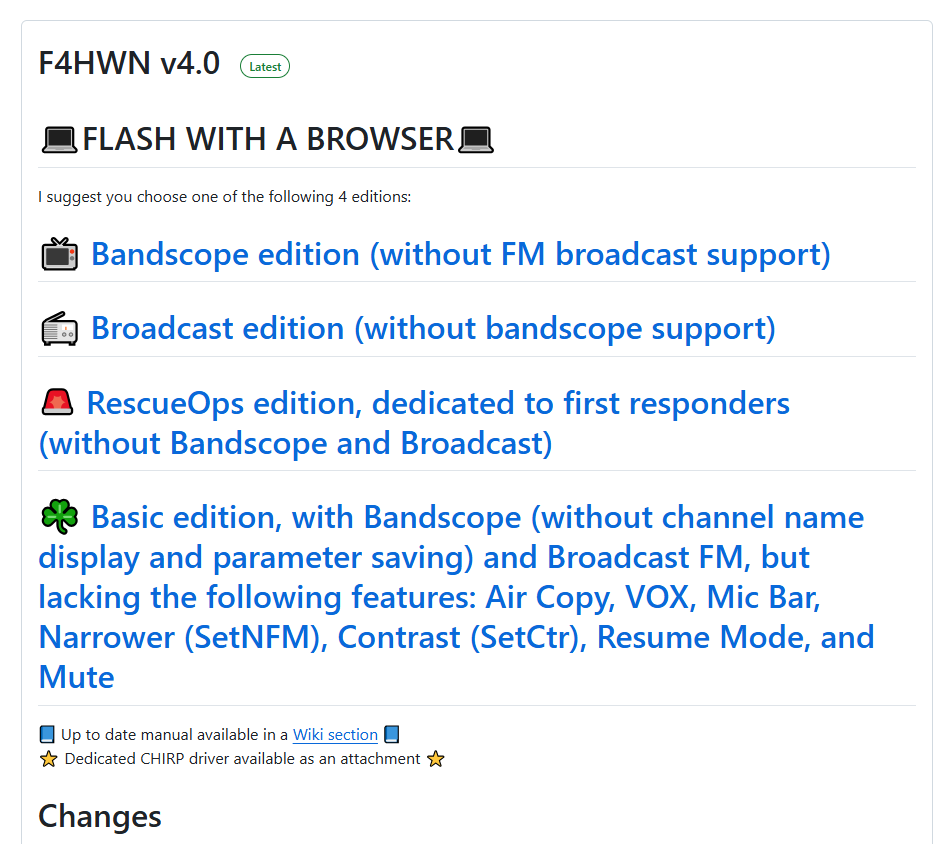
FLASH WITH A BROWSER
3. Connect the radio to PC
- Connect your UV-K5 to your computer with the USB cable
- Turn on flashing mode: press and hold
PTT+VOLwhile you turn on
4. Flash with the browser
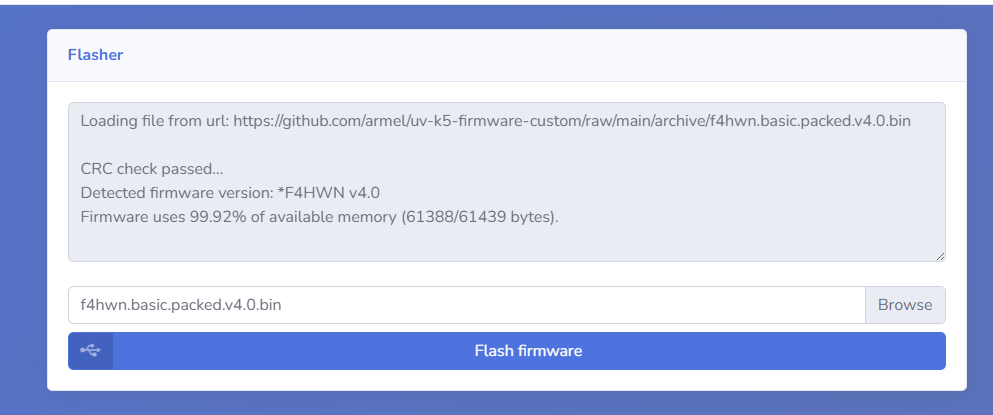
🧩 F4HWN Firmware Editions
| Edition | Description | Includes | excludes |
|---|---|---|---|
| 📺 Bandscope | Ideal for radio amateurs who need to view spectrum in real time | Band Scope | No FM radio |
| 📻 Broadcast | Perfect for users who use FM radio | FM Radio (broadcast) | Without Band Scope |
| 🚨 RescueOps | Specialized for emergency services | Fast, clean operation mode | No Band Scope or FM Radio |
| ☘️ BASIC | Lightweight and universal version | Band Scope + FM Broadcast | Does not include: VOX, Air Copy, Mic Bar, contrast, save parameters, etc. |
-
❌ Air Copy: Wireless channel sharing
-
❌ VOX: Voice activation
-
❌ Mic Bar: Graphic microphone indicator
-
❌ SetNFM: Closer modulation
-
❌ SetCtr: Contrast adjustment
-
❌ Resume Mode: Automatic recovery at power on
-
❌ Save Settings: Does not save parameters when restarting
📊 Final Firmware Comparison
| Firmware | Web interface | Personalization | Stability | Technical level | Ideal for |
|---|---|---|---|---|---|
| UVMod | ✅ Yes | Registration (themes, buttons, export/import of .k5) |
Very good | 🟢 Beginners | General users, visual, easy to use |
| Egzumer | ✅ Yes (recent) | Very high (advanced features, spectrum, mods) | Excellent | 🔵 Medium-advanced | Enthusiasts, makers, hackers |
| F4HWN | ✅ Yes (uses Egzumer WebFlash) | Medium-High (several predefined editions) | Very good | 🟡 Basic to medium | Radio amateurs, emergencies |
✅ Recommendations according to profile
| User | Recommended Firmware | Edition |
|---|---|---|
| 👨💼Casual/beginner user | UVMod | Latest stable version |
| 📡 Experienced radio amateur | Egzumer | dx, dx-full |
| 🧑🚒 Emergencies / Civil Protection | F4HWN | RescueOps |
| 📻 FM listening / urban use | F4HWN | Broadcast |
| 🛰️ Spectrum explorers / technicians | F4HWN or Egzumer | Bandscope |
| 💡 Users who want to customize without complications | UVMod | With file .k5 own |
:wq!
Comments