
Introduction
This manual is intended for users who need high privacy and anonymity on the Internet, such as journalists, activists or people who live under censorship. The described configuration combines:
- Mullvad VPN- Protects your real IP address and encrypts all traffic.
- Tor: Anonymizes traffic and allows you to evade censorship.
- Bridges (obfs4/meek)- Hides Tor usage from ISPs or governments that block Tor.
- Encrypted DNS (DoH/DoT)- Protect your domain name queries from surveillance.
The resulting traffic flow is:
Tu Sistema (Debian)
        ↓
   Mullvad VPN
        ↓
    Tor Client (con Bridges)
        ↓
      Internet
Warning: This setting is advanced. Poor implementation can expose your real IP or allow DNS leaks. It is recommended use Tor Browser for anonymous browsing and do not mix it with normal browsers.
Mullvad VPN Preparation
Installation and connection
Install from the official repositories
# Download the Mullvad signing key
sudo curl -fsSLo /usr/share/keyrings/mullvad-keyring.asc https://repository.mullvad.net/deb/mullvad-keyring.asc

# Add the Mullvad repository server to apt
echo "deb [signed-by=/usr/share/keyrings/mullvad-keyring.asc arch=$( dpkg --print-architecture )] https://repository.mullvad.net/deb/stable stable main" | sudo tee /etc/apt/sources.list.d/mullvad.list

# Install the package
sudo apt update
sudo apt install mullvad-vpn
Download from the website
- Download the official Mullvad app for Linux (Debian supported).
- Connect the VPN to a secure server.
Configure Mullad
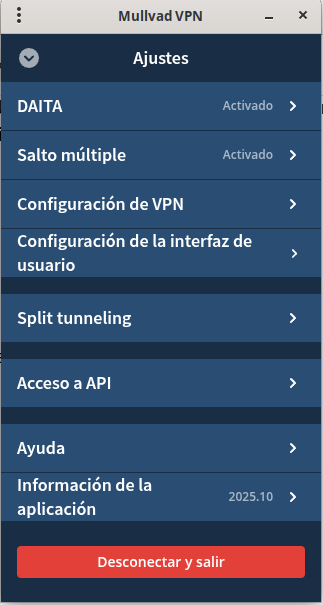
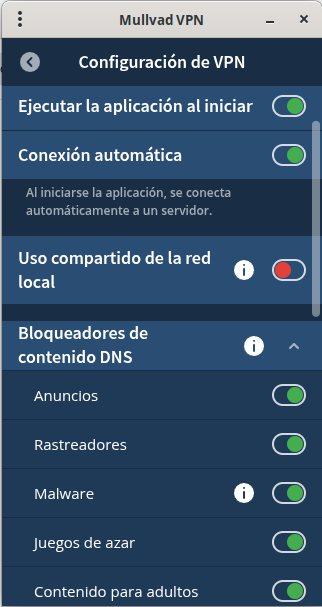
- Daita: The function DAITA (Defense Against AI-guided Traffic Analysis) in Mullvad VPN is an additional layer of protection aimed at traffic obfuscation to make it difficult for even advanced AI-based analytics to identify usage patterns, sites visited, or user activities.
- Multiple jump: The option “multiple hop” (Multihop / Multiple hop) from Mullvad allows you to route your traffic across two (or more) servers instead of one: first go through a entry (entry server) and then a exit (outbound server). It is, in practice, a tunnel within a tunnel (tunnel-within-a-tunnel) using WireGuard.
Configuring Secure DNS (DoT/DoH with systemd-resolved)
DNS over TLS (DoT) with systemd-resolved
Install and enable the resolver:
sudo apt install systemd-resolved -y
sudo systemctl enable systemd-resolved
sudo systemctl start systemd-resolved
Edit the configuration file:
sudo vi /etc/systemd/resolved.conf
Add the following:
[Resolve]
DNS=194.242.2.3#dns.mullvad.net 194.242.2.2#dns.mullvad.net
DNSOverTLS=yes
Restart the service:
sudo systemctl restart systemd-resolved
Bind the resolv.conf to the local stub:
sudo ln -sf /run/systemd/resolve/stub-resolv.conf /etc/resolv.conf
Check status:
resolvectl status
Expected result:
The global DNS must point to 194.242.2.2 and 194.242.2.3 (Mullvad), with “DNS over TLS: yes”.
Disable IPv6
sudo vi /etc/sysctl.conf
# Añade al final
net.ipv6.conf.all.disable_ipv6 = 1
net.ipv6.conf.default.disable_ipv6 = 1
sudo sysctl -p
VPN verification
curl -s https://ifconfig.co
It should show the IP of the Mullvad server, not your real IP.
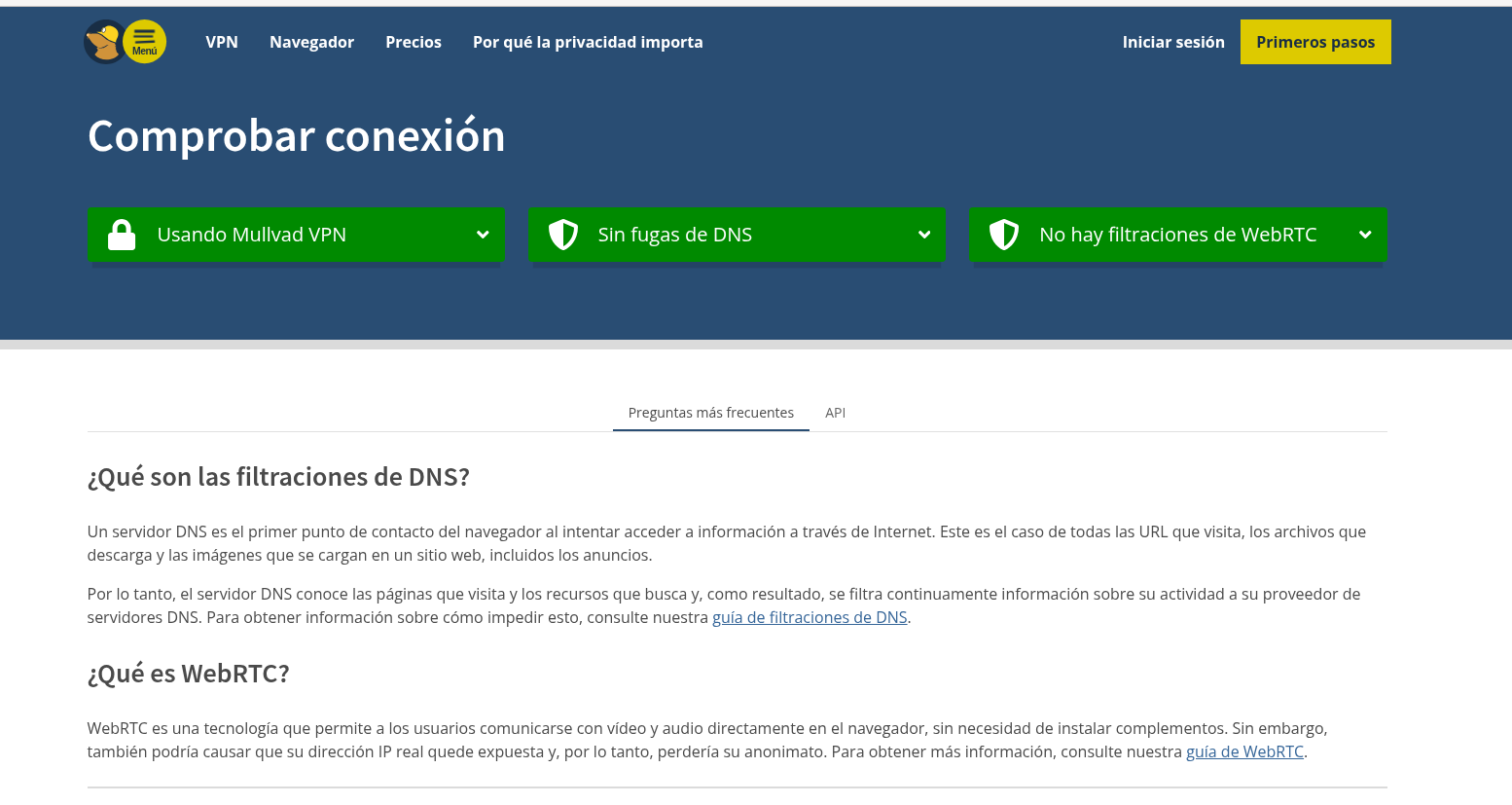
DNS verification
Check with: https://mullvad.net/check
Bridges and Tor configuration
Get bridges
- Visit bridges.torproject.org or send email to
bridges@torproject.org. - 2-3 obfs4 bridges recommended

Install Tor and transports
sudo apt update
sudo apt install tor obfs4proxy meek-client
Install meek-client
In debian you cannot install meek-client through a repository. Therefore we have to compile it.
We install the dependencies
sudo apt install -y golang git
Clone the official repository
cd ~
git clone https://git.torproject.org/pluggable-transports/meek.git
cd meek/meek-client
Compile the binary
go build
This will generate a file called meek-client in the same folder.
Install it on the system
sudo mv meek-client /usr/local/bin/
sudo chmod +x /usr/local/bin/meek-client
obfs4proxy: transport obfs4meek-client: meek transport (optional, useful in extreme censorship)
Configure Bridges in torrc
sudo vi /etc/tor/torrc
Add:
ClientOnly 1
UseBridges 1

# Obfs4
ClientTransportPlugin obfs4 exec /usr/bin/obfs4proxy
Bridge obfs4 IP_ADRESS:PORT XXXXXXXXX cert=XXXXX iat-mode=0
Bridge obfs4 IP_ADRESS:PORT XXXXXXXXX cert=XXXXX iat-mode=2

# Meek
ClientTransportPlugin meek exec /usr/bin/meek-client
Bridge meek 0.0.2.0:3 url=https://meek.azureedge.net/ front=ajax.aspnetcdn.com


# Configuración estándar
SocksPort 9050
Log notice file /var/log/tor/notices.log
Log debug file /var/log/tor/debug.log
Start Tor
sudo systemctl enable --now tor
sudo journalctl -u tor -f
Verification
- VPN connected successfully
curl -s https://ifconfig.co
Expected result: Mullvad server IP.
- Kill Switch active
Disconnect the VPN temporarily:
sudo systemctl stop mullvad-vpn
curl -s https://ifconfig.co
Expected result: no IP visible, traffic should not exit (kill switch working).
- IPv6 disabled
ip a | grep inet6
Expected result: There are no active IPv6 addresses.
2. Secure DNS (Mullvad DoH/DoT)
- Active encrypted DNS
resolvectl status
Expected result: Global DNS points to 194.242.2.x (Mullvad).
- DNS leak check
Visit: https://mullvad.net/check
Expected result: “No DNS leaks”, server contains “dns” in the name.
3. Tor + Bridges + Connectable Transports
- Active Tor
sudo systemctl status tor
- Review Tor logs
sudo journalctl -u tor -f
Expected result: bridges connected, no errors.
- Obfs4 bridges active
Check that your torrc contains the correct bridge lines:
Bridge obfs4 1.2.3.4:9001 ABCDEF1234567890 cert=MIIB... iat-mode=0
ClientTransportPlugin obfs4 exec /usr/bin/obfs4proxy
Using Tor Browser
- Tor Browser installed and updated
- Only open Tor for anonymous activities
- Check Tor Node
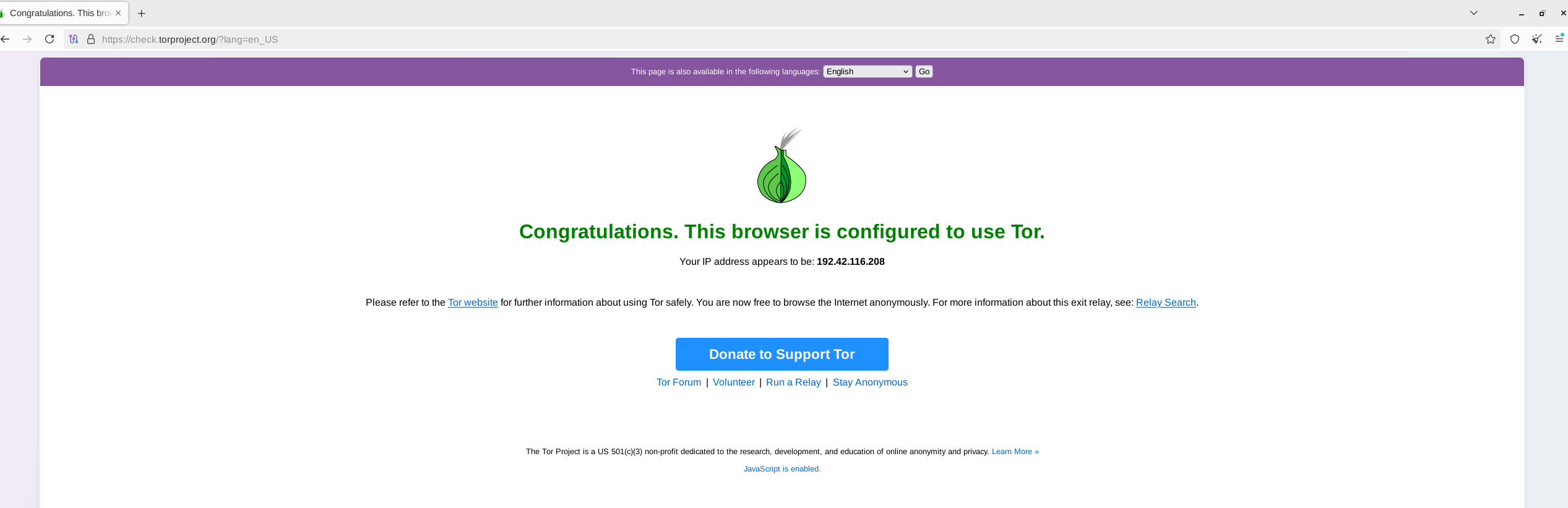
- Visit: https://check.torproject.org
- Expected result: "Congratulations. You are using Tor."
- Do not mix browsers
- Recommendation: use normal apps for everyday browsing and Tor Browser only for sensitive activities.
Check automation
check-anon.sh, a complete Bash script that automates key checks in your setup Mullvad → Tor (obfs4/meek bridges) + secure DNS in Debian.
The script performs the tests you requested: external IP, IP via Tor, Mullvad/Tor status, bridges/transports, DNS (systemd-resolved), IPv6, SOCKS5, processes obfs4proxy/meek-client, and firewall/kill-switch checks. It also shows relevant log outputs for diagnosis.
set -euo pipefail
IFS=$'\n\t'

# Colores
RED='\033[0;31m'
GRN='\033[0;32m'
YEL='\033[0;33m'
BLU='\033[0;34m'
NORM='\033[0m'

echo -e "${BLU}========== Comprobación Mullvad -> Tor (bridges + DNS seguro) ==========${NORM}\n"

# -----------------------------
# 0) Verificar utilidades
# -----------------------------
need_cmds=(curl ss ip systemctl journalctl pgrep resolvectl)
for cmd in "${need_cmds[@]}"; do
  if ! command -v "$cmd" >/dev/null 2>&1; then
    echo -e "${YEL}AVISO:${NORM} El comando '$cmd' no está disponible. Algunas comprobaciones fallarán."
  fi
done
echo

# -----------------------------
# 1) Conectividad general
# -----------------------------
echo -e "${BLU}1) Conectividad general e IP externa${NORM}"
if command -v curl >/dev/null 2>&1; then
  echo -n " -> IP pública (fuera de Tor): "
  ip_out=$(curl -s --max-time 10 https://ifconfig.co || true)
  if [[ -z "$ip_out" ]]; then
    echo -e "${RED}ERROR:${NORM} No se pudo obtener IP pública."
  else
    echo -e "${GRN}$ip_out${NORM}"
  fi
else
  echo -e "${YEL}SKIP:${NORM} curl no disponible."
fi
echo

# -----------------------------
# 2) VPN Mullvad
# -----------------------------
echo -e "${BLU}2) Verificación básica de VPN (Mullvad)${NORM}"
if command -v resolvectl >/dev/null 2>&1; then
  resolv_info=$(resolvectl status --no-pager 2>/dev/null || true)
  if [[ -z "$resolv_info" ]]; then
    echo -e "${YEL}No hay información de resolvectl.${NORM}"
  else
    echo "$resolv_info" | sed -n '1,6p'
    if echo "$resolv_info" | grep -qi "194\.242\.2|dns\.mullvad"; then
      echo -e " -> DNS apunta a Mullvad: ${GRN}OK${NORM}"
    else
      echo -e " -> DNS apunta a Mullvad: ${YEL}NO${NORM}"
    fi
  fi
else
  echo -e "${YEL}SKIP:${NORM} resolvectl no disponible."
fi
echo

# -----------------------------
# 3) Estado Tor
# -----------------------------
echo -e "${BLU}3) Estado del servicio Tor y puentes${NORM}"
tor_active="unknown"
if command -v systemctl >/dev/null 2>&1; then
  tor_active=$(systemctl is-active tor 2>/dev/null || true)
  if [[ "$tor_active" == "active" ]]; then
    echo -e " -> Tor service: ${GRN}active${NORM}"
  else
    echo -e " -> Tor service: ${RED}${tor_active}${NORM}"
  fi
else
  echo -e "${YEL}SKIP:${NORM} systemctl no disponible."
fi

# Logs recientes de Tor
if command -v journalctl >/dev/null 2>&1; then
  echo -e " -> Últimas líneas de log de Tor (bridges/obfs4/meek/bootstrap/errores):"
  echo "----------------------------------------"
  sudo journalctl -u tor -n 80 --no-pager | grep -iE "bridge|obfs4|meek|bootstrap|100%|error|failed" || true
  echo "----------------------------------------"
fi
echo

# -----------------------------
# 4) Transportes (obfs4/meek)
# -----------------------------
echo -e "${BLU}4) Transportes conectables (obfs4/meek)${NORM}"
if command -v pgrep >/dev/null 2>&1; then
  if pgrep -x obfs4proxy >/dev/null 2>&1; then
    echo -e " -> obfs4proxy: ${GRN}ejecutándose${NORM}"
  else
    echo -e " -> obfs4proxy: ${YEL}no encontrado${NORM}"
  fi
  if pgrep -x meek-client >/dev/null 2>&1 || command -v meek-client >/dev/null 2>&1; then
    echo -e " -> meek-client: ${GRN}instalado/ejecutándose${NORM}"
  else
    echo -e " -> meek-client: ${YEL}no instalado/ejecutándose${NORM}"
  fi
fi
echo

# -----------------------------
# 5) SOCKS5 local
# -----------------------------
echo -e "${BLU}5) SOCKS5 local (Tor)${NORM}"
if command -v ss >/dev/null 2>&1; then
  if ss -ltnp 2>/dev/null | grep -qE "127.0.0.1:9050|:9050"; then
    echo -e " -> SOCKS5 (127.0.0.1:9050): ${GRN}LISTEN${NORM}"
  else
    echo -e " -> SOCKS5 (127.0.0.1:9050): ${RED}NO LISTEN${NORM}"
  fi
fi
echo

# -----------------------------
# 6) IP vía Tor
# -----------------------------
echo -e "${BLU}6) IP pública a través de Tor (SOCKS5)${NORM}"
tor_ip=$(curl -s --socks5-hostname 127.0.0.1:9050 --max-time 20 https://icanhazip.com || true)
if [[ -n "$tor_ip" ]]; then
  echo -e " -> IP vía Tor: ${GRN}$tor_ip${NORM}"
else
  echo -e " -> IP vía Tor: ${RED}No se pudo obtener${NORM}"
fi
echo

# -----------------------------
# 7) IPv6
# -----------------------------
echo -e "${BLU}7) Comprobación IPv6 (fugas)${NORM}"
ipv6_addrs=$(ip -6 addr show scope global 2>/dev/null || true)
if [[ -z "$ipv6_addrs" ]]; then
  echo -e " -> IPv6: ${GRN}No detectada${NORM}"
else
  echo -e " -> IPv6: ${RED}Detectadas direcciones globales:${NORM}"
  echo "$ipv6_addrs"
  echo -e "${YEL}Revisa si tu VPN soporta IPv6; si no, desactívala o configúrala correctamente.${NORM}"
fi
echo

# -----------------------------
# 8) DNS seguro
# -----------------------------
echo -e "${BLU}8) DNS seguro (DoT/DoH)${NORM}"
if command -v resolvectl >/dev/null 2>&1; then
  resolvectl status | sed -n '1,20p'
  if resolvectl status | grep -qi "mullvad"; then
    echo -e " -> DNS apunta a Mullvad: ${GRN}OK${NORM}"
  else
    echo -e " -> DNS apunta a Mullvad: ${YEL}NO${NORM}"
  fi
fi
echo

# Comprobación rápida Mullvad web
if command -v curl >/dev/null 2>&1; then
  echo " -> Comprobación Mullvad / DNS leak (web, no concluyente)"
  mullvad_check=$(curl -s --max-time 15 https://mullvad.net/check || true)
  if echo "$mullvad_check" | grep -qi "No DNS leaks"; then
    echo -e "   -> ${GRN}No DNS leaks detectados${NORM}"
  else
    echo -e "   -> ${YEL}Resultado no concluyente. Abrir https://mullvad.net/check${NORM}"
  fi
fi
echo

# -----------------------------
# 9) Firewall (iptables)
# -----------------------------
echo -e "${BLU}9) Reglas de firewall (básica)${NORM}"
if command -v iptables >/dev/null 2>&1; then
  sudo iptables -L OUTPUT -n -v --line-numbers || true
  echo -e " -> Revisa reglas OUTPUT y Kill Switch (VPN)"
else
  echo -e "${YEL}SKIP:${NORM} iptables no disponible."
fi
echo

# -----------------------------
# 10) Resumen final
# -----------------------------
echo -e "${BLU}========== Resumen (recomendaciones) ==========${NORM}"
[[ -n "${ip_out:-}" ]] && echo -e " - IP pública (fuera de Tor): ${GRN}${ip_out}${NORM}"
[[ -n "${tor_ip:-}" ]] && echo -e " - IP vía Tor: ${GRN}${tor_ip}${NORM}"
[[ "$tor_active" != "active" ]] && echo -e " - Tor service: ${RED}${tor_active}${NORM}"

echo -e "${YEL}Si alguno falla, sigue las recomendaciones:${NORM}"
echo " - Tor no activo -> sudo systemctl start tor ; revisar /etc/tor/torrc y bridges."
echo " - SOCKS no escucha -> verificar SocksPort 9050 en /etc/tor/torrc."
echo " - IP de Mullvad no detectada -> revisar VPN y Kill Switch."
echo " - DNS no apunta a Mullvad -> revisar /etc/systemd/resolved.conf o /etc/resolv.conf."
echo " - Direcciones IPv6 presentes -> desactivar IPv6 o configurarlo en VPN."

echo -e "${GRN}Comando recomendado antes de operar en terreno:${NORM}"
echo "  sudo ./check-anon.sh && abrir Tor Browser y verificar https://check.torproject.org y https://mullvad.net/check"
echo -e "${BLU}Fin de comprobaciones.${NORM}"
:wq!
Comments