
1. Introduction to OpenCode
What is OpenCode and what is it for?
OpenCode is an artificial intelligence coding agent that lives on your terminal. Unlike simple autocomplete (like Copilot inline), OpenCode has the ability to read your project, understand the context, plan changes and write code in multiple files autonomously or semi-autonomously.
Its main objective is to accelerate development by acting as a senior pair programmer who can execute complex tasks such as:
- Refactor entire modules.
- Write unit tests based on the current implementation.
- Debug errors by reading the stack trace and source code.
Differences with other similar tools
|
Feature
|
OpenCode
|
Copilot / Standard Chat
|
IDEs with AI (Cursor)
|
|---|---|---|---|
|
Location
|
Terminal (CLI)
|
Extension / Web
|
Integrated Editor
|
|
Context
|
The entire repository
|
Current File/Chat
|
Open project
|
|
Action
|
You can edit files directly
|
Suggest code
|
Suggest and apply
|
|
Privacy
|
Open-Source (you control the keys)
|
Closed service
|
Closed/hybrid service
|
System Prerequisites
To run OpenCode without problems, you need a clean environment:
- Operating System: Windows 10/11, macOS (Intel/Apple Silicon) or Linux (Ubuntu/Debian/Fedora).
- Node.js: Version 18 or higher (required to run the CLI).
- Git: Installed and configured (OpenCode uses Git to manage changes).
- AI Provider: A valid API key (OpenAI, Anthropic, or a supported local endpoint).
2. Step by Step Installation
OpenCode is primarily distributed as a Node.js package. This ensures that you have the correct dependencies without fighting with OS-specific binaries.
Recommended installation method
we will use
npm (Node Package Manager) for a global installation. This allows you to run the command opencode from any folder on your system.Commands by Operating System
Open your terminal and run the following command:
CODE
npm install -g opencodeThe easiest way to install OpenCode is through the installation script.
BASH
curl -fsSL https://opencode.ai/install | bashPor qué global: El flag -g instala la herramienta en todo el sistema. Si no lo usas, solo podrás ejecutar OpenCode dentro de la carpeta donde lo instalaste, lo cual es poco práctico.Installation verification
To confirm that everything went well, check the installed version:
CODE
opencode --versionTroubleshooting Common Installation Errors
EACCES error or Permission denied
-
Cause: You do not have permissions to write to the global folder of Node.
-
Solution: Do not use
sudo. Configure npm permissions correctly:
BASH
mkdir ~/.npm-global
npm config set prefix '~/.npm-global'
echo 'export PATH=~/.npm-global/bin:$PATH' >> ~/.bashrc
source ~/.bashrc
npm install -g opencode
Error Node version not supported
-
Cause: Your version of Node is old (< 18).
-
Solution: Upgrade to Node 20 LTS from nodejs.org
Command not found error (Windows)
-
Cause: The folder
npmIt is not in the PATH. -
Solution: Restart PowerShell as Administrator or reinstall Node.js with the “Add to PATH” option.
3. Initial Configuration and Authentication
First Steps: Sign In
OpenCode supports multiple AI providers. You must configure at least one:
CODE
opencode auth login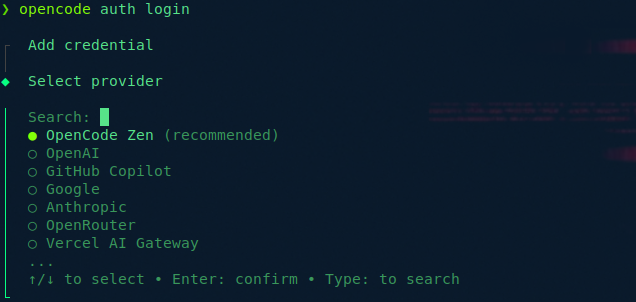
Multiple Providers
TERRAFORM
# Configurar primario y fallback
opencode config set primary_provider anthropic
opencode config set fallback_provider openai
opencode config set azure_endpoint "https://tu-recurso.openai.azure.com/"
Persistent Environment vs Configuration Variables
Method A: Local environment file (per project) Create
.env in the root of your project:CODE
# .env - AÑADIR A .gitignore OBLIGATORIAMENTE
OPENAI_API_KEY=sk-proj-1234567890abcdef1234567890abcdef1234567890abcdef
ANTHROPIC_API_KEY=sk-ant-api03-1234567890abcdef-1234567890abcdef-1234567890abcdef
GITHUB_TOKEN=ghp_1234567890abcdefghijklmnopqrstuvwxyz12
AZURE_OPENAI_KEY=1234567890abcdef1234567890abcdef
AZURE_OPENAI_ENDPOINT=https://mi-empresa.openai.azure.com/
Method B: Global Settings (Recommended)
JAVA
# Configura claves de forma segura (encriptadas en el keyring del sistema)
opencode config set providers.openai.api_key "sk-proj-1234567890abcdef1234567890abcdef1234567890abcdef" --global
opencode config set providers.anthropic.api_key "sk-ant-api03-1234567890abcdef-1234567890abcdef-1234567890abcdef" --global
opencode config set providers.azure.endpoint "https://mi-empresa.openai.azure.com/" --global
opencode config set providers.azure.api_key "1234567890abcdef1234567890abcdef" --global

# Configura el modelo por defecto
opencode config set defaults.model "claude-3-5-sonnet-20241022" --global
opencode config set defaults.fallback_model "gpt-4o" --global
opencode config set defaults.max_tokens 4096 --global
Method C: Advanced enterprise configuration (multiple models) Archive ~/.opencode/config.json:
JSON
{
  "version": "1.0",
  "active_profile": "enterprise",
  "profiles": {
    "enterprise": {
      "providers": {
        "openai": {
          "api_key": "sk-proj-1234567890abcdef1234567890abcdef1234567890abcdef",
          "organization": "org-empresa123",
          "base_url": "https://api.openai.com/v1",
          "timeout": 60
        },
        "anthropic": {
          "api_key": "sk-ant-api03-1234567890abcdef-1234567890abcdef-1234567890abcdef",
          "base_url": "https://api.anthropic.com",
          "timeout": 60
        },
        "github_copilot": {
          "enabled": true,
          "oauth_token": "ghu_1234567890abcdefghijklmnopqrstuvwxyz123456",
          "default_model": "claude-3-5-sonnet-20241022",
          "models": {
            "claude-3-5-sonnet-20241022": { "max_tokens": 8192 },
            "gpt-4o": { "max_tokens": 4096 },
            "gpt-4o-mini": { "max_tokens": 4096 }
          }
        },
        "azure_openai": {
          "api_key": "1234567890abcdef1234567890abcdef",
          "endpoint": "https://mi-empresa.openai.azure.com/",
          "deployment": "gpt-4o-enterprise",
          "api_version": "2024-08-01-preview"
        }
      },
      "defaults": {
        "primary_provider": "anthropic",
        "fallback_provider": "openai",
        "model": "claude-3-5-sonnet-20241022",
        "fallback_model": "gpt-4o",
        "max_tokens": 4096,
        "temperature": 0.2,
        "context_window": 200000,
        "timeout": 120
      },
      "security": {
        "encrypt_keys": true,
        "keyring_backend": "auto",
        "allow_insecure_local_storage": false
      }
    },
    "local": {
      "providers": {
        "ollama": {
          "enabled": true,
          "endpoint": "http://localhost:11434",
          "model": "codellama:70b",
          "timeout": 300
        }
      },
      "defaults": {
        "primary_provider": "ollama",
        "model": "codellama:70b"
      }
    }
  },
  "logging": {
    "level": "info",
    "file": "~/.opencode/logs/opencode.log",
    "max_size": "100MB",
    "max_age": 30,
    "compress": true
  }
}
Configuration per project (high priority) Archive .opencode/config.json in the root of the project (overwrites the global one):
JSON
{
  "extends": "~/.opencode/config.json",
  "project": {
    "name": "mi-plataforma-terraform",
    "type": "platform-engineering"
  },
  "defaults": {
    "model": "claude-3-5-sonnet-20241022",
    "max_tokens": 8192
  },
  "context": {
    "include": ["terraform/**/*.tf", "k8s/**/*.yaml", "docs/**/*.md"],
    "exclude": ["**/.terraform/**", "**/*.tfstate*", "**/secrets/**"]
  }
}
Modes of Operation
Interactive Mode (Default)
CODE
opencode
# Inicia chat interactivo con contexto persistente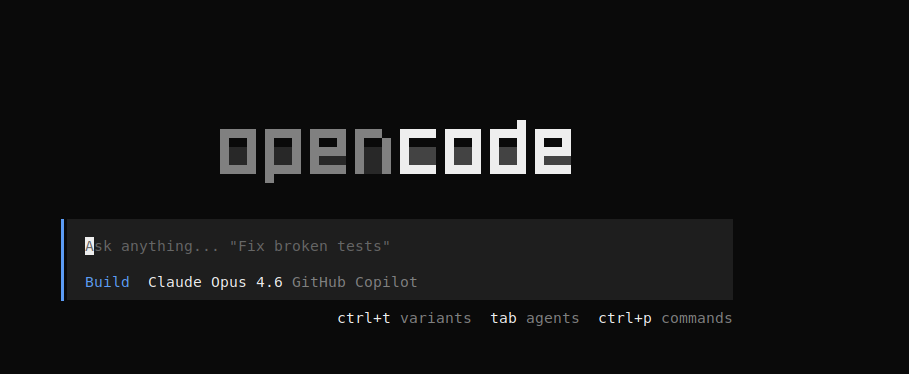
ZEN Mode (No interaction, for CI/CD)
CODE
opencode --zen "Generar tests para src/auth.ts"
# Ejecuta y sale, sin preguntas interactivas
# Ideal para: pre-commit hooks, scripts de automatización
Verbose Mode (Debugging)
CODE
opencode --verbose
# Muestra: tokens usados, tiempo de respuesta, archivos leídos
Dry-Run Mode (Simulation)
CODE
opencode --dry-run "Refactorizar a TypeScript"
# Muestra qué haría pero no modifica archivos
4. Multi-Agent Enterprise Architecture
Once the basics are configured, we activate the enterprise architecture where an orchestrator delegates to specialized agents depending on the task.
Enterprise Folder Structure
CODE
mi-plataforma/
├── .opencode/
│   ├── agents/                    # Definiciones JSON de cada agente
│   │   ├── orchestrator.json
│   │   ├── code.json
│   │   └── run.json
│   ├── skills/                    # Skills técnicos específicos
│   │   ├── terraform-guardian.json
│   │   └── k8s-gitops.json
│   ├── policies/                  # Reglas de gobernanza
│   │   └── security-baseline.md
│   └── audit/                     # Logs de auditoría
├── opencode.json                  # Configuración raíz
└── src/
Root Configuration: opencode.json
Example A: Balanced Configuration (Recommended for medium sized teams)
JSON
{
  "version": "enterprise-v1",
  "project": {
    "name": "acme-platform",
    "type": "platform-engineering"
  },
  "agent": {
    "nv-orchestrator": {
      "mode": "primary",
      "model": "claude-3-5-sonnet-20241022",
      "fallback_model": "gpt-4o",
      "max_tokens": 4096,
      "description": "Coordina y delega tareas. Nunca hace trabajo técnico directo.",
      "prompt": "Lee .opencode/policies/security-baseline.md. Analiza la petición y delega al sub-agente adecuado.",
      "include": ["*.md", "**/README.md"],
      "exclude": ["**/*.tfstate*", "**/.terraform/**"]
    },
    "nv-code": {
      "mode": "subagent",
      "model": "claude-3-5-sonnet-20241022",
      "description": "Generación de Terraform, K8s, Ansible. Especialista en IaC.",
      "prompt": "Valida sintaxis con 'terraform validate' antes de proponer cambios. Nunca hardcodees secrets.",
      "include": ["terraform/**/*.tf", "k8s/**/*.yaml"],
      "constraints": {
        "bash_allowed_commands": ["terraform validate", "terraform fmt", "terraform plan"],
        "bash_blocked_commands": ["terraform apply", "terraform destroy"],
        "require_approval": true,
        "approval_threshold": "high"
      }
    },
    "nv-run": {
      "mode": "subagent",
      "model": "gpt-4o-mini",
      "description": "Ejecución controlada de comandos. Solo lectura por defecto.",
      "prompt": "Agente de ejecución. Whitelist estricto. Requiere aprobación para mutaciones.",
      "constraints": {
        "bash_allowed_commands": ["kubectl get", "kubectl describe", "az aks show"],
        "bash_blocked_commands": ["kubectl delete", "kubectl apply", "terraform apply"],
        "require_approval": true,
        "approval_threshold": "high"
      }
    },
    "nv-fast": {
      "mode": "subagent",
      "model": "gpt-4o-mini",
      "description": "Tareas mecánicas: commits, exploración, linting.",
      "prompt": "Operaciones Git y exploración de código. Rápido y económico.",
      "max_tokens": 2048
    }
  },
  "security": {
    "secret_scanning": true,
    "audit_log": ".opencode/audit/session.log",
    "verbose": true,
    "timestamps": true,
    "color": "auto"
  },
  "context": {
    "include": ["**/*.tf", "**/*.yaml", "**/*.md"],
    "exclude": ["**/.git/**", "**/.terraform/**", "**/*.tfstate*"],
    "always_read": ["COMPLIANCE.md", ".opencode/policies/security-baseline.md"]
  }
}
Enterprise field breakdown:
-
fallback_model: Backup model if the primary fails (rate limit, crash). -
max_tokens: Hard limit of tokens (cost control). -
include/exclude: Granular context control (avoid sending tfstate or secrets to the AI). -
always_read: Files injected at EVERY prompt (security policies). -
bash_allowed_commands: Whitelist of allowed shell commands. -
bash_blocked_commands: Explicit blacklist (defense in depth). -
require_approval: Force human confirmation. -
approval_threshold:low/medium/highdepending on the risk.
Example B: GitHub Copilot Enterprise Configuration (For organizations with a Copilot license)
This configuration is optimized for enterprise environments that use GitHub Copilot as main provider, taking advantage of the models available through the GitHub platform.
JSON
{
  "agent": {
    "nv-orchestrator": {
      "mode": "primary",
      "model": "claude-3-5-sonnet-20241022",
      "fallback_model": "gpt-4o",
      "description": "Coordina y delega tareas de Platform Engineering a sub-agentes especializados. Nunca ejecuta código ni comandos directamente.",
      "prompt": "Eres el orquestador principal del sistema de Platform Engineering. Tu función es analizar solicitudes, determinar la complejidad y riesgo, y delegar al sub-agente adecuado. REGLAS: 1) NUNCA escribas código ni ejecutes comandos directamente. 2) SIEMPRE lee .opencode/policies/security-baseline.md al inicio. 3) Delega a: nv-think (arquitectura/seguridad), nv-code (IaC/manifests), nv-run (validación/lectura), nv-fast (tareas mecánicas). 4) Valida que el contexto incluya los archivos necesarios antes de delegar. 5) Resume la respuesta del sub-agente antes de presentarla al usuario."
    },
    "nv-think": {
      "mode": "subagent",
      "model": "claude-3-opus-20240229",
      "fallback_model": "claude-3-5-sonnet-20241022",
      "max_tokens": 8192,
      "description": "Razonamiento profundo: planificación de migraciones, análisis de seguridad, decisiones arquitectónicas, evaluación de riesgos.",
      "prompt": "Eres un sub-agente de arquitectura y análisis profundo. Tu objetivo es pensar antes de actuar. REGLAS: 1) Carga el SKILL.md indicado por el orquestador. 2) Analiza trade-offs, riesgos de seguridad, compliance y costos. 3) Genera diagramas de arquitectura en Mermaid cuando sea necesario. 4) Valida contra .opencode/policies/security-baseline.md. 5) NUNCA propongas soluciones que violen las políticas de seguridad. 6) Si detectas un riesgo crítico, alerta al orquestador para escalar a aprobación humana."
    },
    "nv-code": {
      "mode": "subagent",
      "model": "claude-3-5-sonnet-20241022",
      "fallback_model": "gpt-4o",
      "max_tokens": 4096,
      "description": "Generación de código, manifests Kubernetes, Terraform, Ansible, Pulumi, scripts de automatización. Especialista en IaC y GitOps.",
      "prompt": "Eres un sub-agente de generación de código e infraestructura. Especialista en Terraform, Kubernetes, y GitOps. REGLAS: 1) Carga el SKILL.md indicado. 2) SIEMPRE valida sintaxis antes de entregar (terraform validate, kubeconform, etc.). 3) NUNCA hardcodees secrets, passwords o tokens. Usa variables sensibles. 4) Incluye tags de costo obligatorios (Environment, Owner, Project, CostCenter). 5) Genera código idempotente y modular. 6) Si detectas un 'forces replacement' en Terraform, advierte EXPLÍCITAMENTE. 7) Prioriza recursos managed de cloud sobre self-hosted."
    },
    "nv-run": {
      "mode": "subagent",
      "model": "gpt-4o",
      "description": "Ejecución controlada de comandos: validaciones técnicas, operaciones de lectura sobre infraestructura, verificación de estado.",
      "prompt": "Eres un sub-agente de ejecución con privilegios limitados. Tu función es validar, no mutar. REGLAS: 1) Carga el SKILL.md indicado. 2) SOLO ejecuta comandos de la whitelist: terraform plan/validate/fmt, kubectl get/describe/logs/top, helm template/lint, az/aws/gcloud read-only. 3) NUNCA ejecutes: terraform apply/destroy, kubectl apply/delete, helm install/upgrade, rm -rf. 4) Si necesitas ejecutar un comando bloqueado, solicita aprobación explícita al orquestador. 5) Captura y analiza el output de los comandos. 6) Reporta errores con contexto completo.",
      "constraints": {
        "bash_allowed_commands": [
          "terraform plan",
          "terraform validate",
          "terraform fmt",
          "terraform show",
          "terraform state list",
          "terraform state show",
          "kubectl get",
          "kubectl describe",
          "kubectl logs",
          "kubectl top",
          "kubectl config current-context",
          "helm template",
          "helm lint",
          "helm get values",
          "az account show",
          "az aks show",
          "az resource list",
          "aws sts get-caller-identity",
          "aws configure list",
          "gcloud config list",
          "docker images",
          "docker ps",
          "git status",
          "git log --oneline -10",
          "git diff --stat"
        ],
        "bash_blocked_commands": [
          "terraform apply",
          "terraform destroy",
          "terraform force-unlock",
          "kubectl apply",
          "kubectl delete",
          "kubectl create",
          "kubectl patch",
          "kubectl edit",
          "kubectl exec",
          "kubectl port-forward",
          "helm install",
          "helm upgrade",
          "helm uninstall",
          "helm rollback",
          "az aks delete",
          "aws ec2 terminate-instances",
          "gcloud compute instances delete",
          "docker rm",
          "docker rmi -f",
          "rm -rf",
          "sudo",
          "chmod 777",
          "curl *|*sh",
          "wget *|*sh"
        ],
        "require_approval": true,
        "approval_threshold": "high"
      }
    },
    "nv-fast": {
      "mode": "subagent",
      "model": "gpt-4o-mini",
      "description": "Tareas rápidas y mecánicas de bajo riesgo: exploración de repositorios, operaciones Git, GitHub CLI, linting básico.",
      "prompt": "Eres un sub-agente de operaciones mecánicas. Optimizado para velocidad y bajo costo. REGLAS: 1) Carga el SKILL.md indicado. 2) Tareas permitidas: git add/commit/push/branch, gh pr create/list, exploración de directorios, búsqueda de archivos, linting con herramientas locales. 3) NUNCA modifiques código funcional sin pasar por nv-code. 4) NUNCA ejecutes comandos de infraestructura (deja eso a nv-run). 5) Sé conciso en tus respuestas.",
      "max_tokens": 2048,
      "cost_optimization": {
        "cache_context": true,
        "compress_history": true
      }
    }
  },
  "security": {
    "secret_scanning": true,
    "audit_log": ".opencode/audit/session.log",
    "verbose": true,
    "timestamps": true,
    "color": "auto"
  },
  "context": {
    "include": ["**/*.tf", "**/*.yaml", "**/*.yml", "**/*.json", "**/*.md", "**/*.sh"],
    "exclude": [
      "**/.git/**",
      "**/.terraform/**",
      "**/*.tfstate*",
      "**/crash.log",
      "**/node_modules/**",
      "**/vendor/**",
      "**/secrets/**",
      "**/*.pem",
      "**/*.key"
    ],
    "always_read": [
      "README.md",
      "ARCHITECTURE.md",
      "COMPLIANCE.md",
      ".opencode/policies/security-baseline.md"
    ]
  }
}
5. Specialized Skills for Platform Engineering
The Skills They are predefined instructions that activate specific behaviors. They are saved in
.opencode/skills/.Skill 1: Terraform Guardian
Archive:
.opencode/skills/terraform-guardian.jsonJSON
{
  "name": "terraform-guardian",
  "trigger": "tf-module",
  "description": "Genera módulos Terraform con validación de seguridad y cost estimation",
  "instruction": "Al activarse con 'tf-module':\n1. Genera estructura: main.tf, variables.tf (con validaciones), outputs.tf, README.md\n2. REGLAS DE SEGURIDAD:\n   - NUNCA hardcodees secrets\n   - Incluye tags de costo (Owner, Project, Environment)\n   - Usa data sources para recursos existentes\n3. Valida 'terraform fmt' y 'terraform validate' mentalmente\n4. Si detectas 'forces replacement', advierte EXPLÍCITAMENTE",
  "context_files": ["terraform/providers.tf"],
  "validation_hooks": ["terraform validate"]
}Use:
CODE
opencode "tf-module: Crear Storage Account de Azure con soft-delete"Skill 2: Kubernetes GitOps
Archive:
.opencode/skills/k8s-gitops.jsonJSON
{
  "name": "k8s-gitops",
  "trigger": "deploy-k8s",
  "description": "Genera manifests K8s con Kustomize y seguridad PSS",
  "instruction": "Al activarse con 'deploy-k8s':\n1. Estructura: base/ + overlays/{dev,prod}/\n2. SEGURIDAD:\n   - securityContext: runAsNonRoot, readOnlyRootFilesystem\n   - NUNCA uses 'latest' en imágenes\n   - Genera NetworkPolicy (deny-all por defecto)\n3. Secrets: Usa External Secrets Operator, nunca valores planos",
  "validation": {
    "kubeconform": true,
    "policy": "restricted"
  }
}
Skill 3: CI/CD Architect
Archive:
.opencode/skills/cicd-architect.jsonJSON
{
  "name": "cicd-architect",
  "trigger": "pipeline",
  "description": "Diseña pipelines GitHub Actions con SAST y OIDC",
  "instruction": "Diseña workflow con:\n1. Fases: Lint → SAST (Semgrep/Trivy) → Build → Sign (Cosign) → Deploy\n2. Usa OIDC para auth cloud (nunca long-lived credentials)\n3. Pinnea acciones a SHA específicos, no tags @v2\n4. Incluye etapa de terraform plan en PRs"
}
Skills Repositories for OpenCode
| Resource | Description | Link |
|---|---|---|
| awesome-opencode | Official curated list of plugins, skills and resources for OpenCode. Includes community skills such as Opencode Skills, OpenSpec, and Agent Skills (JDT) |
GitHub
|
| Gentleman-Skills | Skills curated by @Gentleman-Programming for OpenCode, Claude Code and other agents. Includes React, TypeScript, Python, testing skills | GitHub
|
| n-skills (numman-ali) | Curated marketplace of universal skills compatible with OpenCode, Claude Code, Cursor, Codex, etc. Use the standard SKILL.md + AGENTS.md |
GitHub
|
| opencode-skills | Official OpenCode skills structure examples with format SKILL.md |
GitHub
|
| opencode-skillful | Skills plugin with lazy loading and discovery for OpenCode. Interprets the Anthropic Agent Skills specification |
6. CLI (Command Line Interface) Commands
Basic Commands
CODE
# Modo interactivo
opencode

# Ejecución directa (ZEN mode)
opencode --zen "Refactorizar auth.ts a clase"

# Ejecutar skill específico
opencode --skill terraform-guardian "Crear módulo VPC"

# Verificar configuración
opencode --check-config
Enterprise and Security Commands
TERRAFORM
# Ver contexto actual (debug)
opencode context --list

# Escanear secretos en el repo
opencode scan-secrets

# Ver audit log
opencode audit --session

# Ejecutar como sub-agente específico
opencode --agent nv-code "Generar Terraform"
opencode --agent nv-run --require-approval "terraform plan"| Flag | Description |
|---|---|
--help / -h | General help |
--version / -v | Installed version |
--verbose | Detailed token and context logs |
--no-stream | Show full answer at the end |
--dry-run | Simulation without modifying files |
--zen | Non-interactive mode (CI/CD) |
--agent [nombre] | Force use of specific agent |
--skill [nombre] | Activate specific skill |
Alias Creation (Bash/Zsh)
CODE
# ~/.bashrc o ~/.zshrc
alias oc='opencode'
alias oc-zen='opencode --zen'
alias oc-tf='opencode --skill terraform-guardian'
alias oc-k8s='opencode --skill k8s-gitops'
alias oc-safe='opencode --agent nv-run --require-approval'
7. Recommended Workflow
Safe Work Cycle
TERRAFORM
# 1. Antes de empezar, commit de seguridad
git add .
git commit -m "checkpoint: antes de usar OpenCode"

# 2. Iniciar con contexto limpio
opencode context --clear

# 3. Trabajar con el orquestador
opencode "Necesito crear un módulo Terraform para PostgreSQL HA en Azure"

# 4. El orquestador delega:
#    - nv-think: Diseña arquitectura (zonas, SKU)
#    - nv-code: Genera código Terraform
#    - nv-run: Ejecuta terraform plan (modo lectura)

# 5. Revisar el diff antes de aplicar
git diff
# o
opencode --agent nv-run "terraform show plan.tfplan"

# 6. Solo si se aprueba explícitamente:
opencode --agent nv-run --approve "terraform apply"
Enterprise Best Practices
-
Small Commits: Beam
git commitbefore any large operation. If the AI breaks something:git reset --hard HEAD. -
Clean Context: Do not include
node_modules/,.terraform/either*.tfstatein context (useexcludeinopencode.json). -
Human Review: Never configure
autoApply: truein production. Always userequire_approval: true. -
Separation of Agents: Use
nv-codeto write,nv-runto validate, never mix permissions.
8. Frequently Asked Questions (FAQ) and Troubleshooting
Problem 1: “Error: Rate limit exceeded”
Cause: You have made too many requests to the API in a short time. Solution:
-
Wait a few minutes or upgrade your plan.
-
Configure
fallback_modelinopencode.jsonto automatically change providers. -
Reduce
max_tokensto reduce consumption.
Problem 2: “OpenCode ignores my files”
Cause: The files are in
.gitignore or do not match the patterns include. Solution:CODE
opencode context --list # Ver qué archivos carga-
Review
includeandexcludeinopencode.json. -
Make sure glob patterns (e.g.
src/**/*.ts) are correct.
Problem 3: "AI writes code that doesn't compile"
Cause: Lack of context about your libraries or versions. Solution:
-
Duck
package.json,go.mod,requirements.txteitherversions.tfto thealways_read. -
Use the specific skill for your stack (ex.
terraform-guardianvalid syntax).
Problem 4: “The opencode command is not found”
Cause: Global installation failed or PATH is not up to date. Solution:
CODE
# Reinstalar
npm install -g opencode

# Recargar PATH
hash -r  # Linux/macOS
# o reiniciar terminal en Windows
Problem 5: “Very high API costs”
Cause: Sending too much context or using expensive models for simple tasks. Solution:
-
Use
nv-fast(GPT-4o-mini) for mechanical tasks. -
Limit
max_tokens(e.g. 2048 for simple tasks). -
Excludes binaries/logs from the context.
Problem 6: "OpenCode suggests changes that violate security policies"
Cause: You are not loading the policy file. Solution:
-
Verify that
always_readinclude.opencode/policies/security-baseline.md. -
Use
opencode --verboseto confirm that the file is injected at the prompt.
Annexes
Annex A: Minimum Template to Start
JSON
{
  "agent": {
    "nv-orchestrator": {
      "mode": "primary",
      "model": "claude-3-5-sonnet-20241022",
      "prompt": "Coordina tareas de Platform Engineering."
    },
    "nv-code": {
      "mode": "subagent",
      "model": "gpt-4o",
      "constraints": {
        "require_approval": true
      }
    }
  },
  "security": {
    "secret_scanning": true,
    "audit_log": ".opencode/audit.log"
  }
}
Annex B: Pre-commit Integration
CODE
# .pre-commit-config.yaml
repos:
  - repo: local
    hooks:
      - id: opencode-security
        name: Security Scan
        entry: opencode scan-secrets
        language: system
        pass_filenames: false
:wq!
Comments