
Hardening in computer security is the process of securing a system by reducing vulnerabilities in it, this is achieved by eliminating software, services, users, etc. Unnecessary in the system as well as closing ports that are not in use in addition to many other methods and techniques that we will see during this short introductory summary to System Hardening.
Making life difficult for the attacker. That is the summary of the reason for operating system hardening, which could be said to be a set of activities that are carried out by the administrator of an operating system to strengthen the security of their computer as much as possible. Its purpose is to hinder the attacker's work and buy time to minimize the consequences of an imminent security incident and even, in some cases, prevent it from taking place in its entirety.
We review the services that are running.
rokitoh@red-orbita:~# netstat -putan |grep LISTEN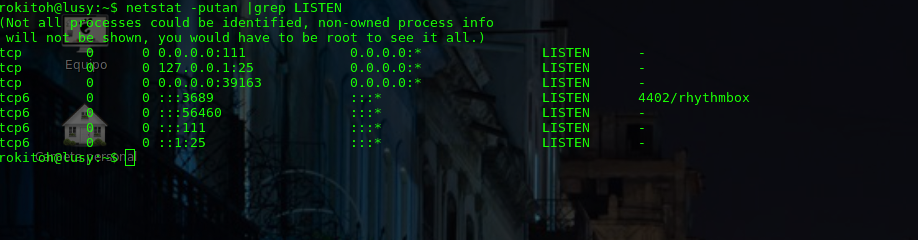
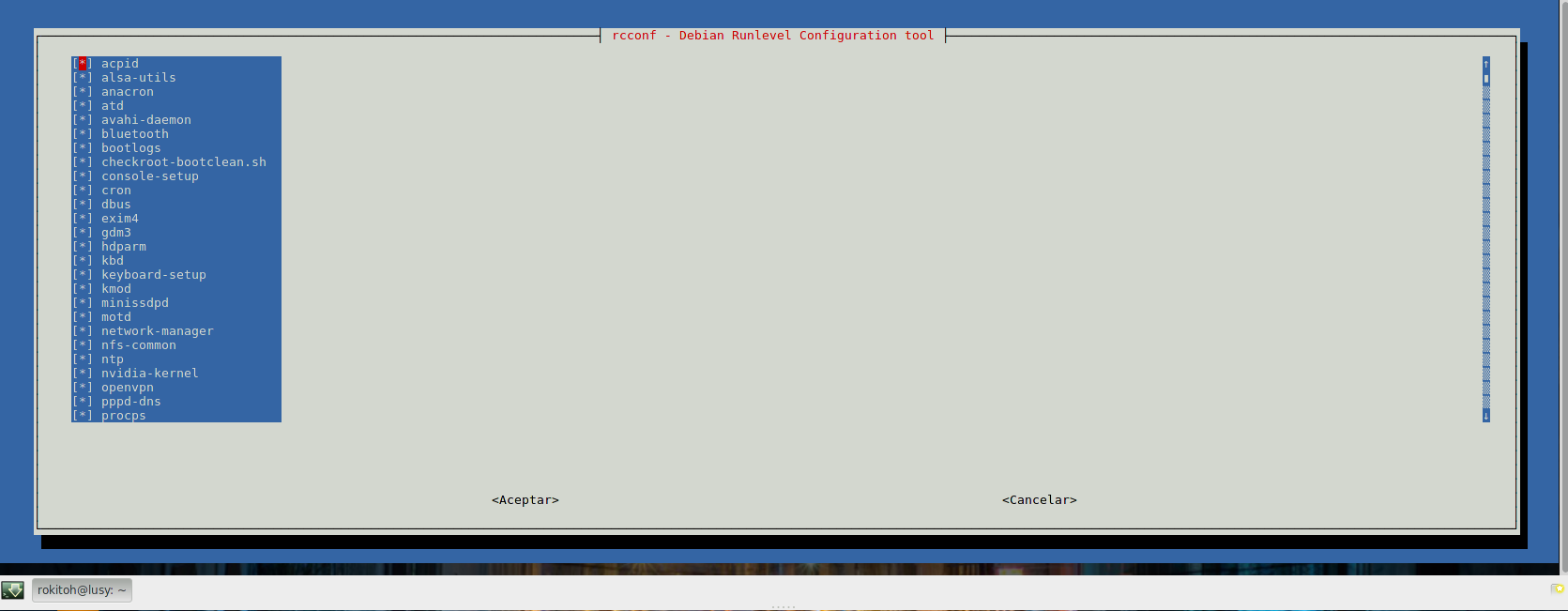
We install rcconf to be able to more easily manage the services that are started in the different runlevels
rokitoh@red-orbita:~# apt-get install rcconfWe run rcconf and deactivate all the services that we are not going to use.
rokitoh@red-orbita:~# rcconf
 You can also check chkconfig or update-rc.d
List services that start with chkconfig
rokitoh@red-orbita:~# chkconfig –listWe can also list all services as follows:
rokitoh@red-orbita:~# ls -lsrt /etc/rc*To eliminate the service we do it in the following way:
rokitoh@red-orbita:~#  update-rc.d -f apache2 remove
rokitoh@red-orbita:~#  chkconfig apache2 off
We remove all packages (This is just an example)
rokitoh@red-orbita:~# aptitude remove –purge exim4-config exim4-base nano telnet makedev lighttpd sendmailDisable reboot with ctrl+alt+del:
rokitoh@red-orbita:~#  vi /etc/inittab

#ca:12345:ctrlaltdel:/sbin/shutdown -t1 -a -r now
We remove the floppy drive
rokitoh@red-orbita:~#  vi  /etc/fstab
#/dev/fd0 /media/floppy0 auto rw,user,noauto 0 0
We disable shells for users who don't need it:
rokitoh@red-orbita:~#  vi /etc/passwd

daemon:x:1:1:daemon:/usr/sbin:/bin/false

bin:x:2:2:bin:/bin:/bin/false

sys:x:3:3:sys:/dev:/bin/false

games:x:5:60:games:/usr/games:/bin/false

man:x:6:12:man:/var/cache/man:/bin/false

lp:x:7:7:lp:/var/spool/lpd:/bin/false

mail:x:8:8:mail:/var/mail:/bin/false

news:x:9:9:news:/var/spool/news:/bin/false

uucp:x:10:10:uucp:/var/spool/uucp:/bin/false

proxy:x:13:13:proxy:/bin:/bin/false

www-data:x:33:33:www-data:/var/www:/bin/false

backup:x:34:34:backup:/var/backups:/bin/false

list:x:38:38:Mailing List Manager:/var/list:/bin/false

irc:x:39:39:ircd:/var/run/ircd:/bin/false

gnats:x:41:41:Gnats Bug-Reporting System (admin):/var/lib/gnats:/bin/false

nobody:x:65534:65534:nobody:/nonexistent:/bin/false

libuuid:x:100:101::/var/lib/libuuid:/bin/false

sshd:x:103:65534::/var/run/sshd:/usr/sbin/nologin
Allow su – only to users who belong to the wheel group:
rokitoh@red-orbita:~#  addgroup –system wheel
rokitoh@red-orbita:~#   usermod -a -G wheel rokitoh
Uncomment the following line:
rokitoh@red-orbita:~#  vi /etc/pam.d/su
auth required pam_wheel.so
Configure the number of login attempts that can be made
rokitoh@red-orbita:~#  vi /etc/login.defs
LOGIN_RETRIES 3
LOGIN_TIMEOUT 30
LOG_UNKFAIL_ENAB yes
Block TTYs to avoid direct access as root
We access the file and execute the following command:
rokitoh@red-orbita:~#  vi /etc/securetty
:1,$s/tty/#ttyrokitoh@red-orbita:~# chmod -R 700 /etc/init.d/*Tiger installation:
rokitoh@red-orbita:~# apt-get install tigerrokitoh@red-orbita:~# tiger -H
Tiger UN*X security checking system
Developed by Texas A&M University, 1994
Updated by the Advanced Research Corporation, 1999-2002
Further updated by Javier Fernandez-Sanguino, 2001-2014
Contributions by Francisco Manuel Garcia Claramonte, 2009-2010
Covered by the GNU General Public License (GPL)
Configuring…
Will try to check using config for ‘unknown’ running Linux 3.12-1-amd64…
–CONFIG– [con005c] Using configuration files for Linux 3.12-1-amd64. Using
configuration files for generic Linux 3.
Tiger security scripts *** 3.2.3, 2008.09.10.09.30 ***
Output Mode is HTML
17:21> Beginning security report for lusy.
17:21> Starting file systems scans in background…
17:21> Checking password files…
17:21> Checking group files…
17:21> Checking user accounts…
17:21> Checking .rhosts files…
17:21> Checking .netrc files…
17:21> Checking ttytab, securetty, and login configuration files…
17:21> Checking PATH settings…
17:21> Checking anonymous ftp setup…
17:21> Checking mail aliases…
17:21> Checking cron entries…
17:21> Checking ‘services’ configuration…
17:21> Checking NFS export entries…
17:21> Checking permissions and ownership of system files…
17:21> Checking for indications of break-in…
17:21> Performing rootkit checks…
17:21> Performing system specific checks…
17:29> Performing root directory checks…
17:29> Checking for secure backup devices…
17:29> Checking for the presence of log files…
17:29> Checking for the setting of user’s umask…
17:29> Checking for listening processes…
17:29> Checking SSHD’s configuration…
17:29> Checking the printers control file…
17:29> Checking ftpusers configuration…
17:29> Checking NTP configuration…
17:29> Waiting for filesystems scans to complete…
17:29> Filesystems scans completed…
17:29> Performing check of embedded pathnames…
17:29> Security report completed for lusy.
Security report is in `/var/log/tiger/security.report.red-orbita.140224-17:21.html’.wget https://checklistlinux.googlecode.com/files/checklist-2.0.6-EN.tarrokitoh@red-orbita:~# tar xvf checklist-2.0.6-EN.tarrokitoh@red-orbita:~# perl checklist-2.0.6-EN.plUse: checklist-2.0.6-EN.pl <options>
– You can run several checks at the same time: checklist-2.0.6-EN.pl <opciones> <opciones>
– Running this scippt falls under your responsibility
<options> Check that we will run
–usuariodefault Operative system default users check.
–serviciodefault Operative system default services check
–permisosAD Files/Directories check
–suidguidsticky Special permission check on the whole system
–sinownergroup Files and directories without owner check
–writeparatodos Files and directories with write for all users
–syslog External syslog configuration check
–usuariosgrupos User to group association
–logindefs User accounts expiration variables check
–seguridadnet Network security variables check
–seguridadssh sshd service variables check
–userid0 Users with ID 0 check
–todos Run all checksrokitoh@red-orbita:~# perl checklist-2.0.6-EN.pl –all
—————————————————————————————————————-
Operating System: Linux
Kernel Release: XXX
Hostname: network-orbit
Additional Info: Linux lusy XXXX #1 SMP Debian 3.12.9-1 (2014-02-01) x86_64 GNU/Linux
—————————————————————————————————————-
– Default users check
—————————————————————————————————————-
Negative:The user lp exists
—————————————————————————————————————-
Information: Check process has finished
Information: The report was saved with the following name: red-orbita24-02-2014.html
Information: Recommendations were saved in file: red-orbita-24-02-2014-recomendacion.html
—————————————————————————————————————-
Greetings, rokitoh!
Comments