Hardening (palabra en ingles que significa endurecimiento) en seguridad informática es el proceso de asegurar un sistema mediante la reducción de vulnerabilidades en el mismo, esto se logra eliminando software, servicios, usuarios, etc. Innecesarios en el sistema así como cerrando puertos que tampoco estén en uso además de muchas otros métodos y técnicas que veremos durante este pequeño resumen introductorio al Hardening de sistemas.
Haciéndole la vida difícil al atacante. Ese es el resumen de la razón de ser del Hardening de sistemas operativos, que se podría decir que es un conjunto de actividades que son llevadas a cabo por el administrador de un sistema operativo para reforzar al máximo posible la seguridad de su equipo. Su propósito, entorpecer la labor del atacante y ganar tiempo para poder minimizar las consecuencias de un inminente incidente de seguridad e incluso, en algunos casos, evitar que éste se concrete en su totalidad.
Revisamos los servicios que están corriendo.
rokitoh@red-orbita:~# netstat -putan |grep LISTEN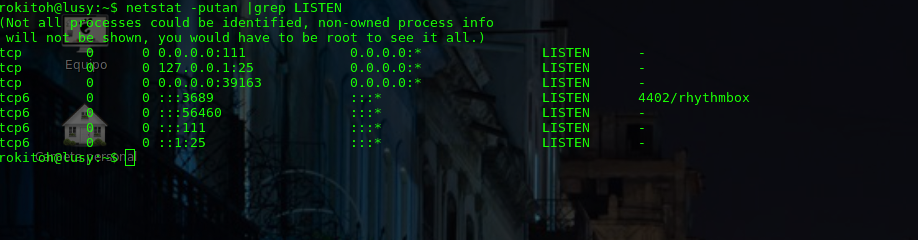
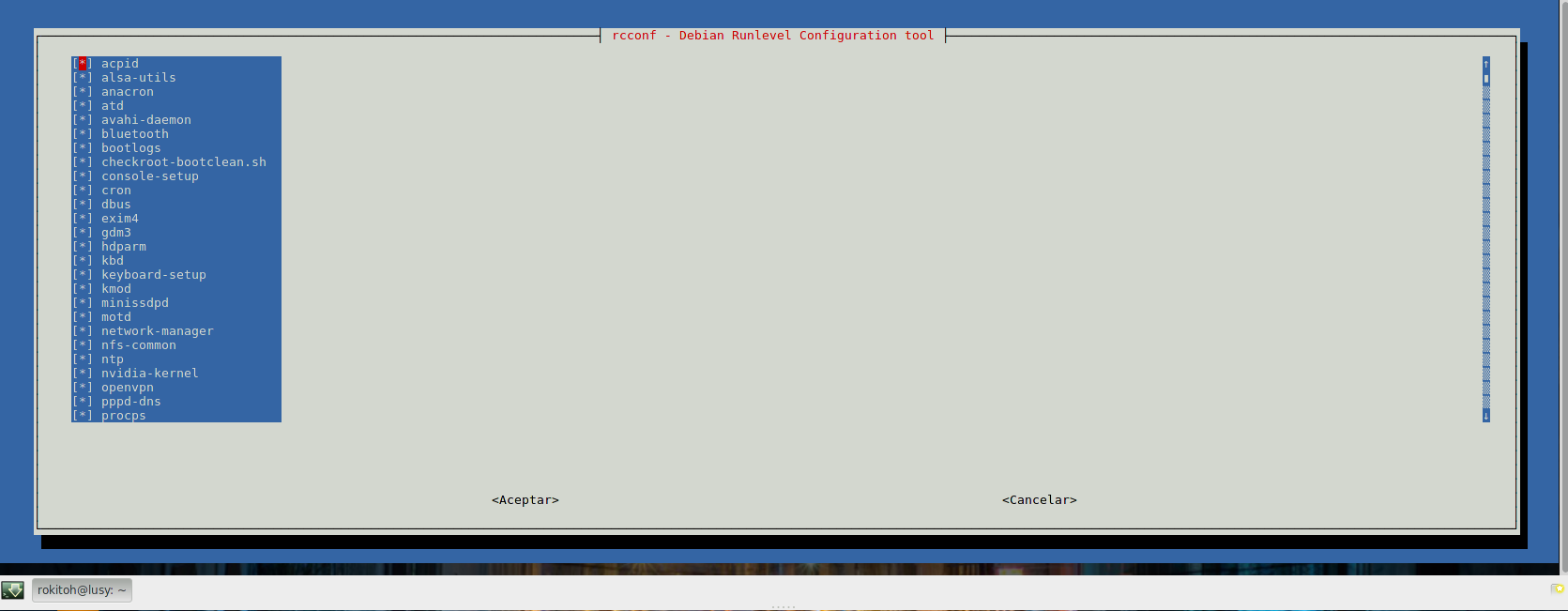
Instalamos rcconf para poder administrar mas fácilmente los servicios que se inician en los diferentes runlevels
rokitoh@red-orbita:~# apt-get install rcconfEjecutamos rcconf y desactivamos todos los servicios que no vayamos a utilizar.
rokitoh@red-orbita:~# rcconf
 También se puede comprobar chkconfig o update-rc.d
Listar servicios que se inician con chkconfig
rokitoh@red-orbita:~# chkconfig –listTambién podemos listar todos los servicios de la siguiente forma:
rokitoh@red-orbita:~# ls -lsrt /etc/rc*Para la eliminación del servicio lo hacemos de la siguiente forma:
rokitoh@red-orbita:~#  update-rc.d -f apache2 remove
rokitoh@red-orbita:~#  chkconfig apache2 off
Eliminamos todos los paquetes (Esto solo es un ejemplo)
rokitoh@red-orbita:~# aptitude remove –purge exim4-config exim4-base nano telnet makedev lighttpd sendmailDeshabilitar el reinicio con ctrl+alt+del:
rokitoh@red-orbita:~#  vi /etc/inittab

#ca:12345:ctrlaltdel:/sbin/shutdown -t1 -a -r now
Eliminamos la disquetera
rokitoh@red-orbita:~#  vi  /etc/fstab
#/dev/fd0 /media/floppy0 auto rw,user,noauto 0 0
Deshabilitamos las shells para los usuarios que no lo necesitan:
rokitoh@red-orbita:~#  vi /etc/passwd

daemon:x:1:1:daemon:/usr/sbin:/bin/false

bin:x:2:2:bin:/bin:/bin/false

sys:x:3:3:sys:/dev:/bin/false

games:x:5:60:games:/usr/games:/bin/false

man:x:6:12:man:/var/cache/man:/bin/false

lp:x:7:7:lp:/var/spool/lpd:/bin/false

mail:x:8:8:mail:/var/mail:/bin/false

news:x:9:9:news:/var/spool/news:/bin/false

uucp:x:10:10:uucp:/var/spool/uucp:/bin/false

proxy:x:13:13:proxy:/bin:/bin/false

www-data:x:33:33:www-data:/var/www:/bin/false

backup:x:34:34:backup:/var/backups:/bin/false

list:x:38:38:Mailing List Manager:/var/list:/bin/false

irc:x:39:39:ircd:/var/run/ircd:/bin/false

gnats:x:41:41:Gnats Bug-Reporting System (admin):/var/lib/gnats:/bin/false

nobody:x:65534:65534:nobody:/nonexistent:/bin/false

libuuid:x:100:101::/var/lib/libuuid:/bin/false

sshd:x:103:65534::/var/run/sshd:/usr/sbin/nologin
Permitir su – solo a los usuarios que pertenezcan al grupo wheel:
rokitoh@red-orbita:~#  addgroup –system wheel
rokitoh@red-orbita:~#   usermod -a -G wheel rokitoh
Descomentar la siguiente linea:
rokitoh@red-orbita:~#  vi /etc/pam.d/su
auth required pam_wheel.so
Configurar el numero de intentos de login que se pueden realizar
rokitoh@red-orbita:~#  vi /etc/login.defs
LOGIN_RETRIES 3
LOGIN_TIMEOUT 30
LOG_UNKFAIL_ENAB yes
Bloquear las TTY para no acceder directamente como root
Accedemos al archivo y ejecutamos el siguiente comando:
rokitoh@red-orbita:~#  vi /etc/securetty
:1,$s/tty/#ttyrokitoh@red-orbita:~# chmod -R 700 /etc/init.d/*Instalación de tiger:
rokitoh@red-orbita:~# apt-get install tigerrokitoh@red-orbita:~# tiger -H
Tiger UN*X security checking system
Developed by Texas A&M University, 1994
Updated by the Advanced Research Corporation, 1999-2002
Further updated by Javier Fernandez-Sanguino, 2001-2014
Contributions by Francisco Manuel Garcia Claramonte, 2009-2010
Covered by the GNU General Public License (GPL)
Configuring…
Will try to check using config for ‘unknown’ running Linux 3.12-1-amd64…
–CONFIG– [con005c] Using configuration files for Linux 3.12-1-amd64. Using
configuration files for generic Linux 3.
Tiger security scripts *** 3.2.3, 2008.09.10.09.30 ***
Output Mode is HTML
17:21> Beginning security report for lusy.
17:21> Starting file systems scans in background…
17:21> Checking password files…
17:21> Checking group files…
17:21> Checking user accounts…
17:21> Checking .rhosts files…
17:21> Checking .netrc files…
17:21> Checking ttytab, securetty, and login configuration files…
17:21> Checking PATH settings…
17:21> Checking anonymous ftp setup…
17:21> Checking mail aliases…
17:21> Checking cron entries…
17:21> Checking ‘services’ configuration…
17:21> Checking NFS export entries…
17:21> Checking permissions and ownership of system files…
17:21> Checking for indications of break-in…
17:21> Performing rootkit checks…
17:21> Performing system specific checks…
17:29> Performing root directory checks…
17:29> Checking for secure backup devices…
17:29> Checking for the presence of log files…
17:29> Checking for the setting of user’s umask…
17:29> Checking for listening processes…
17:29> Checking SSHD’s configuration…
17:29> Checking the printers control file…
17:29> Checking ftpusers configuration…
17:29> Checking NTP configuration…
17:29> Waiting for filesystems scans to complete…
17:29> Filesystems scans completed…
17:29> Performing check of embedded pathnames…
17:29> Security report completed for lusy.
Security report is in `/var/log/tiger/security.report.red-orbita.140224-17:21.html’.wget https://checklistlinux.googlecode.com/files/checklist-2.0.6-EN.tarrokitoh@red-orbita:~# tar xvf checklist-2.0.6-EN.tarrokitoh@red-orbita:~# perl checklist-2.0.6-EN.plUse: checklist-2.0.6-EN.pl <options>
– You can run several checks at the same time: checklist-2.0.6-EN.pl <opciones> <opciones>
– Running this scippt falls under your responsibility
<options> Check that we will run
–usuariodefault Operative system default users check.
–serviciodefault Operative system default services check
–permisosAD Files/Directories check
–suidguidsticky Special permission check on the whole system
–sinownergroup Files and directories without owner check
–writeparatodos Files and directories with write for all users
–syslog External syslog configuration check
–usuariosgrupos User to group association
–logindefs User accounts expiration variables check
–seguridadnet Network security variables check
–seguridadssh sshd service variables check
–userid0 Users with ID 0 check
–todos Run all checksrokitoh@red-orbita:~# perl checklist-2.0.6-EN.pl –todos
—————————————————————————————————————-
Operative System: Linux
Kernel Release: XXX
Hostname: red-orbita
Additional Info: Linux lusy XXXX #1 SMP Debian 3.12.9-1 (2014-02-01) x86_64 GNU/Linux
—————————————————————————————————————-
– Default users check
—————————————————————————————————————-
Negative:The user lp exists
—————————————————————————————————————-
Information: Check process has finished
Informacion: The report was saved with the following name: red-orbita24-02-2014.html
Information: Recommendations were saved in file: red-orbita-24-02-2014-recomendacion.html
—————————————————————————————————————-
Un saludo, rokitoh!

Comentarios