
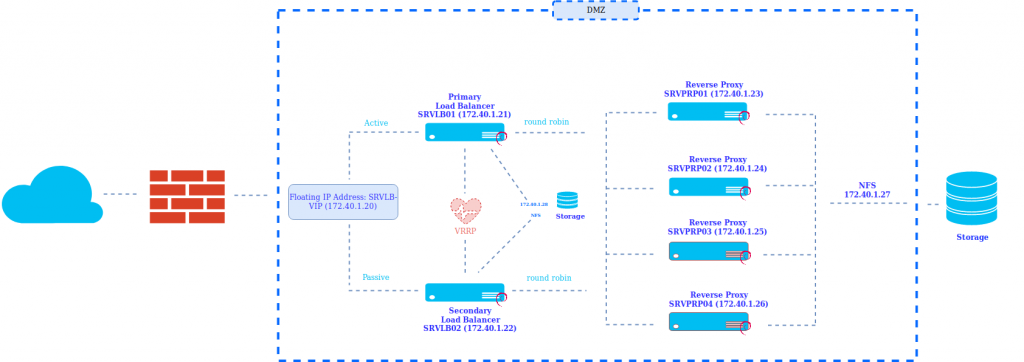
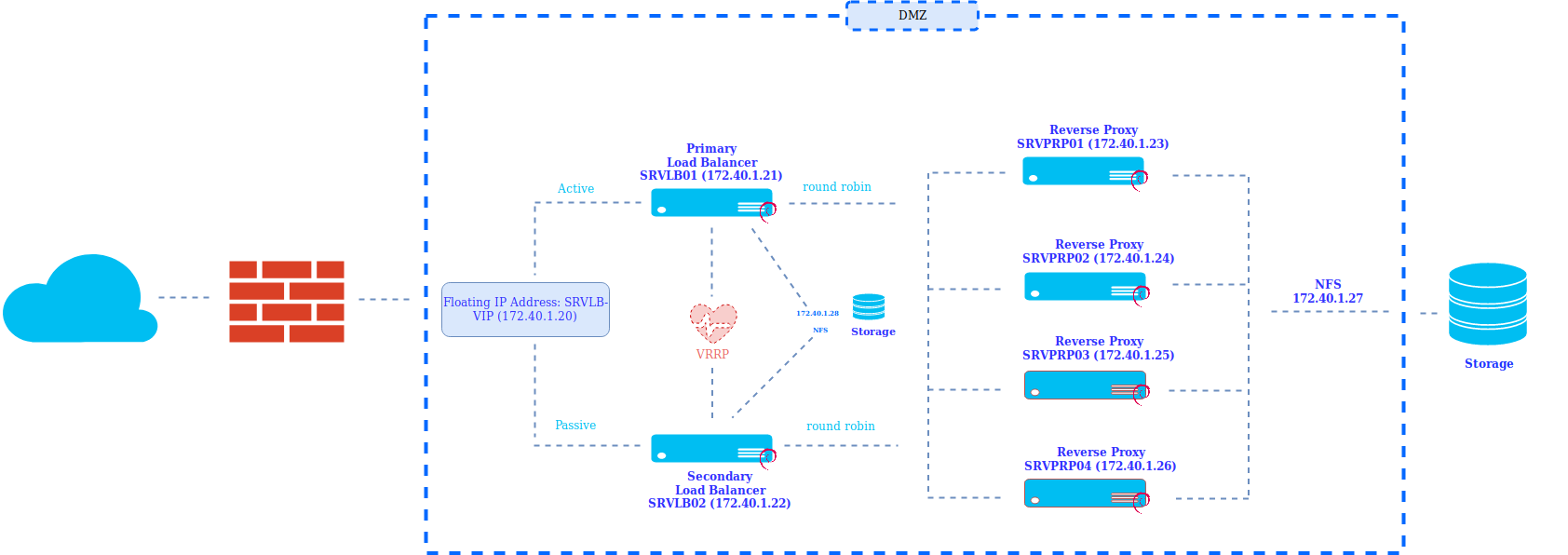
In this example we are going to show how to implement a load balancer using NGINX and keepalived in Active-Passive mode which performs load balancing through round robin to the different reverse proxies.
Through this configuration we will be able to horizontally scale the application servers and thus increase performance, decrease latency and provide fault tolerance.
NETWORK Diagram:
Load Balancer Configuration:
We install the necessary packages
apt-get install keepalived nfs-common psad fail2banWe configure the NFS file system from the cockpit on the two load balancers:
172.40.1.28:/svm_loadbalancer_nginx/ /etc/nginx/ nfs auto,nofail,noatime,nolock,intr,tcp,actimeo=1800 0We configure keepalived
SRVLB01 (Master Node)
cat /etc/keepalived/keepalived.conf
global_defs {

router_id master

}
vrrp_script chk_nginx {

script «/etc/keepalived/nginx_check.sh»

interval 2

weight -20

}
vrrp_instance VI_1 {

state MASTER

interface ens192

virtual_router_id 200

priority 250

advert_int 1
virtual_ipaddress {

172.40.1.20

}
track_script {

chk_nginx

}
}
SRVLB02 Backup Node
cglobal_defs {

router_id backup

}
vrrp_script chk_nginx {

script «/etc/keepalived/nginx_check.sh»

interval 2

weight -20

}

vrrp_instance VI_1 {

state BACKUP

interface ens192

virtual_router_id 200

priority 100

advert_int 1

track_script {

chk_nginx

}

virtual_ipaddress {

172.20.0.16

}
track_script {

chk_nginx

}
}
We configure a check which starts the NGINX If it detects that it is down and if it cannot start the service, it balances the backup node.
cat /etc/keepalived/nginx_check.sh
#!/bin/bash

nginx=`ps -fea | grep -v /etc/keepalived/nginx_check.sh | grep -v grep | grep nginx | wc -l `

if [ $nginx = «0» ]

then
service nginx start
fi
sleep 5
nginx=`ps -fea | grep -v /etc/keepalived/nginx_check.sh | grep -v grep | grep nginx | wc -l `
if [ $nginx = «0» ]

then
service keepalived stop
fi
Once the service is configured keepalived We move on to configure the service NGINX which will be carried out in Load Balancer.
We install NGINX on the balancers
apt-get install nginxWe perform a tuning of the service NGINX following best practices.
cat /etc/nginx/nginx.conf

user www-data;

worker_processes auto;

pid /run/nginx.pid;

include /etc/nginx/modules-enabled/*.conf;
worker_rlimit_nofile 100000;
events {

#worker_connections 768;

worker_connections 4000;

use epoll;

multi_accept on;

}
http {
##

# Basic Settings

##
open_file_cache max=200000 inactive=20s;

open_file_cache_valid 30s;

open_file_cache_min_uses 2;

open_file_cache_errors on;
access_log off;
sendfile on;

tcp_nopush on;

tcp_nodelay on;

types_hash_max_size 2048;

server_tokens off;
# server_names_hash_bucket_size 64;

# server_name_in_redirect off;
include /etc/nginx/mime.types;

default_type application/octet-stream;
##

# SSL Settings

##
ssl_protocols TLSv1 TLSv1.1 TLSv1.2; # Dropping SSLv3, ref: POODLE

ssl_prefer_server_ciphers on;
##

# Logging Settings

##
access_log /var/log/nginx/access.log;

error_log /var/log/nginx/error.log;
##

# Gzip Settings

##
gzip on;

gzip_min_length 10240;

gzip_proxied expired no-cache no-store private auth;

gzip_types text/plain text/css text/xml text/javascript application/x-javascript application/json application/xml;

gzip_disable «msie6»;
reset_timedout_connection on;

#client_body_timeout 10;

#send_timeout 2;

send_timeout 10;

#keepalive_timeout 30;

keepalive_timeout 15;

keepalive_requests 100000;
# gzip_vary on;

# gzip_proxied any;

# gzip_comp_level 6;

# gzip_buffers 16 8k;

# gzip_http_version 1.1;

# gzip_types text/plain text/css application/json application/javascript text/xml application/xml application/xml+rss text/javascript;
##

# Virtual Host Configs

##
include /etc/nginx/conf.d/*.conf;

include /etc/nginx/sites-enabled/*;
#  DDOS
# limit the number of connections per single IP

limit_conn_zone $binary_remote_addr zone=conn_limit_per_ip:10m;
# limit the number of requests for a given session

limit_req_zone $binary_remote_addr zone=req_limit_per_ip:10m rate=5r/s;
# zone which we want to limit by upper values, we want limit whole server

server {

limit_conn conn_limit_per_ip 10;

limit_req zone=req_limit_per_ip burst=10 nodelay;

}
# if the request body size is more than the buffer size, then the entire (or partial)

# request body is written into a temporary file

client_body_buffer_size 128k;
# headerbuffer size for the request header from client — for testing environment

client_header_buffer_size 3m;
# maximum number and size of buffers for large headers to read from client request

large_client_header_buffers 4 256k;
# read timeout for the request body from client — for testing environment

#client_body_timeout 5m;

client_body_timeout 5s;
# how long to wait for the client to send a request header — for testing environment

#client_header_timeout 3m;

client_header_timeout 5s;
client_max_body_size 100M;
}
At the same time we configure the corresponding virtualhost, in our case in backend will host the website red-orbita.com
cat /etc/nginx/sites-enabled/redorbita.conf
upstream backend_servers_redorbita {

least_conn;

server 172.40.1.23 max_fails=1 fail_timeout=5s;

server 172.40.1.24 max_fails=1 fail_timeout=5s;

server 172.40.1.25 max_fails=1 fail_timeout=5s backup;

server 172.40.1.26 max_fails=1 fail_timeout=5s backup;
}
server {

listen 443 ssl;

server_name red-orbita.com

#limit_conn conn_limit_per_ip 50;

#limit_req zone=req_limit_per_ip burst=50 nodelay;

access_log /var/log/nginx/redorbita.access.log;

error_log /var/log/nginx/redorbita.error.log;

#root /var/www/html;

index index.html index.htm;
####################################### SSL ###################################################################
ssl on;

ssl_certificate /etc/nginx/ssl/redorbita-cert.pem;

ssl_certificate_key /etc/nginx/ssl/redorbita-privatekey.key;

keepalive_timeout 60;
ssl_ciphers ALL:!ADH:!EXPORT56:RC4+RSA:+HIGH:+MEDIUM:+LOW:+SSLv3:+EXP;

ssl_protocols SSLv3 TLSv1;

ssl_prefer_server_ciphers on;

ssl_verify_client off;
proxy_buffers 16 64k;

proxy_buffer_size 128k;
################################################################################################################
location / {
proxy_pass http://backend_servers_redorbita;

proxy_buffers 16 32k;

proxy_buffer_size 64k;

proxy_busy_buffers_size 128k;

proxy_cache_bypass $http_pragma $http_authorization;

proxy_connect_timeout 59s;

proxy_hide_header X-Powered-By;

proxy_http_version 1.1;

proxy_ignore_headers Cache-Control Expires;

proxy_next_upstream error timeout invalid_header http_500 http_502 http_503 http_504 http_404;

proxy_no_cache $http_pragma $http_authorization;

proxy_pass_header Set-Cookie;

proxy_read_timeout 600;

proxy_redirect off;

proxy_send_timeout 600;

proxy_temp_file_write_size 64k;

proxy_set_header Accept-Encoding »;

proxy_set_header Cookie $http_cookie;

proxy_set_header Host $host;

proxy_set_header Proxy »;

proxy_set_header Referer $http_referer;

proxy_set_header X-Forwarded-For $proxy_add_x_forwarded_for;

proxy_set_header X-Forwarded-Host $host;

proxy_set_header X-Forwarded-Server $host;

proxy_set_header X-Real-IP $remote_addr;

proxy_set_header X-Forwarded-Proto $scheme;

proxy_set_header X-Original-Request $request_uri;
}
}
Reverse proxy configuration (SRVPRP01, SRVPRP02, SRVPRP03 and SRVPRP04)
First of all we install the necessary packages
apt-get install nfs-commonWe configure the file system that we export from the cabin
172.40.1.27:/svm_reverseproxy_nginx/ /etc/nginx/ nfs auto,nofail,noatime,nolock,intr,tcp,actimeo=1800 0 0We install the service NGINX
apt-get install nginxWe configure the corresponding virtualhost:
cat /etc/nginx/sites-enabled/redorbita.conf
proxy_cache_path /tmp/nginx levels=1:2 keys_zone=redorbita_zone:10m inactive=60m;

proxy_cache_key «$scheme$request_method$host$request_uri»;
upstream web_redorbita

{

server 10.10.4.2;
}
server {

listen 80;

server_name red-orbita.com;

#limit_conn conn_limit_per_ip 50;

#limit_req zone=req_limit_per_ip burst=50 nodelay;

access_log /var/log/nginx/redorbita.access.log;

error_log /var/log/nginx/redorbita.error.log;

root /var/www/html;

index index.html index.htm;
location / {
proxy_pass http://web_redorbita;

proxy_cache innovasport_zone;

add_header X-Proxy-Cache $upstream_cache_status;

include proxy_params;

proxy_headers_hash_max_size 51200;

proxy_headers_hash_bucket_size 6400;

proxy_buffers 16 32k;

proxy_buffer_size 64k;

proxy_busy_buffers_size 128k;

proxy_cache_bypass $http_pragma $http_authorization;

proxy_connect_timeout 59s;

proxy_hide_header X-Powered-By;

proxy_http_version 1.1;

proxy_ignore_headers Cache-Control Expires;

proxy_next_upstream error timeout invalid_header http_500 http_502 http_503 http_504 http_404;

proxy_no_cache $http_pragma $http_authorization;

proxy_pass_header Set-Cookie;

proxy_read_timeout 600;

proxy_redirect off;

proxy_send_timeout 600;

proxy_temp_file_write_size 64k;

proxy_set_header Accept-Encoding »;

proxy_set_header Cookie $http_cookie;

proxy_set_header Host $host;

proxy_set_header Proxy »;

proxy_set_header Referer $http_referer;

proxy_set_header X-Forwarded-For $proxy_add_x_forwarded_for;

proxy_set_header X-Forwarded-Host $host;

proxy_set_header X-Forwarded-Server $host;

proxy_set_header X-Real-IP $remote_addr;

proxy_set_header X-Forwarded-Proto $scheme;

proxy_set_header X-Original-Request $request_uri;
}
}
We create a service user on all servers:
useradd redorbitaservices && passwd redorbitaservicesWe create the RSA and copy it from SRVPROP01 to the others reverse proxy
su – redorbitaservices
ssh-keygen

ssh-copy-id -i ~/.ssh/id_rsa.pub 172.40.1.23

ssh-copy-id -i ~/.ssh/id_rsa.pub 172.40.1.24

ssh-copy-id -i ~/.ssh/id_rsa.pub 172.40.1.25

ssh-copy-id -i ~/.ssh/id_rsa.pub 172.40.1.26
We create a script to restart the service NGINX from all servers from server SRVPROP01
cat /etc/init.d/nginx-all-Services.sh

#!/bin/bash
if [ «$(id -u)» != «1001» ]; then

echo «Este script se tiene que ejecutar con el usuario redorbitaservices» 1>&2

exit 1

fi
start() {
echo -e ‘\e[0;31mStaring NGINX ALL NODES :\e[0m’
echo -e ‘\e[0;32mSRVPRP01(172.40.1.23) :\e[0m’

sudo systemctl start nginx
echo -e ‘\e[0;32mSRVPRP02 (172.40.1.24) :\e[0m’

ssh -t 172.20.0.18 sudo systemctl start nginx
echo -e ‘\e[0;32mSRVPRP03 (172.40.1.25) :\e[0m’
if ping -c1 172.40.1.25 &>/dev/null;

then

ssh -t 172.40.1.25 sudo systemctl start nginx
else
echo -e ‘\e[0;31m El nodo SRVPRP03 (172.40.1.25) esta apagado\e[0m’
fi
echo -e ‘\e[0;32mSRVPRP04 (172.40.1.26) :\e[0m’

if ping -c1 172.40.1.26 &>/dev/null;

then

ssh -t 172.40.1.26 sudo systemctl start nginx
else
echo -e ‘\e[0;31m El nodo SRVPRP04 (172.40.1.26) esta apagado\e[0m’

fi
}
stop() {

echo -e ‘\e[0;31mStopping NGINX ALL NODES :\e[0m’
echo -e ‘\e[0;32mSRVPRP01(172.40.1.23):\e[0m’

sudo systemctl stop nginx
echo -e ‘\e[0;32mSRVPRP02 (172.40.1.24) :\e[0m’

ssh -t 172.40.1.24 sudo systemctl stop nginx
echo -e ‘\e[0;32mSRVPRP03 (172.40.1.25) :\e[0m’

if ping -c1 172.40.1.25 &>/dev/null;

then

ssh -t 172.40.1.25 sudo systemctl stop nginx
else
echo -e ‘\e[0;31m El nodo SRVPRP03 (172.40.1.25) esta apagado\e[0m’
fi
echo -e ‘\e[0;32mSRVPRP04 (172.40.1.26) :\e[0m’

if ping -c1 172.40.1.26 &>/dev/null;

then

ssh -t 172.40.1.26 sudo systemctl stop nginx
else
echo -e ‘\e[0;31m El nodo SRVPRP04 (172.40.1.26) esta apagado\e[0m’
fi
}
status() {
echo -e ‘\e[0;31mStatus NGINX ALL NODES :\e[0m’
echo -e ‘\e[0;32mSRVPRP01(172.40.1.23) :\e[0m’

sudo systemctl status nginx
echo -e ‘\e[0;32mSRVPRP02 (172.40.1.24) :\e[0m’

ssh -t 172.40.1.24 sudo systemctl status nginx
echo -e ‘\e[0;32mSRVPRP03 (172.40.1.25) :\e[0m’

if ping -c1 172.40.1.25 &>/dev/null;

then

ssh -t 172.40.1.25 sudo systemctl status nginx
else
echo -e ‘\e[0;31m El nodo SRVPRP03 (172.40.1.25) esta apagado\e[0m’
fi
echo -e ‘\e[0;32mSRVPRP04 (172.40.1.26) :\e[0m’

if ping -c1 172.40.1.26 &>/dev/null;

then

ssh -t 172.40.1.26 sudo systemctl status nginx
else
echo -e ‘\e[0;31m El nodo SRVPRP04 (172.40.1.26) esta apagado\e[0m’
fi
}
check() {
echo -e ‘\e[0;31mChecking configure NGINX ALL NODES :\e[0m’
echo -e ‘\e[0;32mSRVPRP01(172.40.1.23) :\e[0m’

sudo nginx -t
echo -e ‘\e[0;32mSRVPRP02 (172.40.1.24) :\e[0m’

ssh -t 172.40.1.24) sudo nginx -t
echo -e ‘\e[0;32mSRVPRP03 (172.40.1.25) :\e[0m’

if ping -c1 172.40.1.25 &>/dev/null;

then

ssh -t 172.40.1.25 sudo nginx -t
else
echo -e ‘\e[0;31m El nodo SRVPRP03 (172.40.1.25) esta apagado\e[0m’

¡
fi
echo -e ‘\e[0;32mSRVPRP04 (172.40.1.26) :\e[0m’

if ping -c1 172.40.1.26 &>/dev/null;

then

ssh -t 172.40.1.26 sudo nginx -t
else
¡

echo -e ‘\e[0;31m El nodo SRVPRP04 (172.40.1.26) esta apagado\e[0m’
fi
}
case «$1» in

start)

start

status

;;

stop)

stop

status

;;

status)

status

;;

restart)

stop

start

;;

check)

check

;;

*)

echo «Usage $prg {start|stop|status|restart|check}»

exit 1

;;

esac

exit $RETVAL
We create the RSA and copy it from SRVLB01 to SRVPRP01 (172.40.1.23)
su – redorbitaservices
ssh-keygen

ssh-copy-id -i ~/.ssh/id_rsa.pub 172.40.1.23
To make it easier for us to manage the balancer and the reverse proxies, we created a script which will help us generate new entries.
cat /usr/bin/loadcreate.sh
#!/bin/bash
usage()

{

cat << EOF
USO: $0 -p PUERTO -P PROYECTO -u URL -A IP

Script para agregar nuevas URL al balanceador
OPCIONES:
-p Puertos

-P Nombre del proyecto

-U URL

-A Direccion ip local (Proxy Inverso)
ejemplo de uso: /usr/bin/loadcreate.sh -p 80-443 -P redorbita -u red-orbita.com -A 10.10.1.33

ejemplo de uso: /usr/bin/loadcreate.sh -p 80 -P redorbita -u red-orbita.com -A 10.10.1.33

ejemplo de uso: /usr/bin/loadcreate.sh -p 443 -P redorbita -u red-orbita.com -A 10.10.1.33:8080
EOF

}
#Declaramos todas las variables que se van a usar para guardar los parametros

inputport=

inputproject=

inputurl=

inputaddress=
#Usamos el getopts para guardar los parametros en variables

while getopts «hH:p:P:u:A:» OPTION

do

case $OPTION in

h)

usage

exit 1

;;

p)

inputport=$OPTARG

;;

P)

inputproject=$OPTARG

;;

u)

inputurl=$OPTARG

;;

A)

inputaddress=$OPTARG

;;
esac

done
#Comprobamos que se han introducido los parametros obligatorios

if [ -z $inputport ] || [ -z $inputproject ] || [ -z $inputurl ] || [ -z $inputaddress ]

then

usage

exit 1

fi
function checkproject (){
if [ -f /etc/nginx/sites-enabled/$inputproject.conf ];

then
echo -e «\e[0;31m ERROR: el archivo /etc/nginx/sites-enabled/$inputproject.conf ya existe\e[0m»
exit 1

fi
}
#Funcion para la copia del template segun el puerto
function puertos (){
if [ $inputport = «80-443» ]

then
cp /etc/nginx/templates/template-80-443.tmp /etc/nginx/sites-enabled/$inputproject.conf
elif [ $inputport = «80» ]

then
cp /etc/nginx/templates/template-80.tmp /etc/nginx/sites-enabled/$inputproject.conf
elif [ $inputport = «443» ]

then
cp /etc/nginx/templates/template-443.tmp /etc/nginx/sites-enabled/$inputproject.conf
else echo -e «\e[0;31m RROR: No hemos detectado ningun template con el puerto $inputport\e[0m»
exit 0
fi
}
function configtemplate (){
if [ -f /etc/nginx/sites-enabled/$inputproject.conf ];

then
sed -i -e «s|PROYECTO|$inputproject|g» /etc/nginx/sites-enabled/$inputproject.conf

sed -i -e «s|PROJECT_URL|$inputurl|g» /etc/nginx/sites-enabled/$inputproject.conf
fi
}
checkproject
#Ejecutamos variable de puertos
puertos
configtemplate
############# CONFIGURACION REVERSE PROXY ######################
#Copiamos la el template
cp /etc/nginx/templates/template-reverse.tmp /tmp/$inputproject.conf
if [ -f /tmp/$inputproject.conf ];

then
sed -i -e «s|PROYECTO|$inputproject|g» /tmp/$inputproject.conf

sed -i -e «s|PROJECT_URL|$inputurl|g» /tmp/$inputproject.conf

sed -i -e «s|ADRDRESS_PORT|$inputaddress|g» /tmp/$inputproject.conf
fi
su – redorbitaservices -c «scp /tmp/$inputproject.conf redorbitaservices@172.40.1.23:/tmp/»

su – redorbitaservices -c «ssh -t 172.40.1.23 sudo mv /tmp/$inputproject.conf /etc/nginx/sites-enabled/»

rm /tmp/$inputproject.conf
###############################################################
echo -e «\e[0;31m Se a realizado la configuracion en el Balanceador y el proxy inverso\e[0m»

echo -e «\e[0;31m Revisa la configuracion en /etc/nginx/sites-enabled/$inputproject.conf y reinicie el servicio nginx en ambos nodos\e[0m»
We configure the templates in the corresponding routes which feed the previous script to configure the balancer and reverse proxy
Template port 443
cat /etc/nginx/templates/template-443.tmp
upstream backend_servers_PROYECTO {

least_conn;

server 172.40.1.23 max_fails=1 fail_timeout=5s;

server 172.40.1.24 max_fails=1 fail_timeout=5s;

server 172.40.1.25 max_fails=1 fail_timeout=5s backup;

server 172.40.1.26 max_fails=1 fail_timeout=5s backup;
}
server {

listen 443 ssl;

server_name PROJECT_URL;

#limit_conn conn_limit_per_ip 50;

#limit_req zone=req_limit_per_ip burst=50 nodelay;

access_log /var/log/nginx/PROYECTO.access.log;

error_log /var/log/nginx/PROYECTO.error.log;

#root /var/www/html;

index index.html index.htm;
####################################### SSL ###################################################################
ssl on;

ssl_certificate /etc/nginx/ssl/PROYECTO.crt;

ssl_certificate_key /etc/nginx/ssl/PROYECTO.key;

keepalive_timeout 60;
ssl_ciphers ALL:!ADH:!EXPORT56:RC4+RSA:+HIGH:+MEDIUM:+LOW:+SSLv3:+EXP;

ssl_protocols SSLv3 TLSv1;

ssl_prefer_server_ciphers on;

ssl_verify_client off;
proxy_buffers 16 64k;

proxy_buffer_size 128k;
################################################################################################################
location / {
proxy_pass http://backend_servers_PROYECTO;

proxy_buffers 16 32k;

proxy_buffer_size 64k;

proxy_busy_buffers_size 128k;

proxy_cache_bypass $http_pragma $http_authorization;

proxy_connect_timeout 59s;

proxy_hide_header X-Powered-By;

proxy_http_version 1.1;

proxy_ignore_headers Cache-Control Expires;

proxy_next_upstream error timeout invalid_header http_500 http_502 http_503 http_504 http_404;

proxy_no_cache $http_pragma $http_authorization;

proxy_pass_header Set-Cookie;

proxy_read_timeout 600;

proxy_redirect off;

proxy_send_timeout 600;

proxy_temp_file_write_size 64k;

proxy_set_header Accept-Encoding »;

proxy_set_header Cookie $http_cookie;

proxy_set_header Host $host;

proxy_set_header Proxy »;

proxy_set_header Referer $http_referer;

proxy_set_header X-Forwarded-For $proxy_add_x_forwarded_for;

proxy_set_header X-Forwarded-Host $host;

proxy_set_header X-Forwarded-Server $host;

proxy_set_header X-Real-IP $remote_addr;

proxy_set_header X-Forwarded-Proto $scheme;

proxy_set_header X-Original-Request $request_uri;
}
}
Template port 80
cat /etc/nginx/templates/template-80.tmp
upstream backend_servers_PROYECTO {

least_conn;

server 172.40.1.23 max_fails=1 fail_timeout=5s;

server 172.40.1.24 max_fails=1 fail_timeout=5s;

server 172.40.1.25 max_fails=1 fail_timeout=5s backup;

server 172.40.1.26 max_fails=1 fail_timeout=5s backup;
}
server {

listen 80;
server_name PROJECT_URL;
location / {
# limit_conn conn_limit_per_ip 50;

# limit_req zone=req_limit_per_ip burst=50 nodelay;
proxy_pass http://backend_servers_PROYECTO;

access_log /var/log/nginx/PROYECTO.access.log;

error_log /var/log/nginx/PROYECTO.error.log;
}
}
Template ports 80 and 443
cat /etc/nginx/templates/template-80-443.tmp
upstream backend_servers_PROYECTO {

least_conn;

server 172.40.1.23 max_fails=1 fail_timeout=5s;

server 172.40.1.24 max_fails=1 fail_timeout=5s;

server 172.40.1.25 max_fails=1 fail_timeout=5s backup;

server 172.40.1.26 max_fails=1 fail_timeout=5s backup;
}
server {

listen 80;
location / {
# limit_conn conn_limit_per_ip 50;

# limit_req zone=req_limit_per_ip burst=50 nodelay;
rewrite ^(.*) https://PROJECT_URL$1 permanent;

access_log /var/log/nginx/PROYECTO.access.log;

error_log /var/log/nginx/PROYECTO.error.log;
}
}
server {

listen 443 ssl;

server_name PROJECT_URL;

#limit_conn conn_limit_per_ip 50;

#limit_req zone=req_limit_per_ip burst=50 nodelay;

access_log /var/log/nginx/PROYECTO.access.log;

error_log /var/log/nginx/PROYECTO.error.log;

#root /var/www/html;

index index.html index.htm;
####################################### SSL ###################################################################
ssl on;

ssl_certificate /etc/nginx/ssl/PROYECTO.crt;

ssl_certificate_key /etc/nginx/ssl/PROYECTO.key;

keepalive_timeout 60;
ssl_ciphers ALL:!ADH:!EXPORT56:RC4+RSA:+HIGH:+MEDIUM:+LOW:+SSLv3:+EXP;

ssl_protocols SSLv3 TLSv1;

ssl_prefer_server_ciphers on;

ssl_verify_client off;
proxy_buffers 16 64k;

proxy_buffer_size 128k;
################################################################################################################
location / {
proxy_pass http://backend_servers_PROYECTO;

proxy_buffers 16 32k;

proxy_buffer_size 64k;

proxy_busy_buffers_size 128k;

proxy_cache_bypass $http_pragma $http_authorization;

proxy_connect_timeout 59s;

proxy_hide_header X-Powered-By;

proxy_http_version 1.1;

proxy_ignore_headers Cache-Control Expires;

proxy_next_upstream error timeout invalid_header http_500 http_502 http_503 http_504 http_404;

proxy_no_cache $http_pragma $http_authorization;

proxy_pass_header Set-Cookie;

proxy_read_timeout 600;

proxy_redirect off;

proxy_send_timeout 600;

proxy_temp_file_write_size 64k;

proxy_set_header Accept-Encoding »;

proxy_set_header Cookie $http_cookie;

proxy_set_header Host $host;

proxy_set_header Proxy »;

proxy_set_header Referer $http_referer;

proxy_set_header X-Forwarded-For $proxy_add_x_forwarded_for;

proxy_set_header X-Forwarded-Host $host;

proxy_set_header X-Forwarded-Server $host;

proxy_set_header X-Real-IP $remote_addr;

proxy_set_header X-Forwarded-Proto $scheme;

proxy_set_header X-Original-Request $request_uri;
}
}
Template Reverse Proxy
cat /etc/nginx/templates/template-reverse.tmp
proxy_cache_path /tmp/nginx levels=1:2 keys_zone=PROYECTO_zone:10m inactive=60m;

proxy_cache_key «$scheme$request_method$host$request_uri»;
upstream web_PROYECTO

{

server ADRDRESS_PORT;

}
server {

listen 80;

server_name PROJECT_URL;

#limit_conn conn_limit_per_ip 50;

#limit_req zone=req_limit_per_ip burst=50 nodelay;

access_log /var/log/nginx/PROYECTO.access.log;

error_log /var/log/nginx/PROYECTO.error.log;

#root /var/www/html;

index index.html index.htm;
location / {
proxy_pass http://web_PROYECTO;

proxy_cache PROYECTO_zone;

add_header X-Proxy-Cache $upstream_cache_status;

include proxy_params;

proxy_headers_hash_max_size 51200;

proxy_headers_hash_bucket_size 6400;

proxy_buffers 16 32k;

proxy_buffers 16 32k;

proxy_buffer_size 64k;

proxy_busy_buffers_size 128k;

proxy_cache_bypass $http_pragma $http_authorization;

proxy_connect_timeout 59s;

proxy_hide_header X-Powered-By;

proxy_http_version 1.1;

proxy_ignore_headers Cache-Control Expires;

proxy_next_upstream error timeout invalid_header http_500 http_502 http_503 http_504 http_404;

proxy_no_cache $http_pragma $http_authorization;

proxy_pass_header Set-Cookie;

proxy_read_timeout 600;

proxy_redirect off;

proxy_send_timeout 600;

proxy_temp_file_write_size 64k;

proxy_set_header Accept-Encoding »;

proxy_set_header Cookie $http_cookie;

proxy_set_header Host $host;

proxy_set_header Proxy »;

proxy_set_header Referer $http_referer;

proxy_set_header X-Forwarded-For $proxy_add_x_forwarded_for;

proxy_set_header X-Forwarded-Host $host;

proxy_set_header X-Forwarded-Server $host;

proxy_set_header X-Real-IP $remote_addr;

proxy_set_header X-Forwarded-Proto $scheme;

proxy_set_header X-Original-Request $request_uri;
}
}
Finally, we access the backend server which hosts our website and configure the static routes so that it knows how to return.
route add -net 172.40.0.0/24 gw 10.10.4.1 dev ens192We only have to open it using our favorite snow blower and test that everything works correctly.
In the next post we will configure fail2ban and PSAD to provide a little more security to our environment.
:wq!
Comments