Hoy traemos un mini-tutorial de como instalar las VMware tools en nuestros recién instalados servidores bajo VMware ESXI
Instalamos los paquetes necesarios
bash
apt-get install linux-headers-$(uname -r) make gccNos vamos a VM > Guest > Install/Upgrade VMware Tools
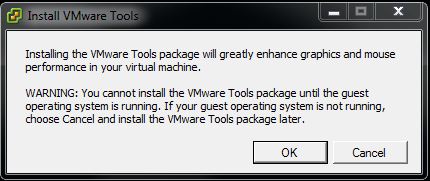
Nos aparecerá una ventana tal como está , Damos OK
Creamos una carpeta donde vamos a montar
text
mkdir /mnt/cdrom/Montamos el CD-ROM
bash
mount /dev/cdrom /mnt/cdrom

mount: dispositivo de bloques /dev/sr0 está protegido contra escritura; se monta como sólo lectura
Copiamos el instalador al temporal
bash
cp /mnt/cdrom/VMwareTools-9.0.1-913578.tar.gz /tmp/Accedemos al directorio y descomprimimos
bash
cd /tmp/
tar xvf  VMwareTools-9.0.1-913578.tar.gz
Accedemos a la carpeta
text
cd vmware-tools-distrib/Empezamos la instalación (Esto es todo siguiente, siguiente…siguiente)
sql
./vmware-install.pl

Creating a new VMware Tools installer database using the tar4 format.
Installing VMware Tools.
In which directory do you want to install the binary files?

[/usr/bin] y
The path «y» is a relative path. Please enter an absolute path.
In which directory do you want to install the binary files?

[/usr/bin]
What is the directory that contains the init directories (rc0.d/ to rc6.d/)?

[/etc]
What is the directory that contains the init scripts?

[/etc/init.d]
In which directory do you want to install the daemon files?

[/usr/sbin]
In which directory do you want to install the library files?

[/usr/lib/vmware-tools]
The path «/usr/lib/vmware-tools» does not exist currently. This program is

going to create it, including needed parent directories. Is this what you want?

[yes] y
In which directory do you want to install the documentation files?

[/usr/share/doc/vmware-tools]
The path «/usr/share/doc/vmware-tools» does not exist currently. This program

is going to create it, including needed parent directories. Is this what you

want? [yes]
The installation of VMware Tools 9.0.1 build-913578 for Linux completed

successfully. You can decide to remove this software from your system at any

time by invoking the following command: «/usr/bin/vmware-uninstall-tools.pl».
Before running VMware Tools for the first time, you need to configure it by

invoking the following command: «/usr/bin/vmware-config-tools.pl». Do you want

this program to invoke the command for you now? [yes]
Initializing…

Making sure services for VMware Tools are stopped.
Stopping VMware Tools services in the virtual machine:

Guest operating system daemon: done

Unmounting HGFS shares: done

Guest filesystem driver: done
The VMware FileSystem Sync Driver (vmsync) allows external third-party backup

software that is integrated with vSphere to create backups of the virtual

machine. Do you wish to enable this feature? [no]
Before you can compile modules, you need to have the following installed…
make

gcc

kernel headers of the running kernel
Searching for GCC…

Detected GCC binary at «/usr/bin/gcc».

The path «/usr/bin/gcc» appears to be a valid path to the gcc binary.

Would you like to change it? [no]
Searching for a valid kernel header path…

The path «» appears to be a valid path to the 3.2.0-4-amd64 kernel headers.

Would you like to change it? [no]

WARNING: This program cannot compile any modules for the following reason(s)…
– This program could not find a valid path to the kernel headers of the running

kernel. Please ensure that the header files for the running kernel are

installed on this sytem.
[ Press Enter key to continue ]

The communication service is used in addition to the standard communication

between the guest and the host. The rest of the software provided by VMware

Tools is designed to work independently of this feature.

If you wish to have the VMCI feature, you can install the driver by running

vmware-config-tools.pl again after making sure that gcc, binutils, make and the

kernel sources for your running kernel are installed on your machine. These

packages are available on your distribution’s installation CD.

[ Press Enter key to continue ]

The VM communication interface socket family is used in conjunction with the VM

communication interface to provide a new communication path among guests and

host. The rest of this software provided by VMware Tools is designed to work

independently of this feature. If you wish to have the VSOCK feature you can

install the driver by running vmware-config-tools.pl again after making sure

that gcc, binutils, make and the kernel sources for your running kernel are

installed on your machine. These packages are available on your distribution’s

installation CD.

[ Press the Enter key to continue.]
The module vmxnet3 has already been installed on this system by another

installer or package and will not be modified by this installer. Use the flag

–clobber-kernel-modules=vmxnet3 to override.
The module pvscsi has already been installed on this system by another

installer or package and will not be modified by this installer. Use the flag

–clobber-kernel-modules=pvscsi to override.
The module vmmemctl has already been installed on this system by another

installer or package and will not be modified by this installer. Use the flag

–clobber-kernel-modules=vmmemctl to override.
The VMware Host-Guest Filesystem allows for shared folders between the host OS

and the guest OS in a Fusion or Workstation virtual environment. Do you wish

to enable this feature? [no]

The fast network device driver (vmxnet module) is used only for our fast

networking interface. The rest of the software provided by VMware Tools is

designed to work independently of this feature.

If you wish to have the fast network driver enabled, you can install the driver

by running vmware-config-tools.pl again after making sure that gcc, binutils,

make and the kernel sources for your running kernel are installed on your

machine. These packages are available on your distribution’s installation CD.

[ Press Enter key to continue ]
The vmblock enables dragging or copying files between host and guest in a

Fusion or Workstation virtual environment. Do you wish to enable this feature?

[no]
!!! [EXPERIMENTAL] !!!

VMware automatic kernel modules enables automatic building and installation of

VMware kernel modules at boot that are not already present. By selecting yes,

you will be enabling this experimental feature. You can always disable this

feature by re-running vmware-config-tools.pl.
Would you like to enable VMware automatic kernel modules?

[no]
No X install found.
Creating a new initrd boot image for the kernel.

update-initramfs: Generating /boot/initrd.img-3.2.0-4-amd64

Checking acpi hot plug done

Starting VMware Tools services in the virtual machine:

Switching to guest configuration: done

Guest operating system daemon: done

The configuration of VMware Tools 9.0.1 build-913578 for Linux for this running

kernel completed successfully.
You must restart your X session before any mouse or graphics changes take

effect.
You can now run VMware Tools by invoking «/usr/bin/vmware-toolbox-cmd» from the

command line.
To enable advanced X features (e.g., guest resolution fit, drag and drop, and

file and text copy/paste), you will need to do one (or more) of the following:

1. Manually start /usr/bin/vmware-user

2. Log out and log back into your desktop session; and,

3. Restart your X session.
Enjoy,
–the VMware team
Found VMware Tools CDROM mounted at /mnt/cdrom. Ejecting device /dev/sr0 …
Si nos vamos ahora a la pestaña Setting ya podemos ver instaladas nuestras tools

Un saludo, rokitoh!

Comentarios