

Introduction
In it previous post we built a local RAG with ChromaDB, LangChain and Grok. It was functional but minimalist: basic CLI, manual ingestion, no quality evaluation and no memory between questions.
In this post we implement 5 improvements which make it a more professional and usable system on a daily basis.
1. Web interface with Streamlit
The CLI is fine for quick tests, but a web interface makes daily use easier and allows you to view sources and history.
app.py
import streamlit as st
from rag import search_context, get_llm, ConversationHistory
from config import Config

st.set_page_config(page_title="RAG Ops", page_icon="🔍", layout="wide")
st.title("RAG Ops - Asistente de Infraestructura")

# Sidebar: configuracion
provider = st.sidebar.selectbox("Proveedor LLM", ["grok", "nvidia"])
collection = st.sidebar.selectbox("Coleccion", get_collections())

# Historial en session_state
if "messages" not in st.session_state:
    st.session_state.messages = []

# Chat interface
for msg in st.session_state.messages:
    with st.chat_message(msg["role"]):
        st.markdown(msg["content"])

if prompt := st.chat_input("Pregunta sobre tu infraestructura..."):
    st.session_state.messages.append({"role": "user", "content": prompt})
    # Buscar contexto y generar respuesta
    context = search_context(prompt, collection)
    response = generate_response(prompt, context, provider)
    st.session_state.messages.append({"role": "assistant", "content": response})
Run with:
# Desde el virtualenv del proyecto
source .venv/bin/activate
streamlit run app.py --server.port 8501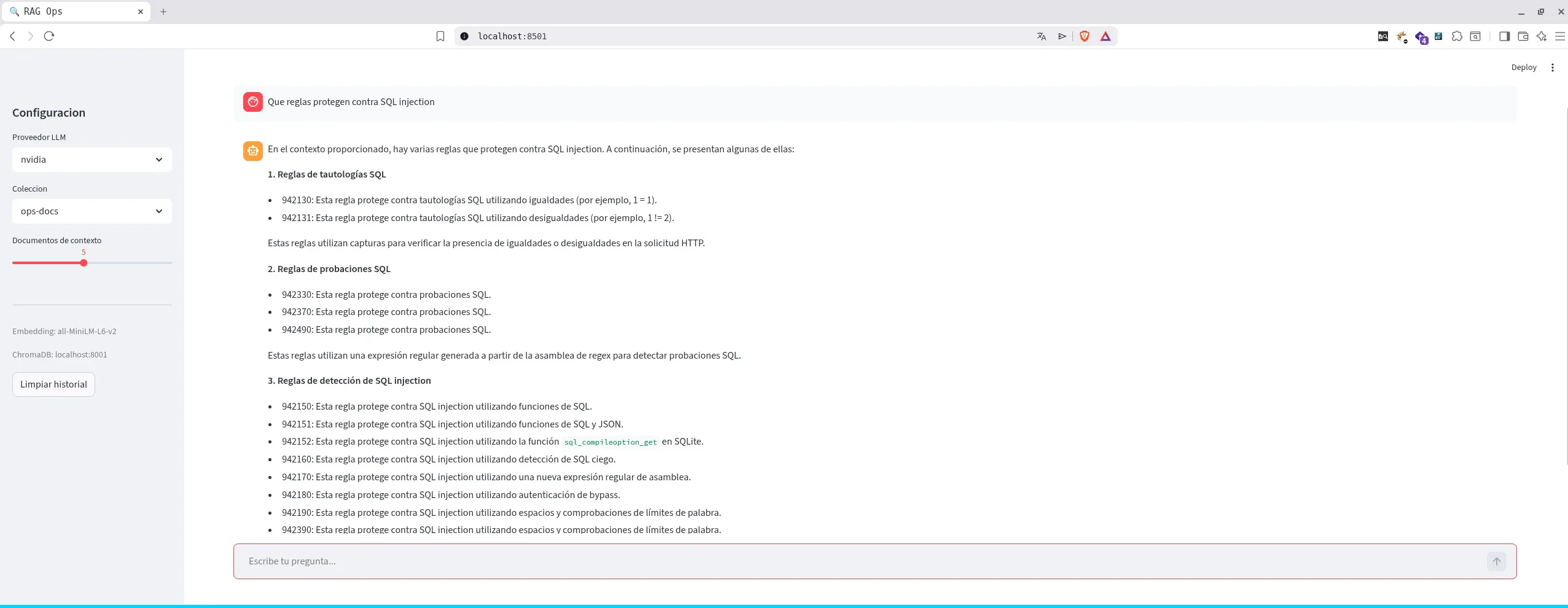
2. Automatic intake with Watcher
Instead of executing python ingest.py Every time we add documents, a watcher monitors the directory and automatically re-ingests it.
watcher.py
from watchdog.observers import Observer
from watchdog.events import FileSystemEventHandler
from ingest import ingest
from config import Config

class DocsHandler(FileSystemEventHandler):
    def on_created(self, event):
        if event.src_path.endswith(('.md', '.txt', '.pdf')):
            print(f"Nuevo fichero detectado: {event.src_path}")
            ingest(Config.WATCH_DIR, Config.CHROMA_COLLECTION)

    def on_modified(self, event):
        if event.src_path.endswith(('.md', '.txt', '.pdf')):
            print(f"Fichero modificado: {event.src_path}")
            ingest(Config.WATCH_DIR, Config.CHROMA_COLLECTION)

def watch():
    observer = Observer()
    observer.schedule(DocsHandler(), Config.WATCH_DIR, recursive=True)
    observer.start()
    print(f"Monitorizando {Config.WATCH_DIR}...")
    observer.join()
Run as a service or in background:
source .venv/bin/activate
python watcher.py &
Every time a file is added or modified .md, .txt either .pdf in the data directory, the ingestion is triggered automatically.
3. Quality evaluation with RAGAS
Without metrics you don't know if your RAG works well. RAGAS evaluates the quality of the answers against a test set.
evaluate.py
from ragas import evaluate
from ragas.metrics import faithfulness, answer_relevancy, context_precision
from datasets import Dataset

def run_evaluation(test_set_path: str, collection: str, provider: str):
    # Cargar test set (JSON con question + ground_truth)
    test_data = load_test_set(test_set_path)

    # Para cada pregunta: buscar contexto y generar respuesta
    results = []
    for item in test_data:
        context = search_context(item["question"], collection)
        answer = generate_answer(item["question"], context, provider)
        results.append({
            "question": item["question"],
            "answer": answer,
            "contexts": [context],
            "ground_truth": item["ground_truth"],
        })

    # Evaluar con RAGAS
    dataset = Dataset.from_list(results)
    scores = evaluate(dataset, metrics=[faithfulness, answer_relevancy, context_precision])
    return scores
Test set (test_set.json)
[
  {
    "question": "Como configurar una regla de ModSecurity para bloquear SQL injection?",
    "ground_truth": "ModSecurity usa reglas SecRule con operadores como @rx..."
  }
]
Execute:
source .venv/bin/activate
python evaluate.py --test-set test_set.json --collection ops-docs
The key metrics are:
- Faithfulness: response is based on recovered context (does not hallucinate)
- Answer Relevance: the answer is relevant to the question
- Context Precision: the chunks recovered are relevant
4. Multi-collection
A single bucket for all documents mixes contexts. With multi-collection we separate by domain:
# Ingestar documentos de ModSecurity en su coleccion
python ingest.py data/modsecurity modsecurity-docs

# Ingestar runbooks de Kubernetes
python ingest.py data/k8s k8s-runbooks

# Ingestar documentacion de redes
python ingest.py data/networking network-docs

# O todo de golpe con multi-ingesta (cada subdirectorio = coleccion)
python ingest.py --multi
In config.py:
COLLECTIONS = {
    "ops-docs": "Documentacion general de operaciones",
    "modsecurity-docs": "Reglas y configuracion ModSecurity/CRS",
    "k8s-runbooks": "Runbooks de Kubernetes",
}
From the web interface or CLI you can select the collection:
python rag.py -c modsecurity-docs -q "Como excluir la regla 942100?"5. Conversational memory
Without memory, each question is independent. With history the assistant maintains context:
> Que es el paranoia level en CRS?
  El paranoia level controla la agresividad de las reglas...

> Y como lo cambio a nivel 2?
  Para cambiar a PL2, edita crs-setup.conf y establece tx.paranoia_level=2...
The implementation uses a class ConversationHistory which keeps the last N turns and injects them at the prompt:
class ConversationHistory:
    def __init__(self, max_turns: int = 5):
        self.messages = []
        self.max_turns = max_turns

    def add(self, role: str, content: str):
        self.messages.append({"role": role, "content": content})
        max_messages = self.max_turns * 2
        if len(self.messages) > max_messages:
            self.messages = self.messages[-max_messages:]

    def get_formatted(self) -> str:
        if not self.messages:
            return ""
        parts = ["HISTORIAL DE CONVERSACION:"]
        for msg in self.messages:
            role = "Usuario" if msg["role"] == "user" else "Asistente"
            parts.append(f"{role}: {msg['content'][:300]}")
        return "\n".join(parts)
In Streamlit you persist via st.session_state, in CLI is maintained during the interactive session.
Updated architecture
rag-ops/
├── app.py              # Interfaz web Streamlit
├── rag.py              # Pipeline RAG con memoria
├── ingest.py           # Ingesta multi-coleccion
├── watcher.py          # Auto-ingesta con watchdog
├── evaluate.py         # Evaluacion RAGAS
├── config.py           # Configuracion centralizada
├── test_set.json       # Test set para evaluacion
├── docker-compose.yaml # ChromaDB
├── data/               # Documentos por dominio
│   ├── modsecurity/
│   ├── k8s/
│   └── networking/
└── requirements.txt
Project setup
1. Clone and create virtual environment
git clone <repo> rag-ops && cd rag-ops
python3 -m venv .venv
source .venv/bin/activate
pip install -r requirements.txt
2. Raise ChromaDB
docker compose up -d3. Configure environment variables
Create a file .env in the root with your API keys:
LLM_PROVIDER=grok
GROK_API_KEY=tu-api-key-aqui
CHROMA_HOST=localhost
CHROMA_PORT=8001
4. Ingest documents
source .venv/bin/activate

# Ingesta simple (todo en una coleccion)
python ingest.py data ops-docs

# Ingesta multi-coleccion (cada subdirectorio = coleccion)
python ingest.py --multi
5. Run
source .venv/bin/activate

# CLI interactivo
python rag.py

# Interfaz web
streamlit run app.py --server.port 8501

# Watcher en background
python watcher.py &
Dependencies (requirements.txt)
langchain>=0.3.25
langchain-huggingface>=1.0.0
langchain-openai>=0.3.12
langchain-text-splitters>=0.3.0
chromadb>=1.0.0
sentence-transformers>=4.0.0
python-dotenv>=1.0.0
rich>=14.0.0
streamlit>=1.38.0
watchdog>=4.0.0
ragas>=0.2.0
datasets>=3.0.0
Conclusions
With these 5 improvements we go from a CLI prototype to a more complete RAG system:
| Improvement | Benefit |
|---|---|
| Streamlit | Daily use without terminal |
| Watcher | Always updated documents |
| RAGAS | Objective quality metrics |
| Multi-collection | Separate context per domain |
| Memory | Natural conversations with follow-up |
The next natural step would be to migrate from ChromaDB to Qdrant for a more robust environment in production, applying these same improvements to the new vector backend.
Comments