
Hola, hay veces que tenemos errores en cacti el cual vemos que no muestra gráficas…. Esto normalmente es fácil de solucionar.
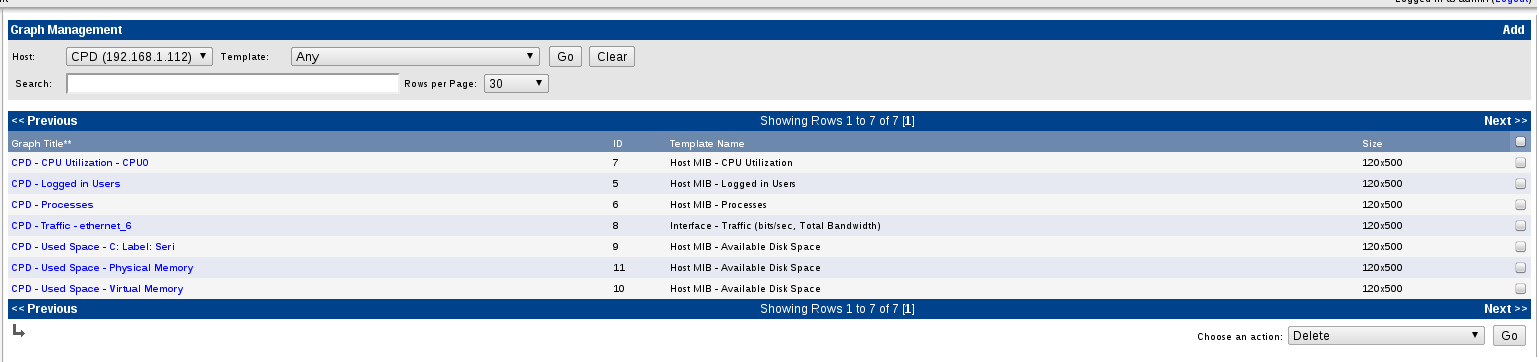
Si nos vamos a Grash List dentro de nuestro device

Seleccionamos la gráfica que nos esta dando error.
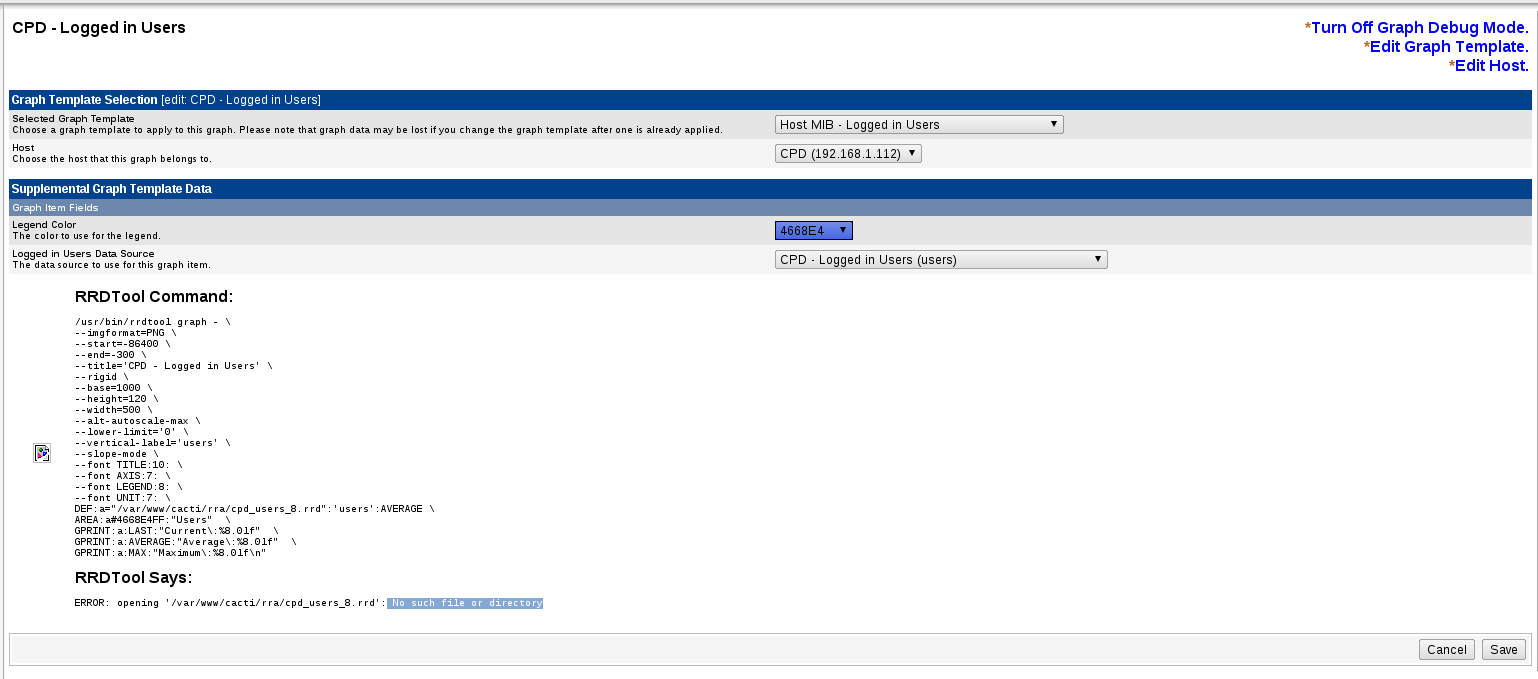
Una vez dentro damos al debug ( *Turn On Graph Debug Mode ) y nos aparecera el siguiente error:
ERROR: opening ‘/var/www/cacti/rra/cpd_users_8.rrd’: No such file or directory
Nos logamos en nuestro servidor y realizamos los siguientes pasos
root@cacti:~# crontab -e
y añadimos la siguiente linea:
*/5 * * * * /usr/bin/php /var/www/cacti/poller.php >/dev/null 2>/var/www/cacti/log/poller-error.log
Y ejecutamos el siguiente comando
root@cacti:~# php /var/www/cacti/poller.php
PHP Warning: PHP Startup: Unable to load dynamic library ‘/usr/lib/php5/20090626+lfs/gd.so’ – /usr/lib/php5/20090626+lfs/gd.so: cannot open shared object file: No such file or directory in Unknown on line 0
PHP Warning: PHP Startup: Unable to load dynamic library ‘/usr/lib/php5/20090626+lfs/gd.so’ – /usr/lib/php5/20090626+lfs/gd.so: cannot open shared object file: No such file or directory in Unknown on line 0
OK u:0.02 s:0.00 r:0.73
OK u:0.02 s:0.00 r:0.74
OK u:0.02 s:0.00 r:0.77
OK u:0.02 s:0.00 r:0.77
OK u:0.02 s:0.00 r:0.87
OK u:0.02 s:0.00 r:0.87
OK u:0.02 s:0.00 r:0.92
OK u:0.02 s:0.00 r:0.97
OK u:0.02 s:0.01 r:1.02
OK u:0.02 s:0.01 r:1.07
OK u:0.02 s:0.01 r:1.11
OK u:0.02 s:0.01 r:1.17
OK u:0.02 s:0.01 r:1.21
OK u:0.02 s:0.01 r:1.27
06/29/2012 11:59:09 AM – SYSTEM STATS: Time:1.5696 Method:cmd.php Processes:1 Threads:N/A Hosts:3 HostsPerProcess:3 DataSources:11 RRDsProcessed:7
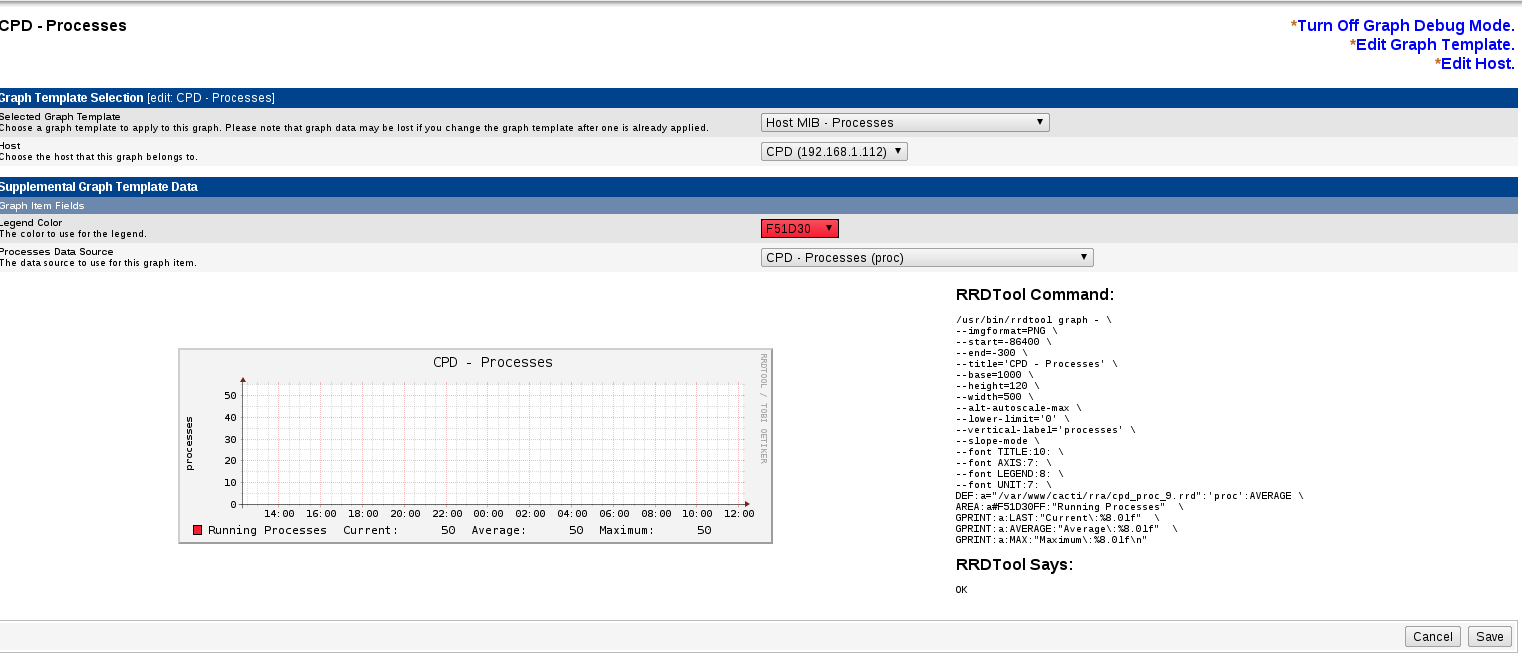
Y listo!!! si vamos de nuevo a nuestro debug ya tendría que aparecer OK
Si esto no funcionase… podemos crear a mano el gráfico
root@cacti:~# /usr/bin/rrdtool graph - \
--imgformat=PNG \
--start=-86400 \
--end=-300 \
--title='CPD - CPU Utilization - CPU0' \
--rigid \
--base=1000 \
--height=120 \
--width=500 \
--alt-autoscale-max \
--lower-limit='0' \
--vertical-label='percent' \
--slope-mode \
--font TITLE:10: \
--font AXIS:7: \
--font LEGEND:8: \
--font UNIT:7: \
DEF:a="/var/www/cacti/rra/cpd_cpu_10.rrd":'cpu':AVERAGE \
AREA:a#FF0000FF:"CPU Utilization"  \
GPRINT:a:LAST:"Current\:%8.0lf"  \
GPRINT:a:AVERAGE:"Average\:%8.0lf"  \
GPRINT:a:MAX:"Maximum\:%8.0lf\n"
damos permisos
chmod 777 /var/www/cacti/rra/cpd_cpu_10.rrdUn saludo, rokitoh!

Comentarios